


WHEN YOU ADD GOOGLE SEARCH AS DEFAULT I WILL USE TB

I LOOKED AT SOME OF THE THINGS SUGGESTED. I'M NOT A GEEK, I DON'T KNOW WHAT IT'S TALKING ABOUT.
All Replies (16)
So which search engine are you being offered?
I can't get rid of google.
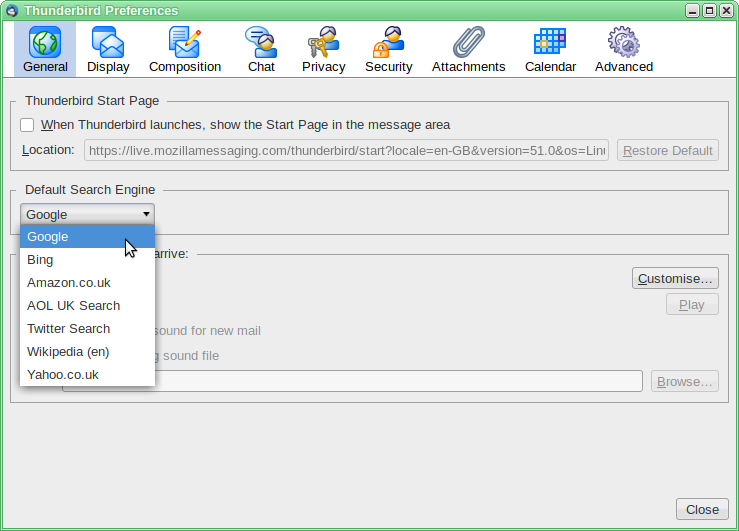
Tools|Options|General→Default search engine
Or
 |Options|General→Default search engine
Which part of finding this is giving you trouble?
Zenos said
So which search engine are you being offered? I can't get rid of google.
BING & OTHERS, NO GOOGLE, NO DUCK DUCK-
BING & OTHERS, NO GOOGLE, NO DUCK DUCK-
Zenos said
Tools|Options|General→Default search engine Or
TB 45.5: I CAN FIND IT, IT DOESN'T HAVE A GOOGLE OPTION. INTERNET SEARCH DOES NOT PROVIDE AN ANSWER I CAN DO.
Zenos, are you sure you do not have the Google Search add-on installed. Googe search is not a choice in the normal install. At least not mine.
Wesgas, I know you said you are not a geek but try and find the caps lock and turn it off.
I ALWAYS USE HIGH CASE SO I CAN READ WHAT I AM WRITING. THANK YOU. I DON'T KNOW ANYTHING ABOUT A GOOGLE ADD-ON. WHAT I HAVE SEEN WAS FROM 2012 AND PRIOR VERSIONS OF TB. NOTHING FOR WIN 10 OS.
I haven't been able to make the duckduckgo search engine work, despite following the advice in that same link that sfhowes gave us.
However I do have a Google.xml file in my searchplugins folder, so that will be why I have Google search. I do not have the Google Search add-on. (Much as I dislike letting Google own too much of my life, the only other search I had that seems to work is Bing and I absolutely refuse to have anything to do with that.)
So we need a brave soul to lead WesGas through the creation of a searchplugins folder and the addition of a google.xml file.
Wes, please try increasing your display font size. Block capitals are hard work for the rest of us.
The Google Search add-on certainly works, but it does so by providing its own searchplugins folder. If you add any other search plugin xml file to that folder, it can also be added into Thunderbird. So, glee unbounded, I can now use duckduckgo as the default search in Thunderbird. This is a purely hyopthetical win, since I can't remember ever wanting or trying to launch an internet search from Thunderbird.
sfhowes' link doesn't work for me because there is no list of search engines from which to pick an alternative. Indeed, the mention of a heart for favourite suggests to me a long-gone configuration where searches appeared in a vertical bar at the side of the Thunderbird window.
Wes, just install the addon.
Wes, install the add-on.
https://support.mozilla.org/en-US/questions/1155055#answer-956075
Then Google will appear in that list.
WHAT ADD--ON? THE LINK POSTED (https://support.mozilla.org/en-US/questions/1155055#answer-956075) JUST BRINGS ME BACK TO THIS PAGE. THE LINK SFHOWES RECOMMENDS SAYS IT (Works with Thunderbird 11.0 - 31.*), WHICH I BELIEVE IS BEFORE WIN 10 OS. I'M USING TB 45.5.
WESGAS said
I ALWAYS USE HIGH CASE SO I CAN READ WHAT I AM WRITING. THANK YOU. I DON'T KNOW ANYTHING ABOUT A GOOGLE ADD-ON. WHAT I HAVE SEEN WAS FROM 2012 AND PRIOR VERSIONS OF TB. NOTHING FOR WIN 10 OS.
No one else likes reading what you write. So consider it a formal warning. Turn it off or I will assist you in doing so by banning you.
SO WHAT DO YOU HAVE AGAINST THOSE OF US WITH DISABILITIES???? MAY YOU LIVE A VERY LONG LIFE!
WESGAS said
SO WHAT DO YOU HAVE AGAINST THOSE OF US WITH DISABILITIES???? MAY YOU LIVE A VERY LONG LIFE!
comment hidden.
Modified by Andrew
ZENOS, THANK YOU, MY FAULT. THE VER 11-31 MENTIONED THREW ME OFF.
The "works with" guidance is usually ignored, at least for recent versions of Thunderbird and add-ons. I have this particular add-on working, as-is, with no tweaks, in TB 51.0b2.
Even when an add-on is refused, it's usually possible to tweak it to make it lie about its compatibility. In some respects this is on a par with winding back the odometer on a used vehicle, but it gets the job done.
Modified by Zenos