


This message contains an event that this version of lightning cannot process

I am using
Thunderbird 45.6.0 Lightning 4.0.5.2
This is extremely frustrating since I can not automatically add events to any of my calendars directly from email invites. What's up?
I followed the somewhat cryptic instructions provided: https://support.mozilla.org/en-US/questions/1097284
All Replies (5)
well lets start with what is the source of the invites? Historically Microsoft have had a habit of just changing the formats of their invites. So is their a single source or website?
In order for us to better investigate this issue you need to add a little more non-personal information.
Please add the troubleshooting information to your post To find the Troubleshooting information:
- Open Help (or click on three-line-icon and select Help)
- Choose Troubleshooting Information
- Use the button Copy to clipboard to select all. Do not check box "Include account names"!
- Paste this in your post.
Application Basics
   Name: Thunderbird
   Version: 45.6.0
   User Agent: Mozilla/5.0 (Macintosh; Intel Mac OS X 10.11; rv:45.0) Gecko/20100101 Thunderbird/45.6.0
   Profile Folder: Show in Finder
   Application Build ID: 20161222195647
   Enabled Plugins: about:plugins
   Build Configuration: about:buildconfig
   Memory Use: about:memory
 Mail and News Accounts
   account1:
     INCOMING: account1, , (none) Local Folders, plain, passwordCleartext
   account2:
     INCOMING: account2, , (pop3) pop.west.cox.net:110, plain, passwordCleartext
     OUTGOING: , smtp.west.cox.net:465, SSL, passwordCleartext, true
   account3:
     INCOMING: account3, , (pop3) pop.gmail.com:995, SSL, passwordCleartext
     OUTGOING: , smtp.gmail.com:587, alwaysSTARTTLS, passwordCleartext, true
   account4:
     INCOMING: account4, , (pop3) mailhost.powersrvcs.com:110, plain, passwordCleartext
     OUTGOING: , mailhost.powersrvcs.com:587, plain, passwordEncrypted, true
 Crash Reports
   http://crash-stats.mozilla.com/report/index/bp-fd2bede9-8211-4f5a-ae06-e205d2120901 (9/1/12)
   http://crash-stats.mozilla.com/report/index/bp-069df879-5ee5-4667-85e8-48fa02120130 (1/30/12)
   http://crash-stats.mozilla.com/report/index/bp-a6dc253e-6d40-4761-84af-51bd32110417 (4/17/11)
 Extensions
   .vcs Support, 0.6.4, true, {efcbec50-6821-11db-bd13-0800200c9a66}
   Adblock Plus, 2.8.2, true, {d10d0bf8-f5b5-c8b4-a8b2-2b9879e08c5d}
   Lightning, 4.7.6, true, {e2fda1a4-762b-4020-b5ad-a41df1933103}
   Provider for Google Calendar, 3.1, true, {a62ef8ec-5fdc-40c2-873c-223b8a6925cc}
Important Modified Preferences
Name: Value
     accessibility.typeaheadfind.flashBar: 0
     browser.cache.disk.capacity: 358400
     browser.cache.disk.filesystem_reported: 1
     browser.cache.disk.smart_size_cached_value: 358400
     browser.cache.disk.smart_size.first_run: false
     browser.cache.disk.smart_size.use_old_max: false
     extensions.lastAppVersion: 45.6.0
     font.internaluseonly.changed: false
     font.name.sans-serif.x-western: Times New Roman
     font.size.fixed.x-western: 14
     font.size.variable.x-western: 14
     gfx.crash-guard.glcontext.appVersion: 45.0
     gfx.crash-guard.glcontext.deviceID: 0x0fe9
     gfx.crash-guard.status.glcontext: 2
     mail.openMessageBehavior.version: 1
     mail.spotlight.enable: true
     mail.spotlight.firstRunDone: true
     mail.spotlight.global_reindex_time: 1276669858
     mailnews.database.global.datastore.id: 3c2d9e7f-70e1-f748-b25f-8ee0bdccdd6
     network.cookie.prefsMigrated: true
     network.predictor.cleaned-up: true
     places.database.lastMaintenance: 1483923041
     places.history.expiration.transient_current_max_pages: 104858
     places.history.expiration.transient_optimal_database_size: 167772160
     plugin.importedState: true
     plugin.state.adobepdfviewernpapi: 0
     plugin.state.silverlight: 0
     print.macosx.pagesetup-2: PD94bWwgdmVyc2lvbj0iMS4wIiBlbmNvZGluZz0iVVRGLTgiPz4KPCFET0NUWVBFIHBsaXN0IFBVQkxJQyAiLS8vQXBwbGUvL0RURCBQTElTVCAxLjAvL0VO…
     print.print_bgcolor: false
     print.print_bgimages: false
     print.print_colorspace:
     print.print_command:
     print.print_downloadfonts: false
     print.print_duplex: 0
     print.print_evenpages: true
     print.print_in_color: true
     print.print_margin_bottom: 0.5
     print.print_margin_left: 0.5
     print.print_margin_right: 0.5
     print.print_margin_top: 0.5
     print.print_oddpages: true
     print.print_orientation: 0
     print.print_page_delay: 50
     print.print_pagedelay: 500
     print.print_paper_data: 0
     print.print_paper_height: 11.00
     print.print_paper_name:
     print.print_paper_size_type: 1
     print.print_paper_size_unit: 0
     print.print_paper_width: 8.50
     print.print_plex_name:
     print.print_printer:
     print.print_resolution: 0
     print.print_resolution_name:
     print.print_reversed: false
     print.print_scaling: 1.00
     print.print_shrink_to_fit: true
     print.print_to_file: false
     print.print_unwriteable_margin_bottom: 20
     print.print_unwriteable_margin_left: 25
     print.print_unwriteable_margin_right: 25
     print.print_unwriteable_margin_top: 20
     print.printer_CUPS/HP-LaserJet-1022.print_bgcolor: false
     print.printer_CUPS/HP-LaserJet-1022.print_bgimages: false
     print.printer_CUPS/HP-LaserJet-1022.print_colorspace: default
     print.printer_CUPS/HP-LaserJet-1022.print_command: lpr ${MOZ_PRINTER_NAME:+-P"$MOZ_PRINTER_NAME"}
     print.printer_CUPS/HP-LaserJet-1022.print_downloadfonts: true
     print.printer_CUPS/HP-LaserJet-1022.print_evenpages: true
     print.printer_CUPS/HP-LaserJet-1022.print_footercenter:
     print.printer_CUPS/HP-LaserJet-1022.print_footerleft: &PT
     print.printer_CUPS/HP-LaserJet-1022.print_footerright: &D
     print.printer_CUPS/HP-LaserJet-1022.print_headercenter:
     print.printer_CUPS/HP-LaserJet-1022.print_headerleft: &T
     print.printer_CUPS/HP-LaserJet-1022.print_headerright: &U
     print.printer_CUPS/HP-LaserJet-1022.print_in_color: true
     print.printer_CUPS/HP-LaserJet-1022.print_margin_bottom: 0.5
     print.printer_CUPS/HP-LaserJet-1022.print_margin_left: 0.5
     print.printer_CUPS/HP-LaserJet-1022.print_margin_right: 0.5
     print.printer_CUPS/HP-LaserJet-1022.print_margin_top: 0.5
     print.printer_CUPS/HP-LaserJet-1022.print_oddpages: true
     print.printer_CUPS/HP-LaserJet-1022.print_orientation: 0
     print.printer_CUPS/HP-LaserJet-1022.print_pagedelay: 500
     print.printer_CUPS/HP-LaserJet-1022.print_paper_data: 0
     print.printer_CUPS/HP-LaserJet-1022.print_paper_height: 279.40
     print.printer_CUPS/HP-LaserJet-1022.print_paper_name: Letter
     print.printer_CUPS/HP-LaserJet-1022.print_paper_size: 0
     print.printer_CUPS/HP-LaserJet-1022.print_paper_size_type: 1
     print.printer_CUPS/HP-LaserJet-1022.print_paper_size_unit: 0
     print.printer_CUPS/HP-LaserJet-1022.print_paper_width: 215.90
     print.printer_CUPS/HP-LaserJet-1022.print_plex_name: default
     print.printer_CUPS/HP-LaserJet-1022.print_resolution_name: default
     print.printer_CUPS/HP-LaserJet-1022.print_reversed: false
     print.printer_CUPS/HP-LaserJet-1022.print_scaling: 1.00
     print.printer_CUPS/HP-LaserJet-1022.print_shrink_to_fit: true
     print.printer_CUPS/HP-LaserJet-1022.print_to_file: false
     print.printer_CUPS/hp-LaserJet-3380.print_command: lpr ${MOZ_PRINTER_NAME:+-P"$MOZ_PRINTER_NAME"}
     print.printer_CUPS/hp-LaserJet-3380.print_downloadfonts: true
     print.printer_CUPS/hp-LaserJet-3380.print_in_color: true
     print.printer_CUPS/hp-LaserJet-3380.print_paper_height: 279.40
     print.printer_CUPS/hp-LaserJet-3380.print_paper_name: Letter
     print.printer_CUPS/hp-LaserJet-3380.print_paper_size_type: 1
     print.printer_CUPS/hp-LaserJet-3380.print_paper_size_unit: 0
     print.printer_CUPS/hp-LaserJet-3380.print_paper_width: 215.90
     print.printer_CUPS/hp-LaserJet-3380.print_resolution_name: default
     print.printer_CUPS/hp-LaserJet-3380.print_scaling: 1.00
     print.printer_CUPS/hp-LaserJet-3380.print_shrink_to_fit: true
     print.printer_CUPS/HP-LaserJet-4100-Bills-Printer.print_command: lpr ${MOZ_PRINTER_NAME:+-P"$MOZ_PRINTER_NAME"}
     print.printer_CUPS/HP-LaserJet-4100-Bills-Printer.print_downloadfonts: true
     print.printer_CUPS/HP-LaserJet-4100-Bills-Printer.print_in_color: true
     print.printer_CUPS/HP-LaserJet-4100-Bills-Printer.print_paper_height: 279.40
     print.printer_CUPS/HP-LaserJet-4100-Bills-Printer.print_paper_name: Letter
     print.printer_CUPS/HP-LaserJet-4100-Bills-Printer.print_paper_size_type: 1
     print.printer_CUPS/HP-LaserJet-4100-Bills-Printer.print_paper_size_unit: 0
     print.printer_CUPS/HP-LaserJet-4100-Bills-Printer.print_paper_width: 215.90
     print.printer_CUPS/HP-LaserJet-4100-Bills-Printer.print_resolution_name: default
     print.printer_CUPS/HP-LaserJet-4100-Bills-Printer.print_scaling: 1.00
     print.printer_CUPS/HP-LaserJet-4100-Bills-Printer.print_shrink_to_fit: true
     print.printer_CUPS/NESIHLab--Color-LaserJet-3550n.print_command: lpr ${MOZ_PRINTER_NAME:+-P"$MOZ_PRINTER_NAME"}
     print.printer_CUPS/NESIHLab--Color-LaserJet-3550n.print_downloadfonts: true
     print.printer_CUPS/NESIHLab--Color-LaserJet-3550n.print_in_color: true
     print.printer_CUPS/NESIHLab--Color-LaserJet-3550n.print_paper_height: 279.40
     print.printer_CUPS/NESIHLab--Color-LaserJet-3550n.print_paper_name: Letter
     print.printer_CUPS/NESIHLab--Color-LaserJet-3550n.print_paper_size_type: 1
     print.printer_CUPS/NESIHLab--Color-LaserJet-3550n.print_paper_size_unit: 0
     print.printer_CUPS/NESIHLab--Color-LaserJet-3550n.print_paper_width: 215.90
     print.printer_CUPS/NESIHLab--Color-LaserJet-3550n.print_resolution_name: default
     print.printer_CUPS/NESIHLab--Color-LaserJet-3550n.print_scaling: 1.00
     print.printer_CUPS/NESIHLab--Color-LaserJet-3550n.print_shrink_to_fit: true
     print.tmp.printerfeatures.CUPS/HP-LaserJet-1022.can_change_colorspace: false
     print.tmp.printerfeatures.CUPS/HP-LaserJet-1022.can_change_downloadfonts: false
     print.tmp.printerfeatures.CUPS/HP-LaserJet-1022.can_change_jobtitle: false
     print.tmp.printerfeatures.CUPS/HP-LaserJet-1022.can_change_num_copies: true
     print.tmp.printerfeatures.CUPS/HP-LaserJet-1022.can_change_orientation: true
     print.tmp.printerfeatures.CUPS/HP-LaserJet-1022.can_change_paper_size: true
     print.tmp.printerfeatures.CUPS/HP-LaserJet-1022.can_change_plex: false
     print.tmp.printerfeatures.CUPS/HP-LaserJet-1022.can_change_printincolor: true
     print.tmp.printerfeatures.C
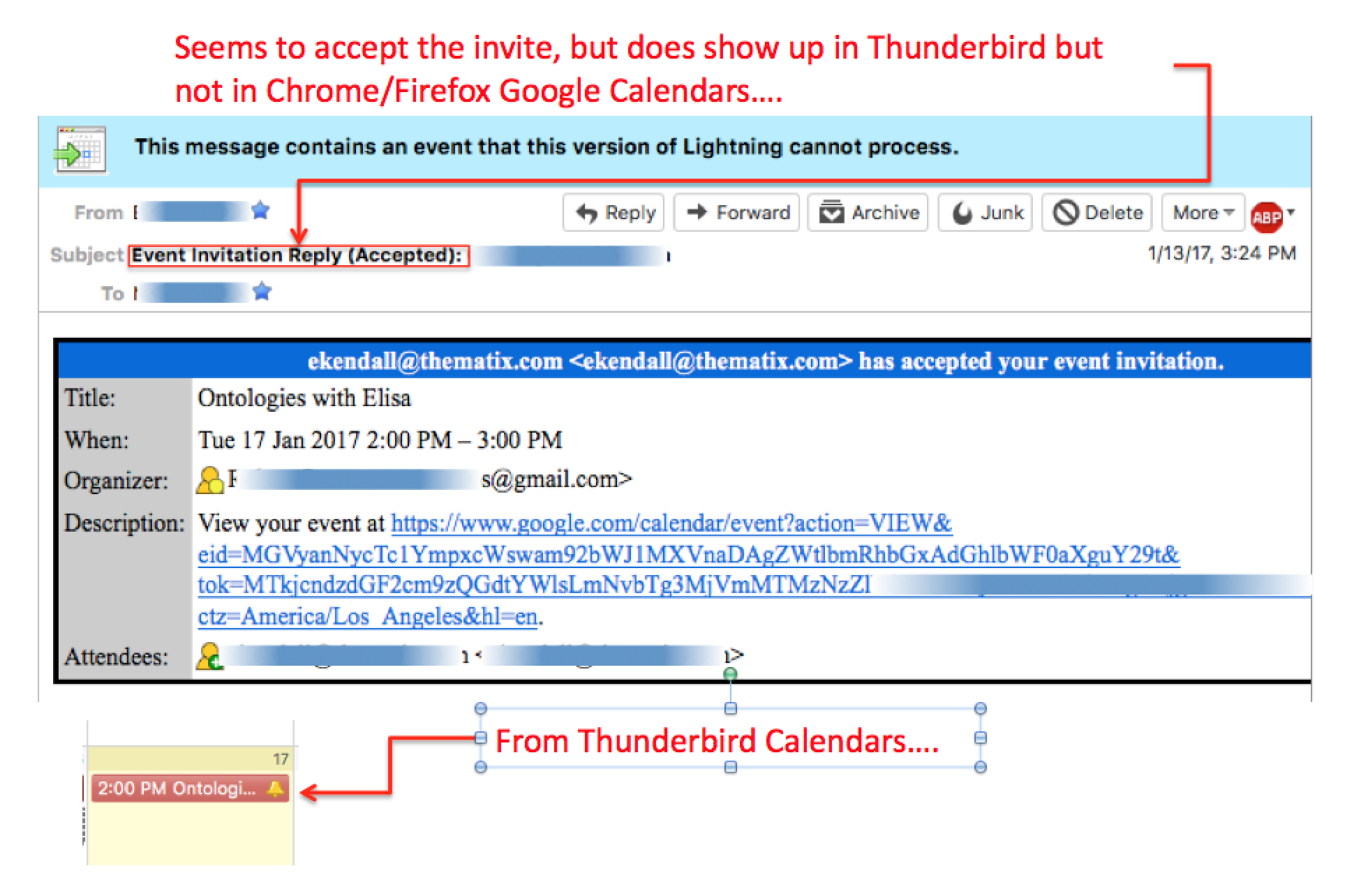
It doesn't seem to matter where the invite comes from. Google Calendar, Thunderbird or even ... MS Outlook!
I am not a huge user of the calendar. So please excuse the obvious. That is not an invite. it is an acceptance. Do all of these appear via your gmail account as the example? I am wondering if gmail is doing the calendar update. They certainly used to with gmail synchronized accounts.
Okay, I think I figured it out. I went back into Calendar and created a "New Calendar". This time I loged into another account other than the <uid>@gmail.com. Then I added the calendars that I wanted to see and ...
it all seems to work now except the <uid>.gmail.com account. It still says
This message contains an event that this version of Lightning cannot process.
Another test. I created an new event in Thunderbird Calendar. The "Calendar" was my <uid>@gmail.com account. I invited myself through my other accounts (one from my ISP <uid>@cox.net and the other through my company <uid>@<company>.com. Naturally, the event occurred on the calendar, but when I review the invitation in my inbox, it says:
This message contains a sent out event that is not in your calendar anymore.
Repeated the same scenario, this tim my ISP email was the inviter and the <uid>@gmail.com and <uid>@<company>.com were the invitees. Same result as before.
Repeated the same scenario, this time without any <uid>@gmail.com. go the same message as before...
This message contains a sent out event that is not in your calendar anymore.
So, I guess I would say its sort of works now ...