


deleted email lists still auto-match when typing "to:" address

I have deleted several email lists. I have some new ones with similar names (e.g., list1, list2 are deleted, list1new, list2new are the new ones). I tried reusing the old names, but it caused errors (too long ago, sorry don't remember the exact errors). When I type the list name in the address area (to:, bcc:, etc), the displayed matches include the deleted lists. How do I either 1) remove them from the auto-complete list or 2) completely delete them so that I can reuse the original names (which ever is easier). I hope my question is clearly worded. Thank you so much in advance.
All Replies (2)

It is clearly worded and understood. Thank you for that!
The best way I know to do this is to use CCleaner. It is a free program that cleans up lots of things.
Quit Thunderbird.
Download and install CCleaner from this link. Once installed, run it.
Unless you want to learn how to use CCleaner properly, for now I suggest disabling lots of things:
1. Click on "Options" on the left side, then "Monitoring". Un-check "Enable system monitoring" and "Enable Active Monitoring". Now CCleaner will not be running in the background all the time.
2. Click on "Cleaner" on the left side. In the "Windows" tab, un-check everything. Do the same for the "Applications" tab.
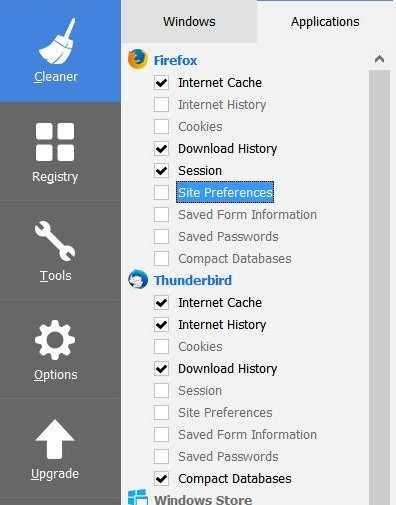
In my screenshot below I show my normal settings in CCleaner for Firefox and Thunderbird (just so you what you are looking for).
Check-mark all the items for Thunderbird except "Saved Passwords", then click the "Run Cleaner" button on the bottom right.
Then change the settings in CCleaner for Thunderbird to the same as in my screenshot.
Quit CCleaner.
Now the autocomplete entries should be cleared in Thunderbird.
If you want to learn more about how to use CCleaner properly, then you can check out their documentation here. Or you can e-mail me privately and I can tell you what options I recommend.
Bingo! thanks sfhowes!