


How can I disable search box suggestions?

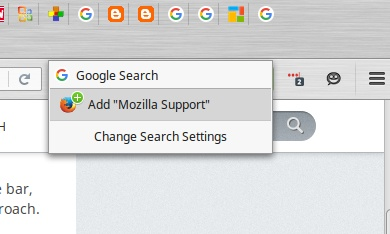
I am trying to type into the search bar, to the right of the address bar in Firefox for Linux Mint 46.0.1. As soon as I type, an overly helpful feature pops up, blocking the search bar, so that I cannot see the contents of that box. (See image.)
I have removed all search engines except Google and have unchecked Edit > Preferences > Search > Provide search suggestions. In that page, I have also removed the check mark in front of Google. I really wish this feature would go away.
TIA.
All Replies (6)
You can consider to move the search bar to the "3-bar" menu button drop-down list via Customization mode or via the right-click context menu of the magnifier icon (Move to Menu).
Thanks, but can't I just kill that pop-up feature? It wasn't happening previously. I often use Ctrl-K to begin typing searches right into the search bar. Moving it somewhere else would presumably interfere with that functionality.
No, even when you move the search bar to the "3-bar" Firefox menu button drop-down list then this list will open automatically with the search bar selected if you press Ctrl+K.
Wow. Well, thank you for that information. That is discouraging. Do you know -- where did that box come from, or why did it suddenly start appearing? It's a brand-new problem.
This box should open below the search bar and not over the search bar and hiding it like seems to show in your screenshot.
Did you check for issues caused by an extension or theme?
Well, now it's back to doing what you say -- opening below the search bar, as it normally would, rather than right on top of it, as in the screenshot. I am not sure what may have changed. Do i have fewer tabs open now? I may. Not sure; I've had a bunch open all day. It doesn't seem to depend on which webpage I'm viewing. Nothing else weird happening on the system. Haven't even closed and restarted Firefox -- it's still the same session.
If it acts up again, I'll come back if I notice any variables that might explain it. Thanks again for your help.