


can't sign in, account not shown on "Saved Passwords..." page?

Yesterday suddenly can't log in my microsoft email account with thunderbird on my PC? But is possible to log in using microsoft website. message shown [Error= "ProxyNotAuthenticated" AuthResult=0 Proxy=KL1PRO3MB1784.apcprd03.prod.outlook.com;1995:SSL] I have tried to change password from Microsoft webpage and to open thunderbird again to try, but still no login. I found also the account detail should be shown on page "Saved Passwords..." of tab "password" of "security" of "Option" is missing. Anybody can help me how to log in again with Thunderbird on my PC?
Chosen solution
Te problem is with your settings on outlook.com. If it is not the two factor authentication, then something else. That is why the problem effects al devices not using a web page.
Read this answer in context 👍 0All Replies (6)

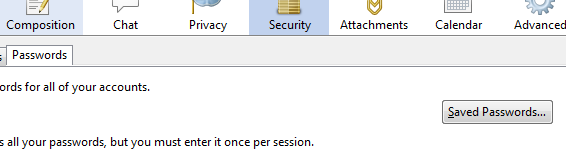
Is that what is missing?
Have you tried disabling your anti virus email scanner. Failure to ask for a password is often caused by anti virus.
In correct ports can cause exchange server to react that way.
Please add the troubleshooting information to your post To find the Troubleshooting information:
- Open Help (or click on three-line-icon and select Help)
- Choose Troubleshooting Information
- Use the button Copy to clipboard to select all. Do not check box "Include account names"!
- Paste this in your post.
Matt, Thank you for help
Tried disable anti-virus, doesn't work. Funny is my android mobile with built-in standard email apps has the same problem. But using webpage either by PC or Android mobile to sign in the microsoft account no problem.
Troubleshooting Information as follows:
Application Basics
   Name: Thunderbird
   Version: 24.0
   User Agent: Mozilla/5.0 (Windows NT 6.2; WOW64; rv:24.0) Gecko/20100101 Thunderbird/24.0
   Profile Folder: Show Folder
             (Local drive)
   Application Build ID: 20130911175743
   Enabled Plugins: about:plugins
   Build Configuration: about:buildconfig
   Crash Reports: about:crashes
   Memory Use: about:memory
 Mail and News Accounts
   account1:
     INCOMING: account1, , (pop3) pop3.live.com:995, SSL, passwordCleartext
     OUTGOING: smtp.live.com:587, alwaysSTARTTLS, passwordCleartext, true
   account2:
     INCOMING: account2, , (none) Local Folders, plain, passwordCleartext
Extensions
Important Modified Preferences
Name: Value
     browser.cache.disk.capacity: 409600
     browser.cache.disk.smart_size.first_run: false
     browser.cache.disk.smart_size.use_old_max: false
     browser.cache.disk.smart_size_cached_value: 358400
     extensions.lastAppVersion: 24.0
     font.internaluseonly.changed: true
     font.name.monospace.el: Consolas
     font.name.monospace.tr: Consolas
     font.name.monospace.x-baltic: Consolas
     font.name.monospace.x-central-euro: Consolas
     font.name.monospace.x-cyrillic: Consolas
     font.name.monospace.x-unicode: Consolas
     font.name.monospace.x-western: Consolas
     font.name.sans-serif.el: Calibri
     font.name.sans-serif.tr: Calibri
     font.name.sans-serif.x-baltic: Calibri
     font.name.sans-serif.x-central-euro: Calibri
     font.name.sans-serif.x-cyrillic: Calibri
     font.name.sans-serif.x-unicode: Calibri
     font.name.sans-serif.x-western: Calibri
     font.name.serif.el: Cambria
     font.name.serif.tr: Cambria
     font.name.serif.x-baltic: Cambria
     font.name.serif.x-central-euro: Cambria
     font.name.serif.x-cyrillic: Cambria
     font.name.serif.x-unicode: Cambria
     font.name.serif.x-western: Cambria
     font.size.fixed.el: 14
     font.size.fixed.tr: 14
     font.size.fixed.x-baltic: 14
     font.size.fixed.x-central-euro: 14
     font.size.fixed.x-cyrillic: 14
     font.size.fixed.x-unicode: 14
     font.size.fixed.x-western: 14
     font.size.variable.el: 17
     font.size.variable.tr: 17
     font.size.variable.x-baltic: 17
     font.size.variable.x-central-euro: 17
     font.size.variable.x-cyrillic: 17
     font.size.variable.x-unicode: 17
     font.size.variable.x-western: 17
     mail.openMessageBehavior.version: 1
     mail.winsearch.firstRunDone: true
     mailnews.database.global.datastore.id: da6fda60-0826-45fe-8c2d-68b5ab31596
     network.cookie.prefsMigrated: true
     places.database.lastMaintenance: 1461378572
     places.history.expiration.transient_current_max_pages: 104858
     plugin.importedState: true
     print.printer_PrimoPDF.print_bgcolor: false
     print.printer_PrimoPDF.print_bgimages: false
     print.printer_PrimoPDF.print_colorspace:
     print.printer_PrimoPDF.print_command:
     print.printer_PrimoPDF.print_downloadfonts: false
     print.printer_PrimoPDF.print_duplex: -923610576
     print.printer_PrimoPDF.print_edge_bottom: 0
     print.printer_PrimoPDF.print_edge_left: 0
     print.printer_PrimoPDF.print_edge_right: 0
     print.printer_PrimoPDF.print_edge_top: 0
     print.printer_PrimoPDF.print_evenpages: true
     print.printer_PrimoPDF.print_footercenter:
     print.printer_PrimoPDF.print_footerleft: &PT
     print.printer_PrimoPDF.print_footerright: &D
     print.printer_PrimoPDF.print_headercenter:
     print.printer_PrimoPDF.print_headerleft: &T
     print.printer_PrimoPDF.print_headerright: &U
     print.printer_PrimoPDF.print_in_color: true
     print.printer_PrimoPDF.print_margin_bottom: 0.5
     print.printer_PrimoPDF.print_margin_left: 0.5
     print.printer_PrimoPDF.print_margin_right: 0.5
     print.printer_PrimoPDF.print_margin_top: 0.5
     print.printer_PrimoPDF.print_oddpages: true
     print.printer_PrimoPDF.print_orientation: 0
     print.printer_PrimoPDF.print_page_delay: 50
     print.printer_PrimoPDF.print_paper_data: 9
     print.printer_PrimoPDF.print_paper_height: 11.00
     print.printer_PrimoPDF.print_paper_name:
     print.printer_PrimoPDF.print_paper_size_type: 0
     print.printer_PrimoPDF.print_paper_size_unit: 1
     print.printer_PrimoPDF.print_paper_width: 8.50
     print.printer_PrimoPDF.print_plex_name:
     print.printer_PrimoPDF.print_resolution: 0
     print.printer_PrimoPDF.print_resolution_name:
     print.printer_PrimoPDF.print_reversed: false
     print.printer_PrimoPDF.print_scaling: 1.00
     print.printer_PrimoPDF.print_shrink_to_fit: true
     print.printer_PrimoPDF.print_to_file: false
     print.printer_PrimoPDF.print_unwriteable_margin_bottom: 0
     print.printer_PrimoPDF.print_unwriteable_margin_left: 0
     print.printer_PrimoPDF.print_unwriteable_margin_right: 0
     print.printer_PrimoPDF.print_unwriteable_margin_top: 0
Graphics
     Adapter Description: Intel(R) HD Graphics 4000
     Vendor ID: 0x8086
     Device ID: 0x0166
     Adapter RAM: Unknown
     Adapter Drivers: igdumd64 igd10umd64 igd10umd64 igdumd32 igd10umd32 igd10umd32
     Driver Version: 9.17.10.2843
     Driver Date: 8-21-2012
     Adapter Description (GPU #2): NVIDIA GeForce GT 640M LE
     Vendor ID (GPU #2): 0x10de
     Device ID (GPU #2): 0x0fd3
     Adapter RAM (GPU #2): 2048
     Adapter Drivers (GPU #2): nvd3dumx,nvwgf2umx,nvwgf2umx nvd3dum,nvwgf2um,nvwgf2um
     Driver Version (GPU #2): 9.18.13.546
     Driver Date (GPU #2): 7-31-2012
     Direct2D Enabled: false
     DirectWrite Enabled: false (6.2.9200.16384)
     ClearType Parameters: ClearType parameters not found
     WebGL Renderer: false
     GPU Accelerated Windows: 0
     AzureCanvasBackend: skia
     AzureFallbackCanvasBackend: cairo
     AzureContentBackend: none
JavaScript
Incremental GC: 1
Accessibility
   Activated: 0
   Prevent Accessibility: 0
Library Versions
     Expected minimum version
     Version in use
     NSPR
     4.10
     4.10
     NSS
     3.15.1 Basic ECC
     3.15.1 Basic ECC
     NSS Util
     3.15.1
     3.15.1
     NSS SSL
     3.15.1 Basic ECC
     3.15.1 Basic ECC
     NSS S/MIME
     3.15.1 Basic ECC
     3.15.1 Basic ECC
Sounds to me like you have the two factor authentication turned on where they send you SMS messages and you have not created application passwords or either your phone or Thunderbird. in their web site.
Dear Matt,
I don't think the two-factors authentication is the problem.
Kindly understood that I have always the same user name and password without change. It used for several years without problem by any channel of signing in (using Thunderbird of PC, using Microsoft webpage on PC, using built-in email apps of android mobile, using Microsoft webpage on android mobile)
But now only the webpage channel on PC and mobile is working, Thunderbird and built-in email apps are not possible, always show incorrect password dialogue box on the screen, but the password and username are correct??!!!
Hope you can help
kwh
Chosen Solution
Te problem is with your settings on outlook.com. If it is not the two factor authentication, then something else. That is why the problem effects al devices not using a web page.
Hi Matt,
I am not really understand the two-factors authentication. However, you reminded me there could be problem on settings of outlook.com.
It's really problem there. Not knowing the reason why, the POP check pane was marked not to allow other devices and apps to use POP. Also the POP3 is disabled.
From when and how and why those settings were changed????? Nobody know???
Anyway, problem solved, thank you very much.
Regards kwh