


How can I get thunder bird to move the my emails form the server instead of copying them?

Every time I get my email a copy is staying on the server. until I log on to the server and delete them. how can I get the emails to be moved from the server instead of being copied?
Chosen solution
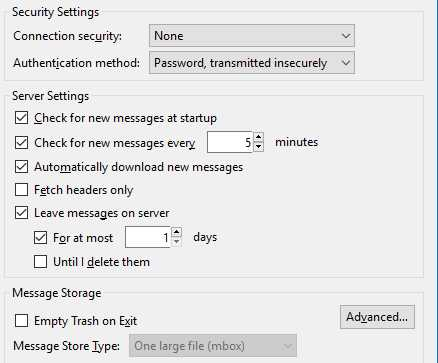
Since you do not want to leave a copy on the server that would be the first one to uncheck.
Read this answer in context 👍 1All Replies (7)
You using POP or IMAP email?
it a POP server
Right click the account in the Folder Pane and select Settings Select the account you are working with and then Server Settings The server settings are about mid page.
here are the current settings witch ones do I need to change
Chosen Solution
Since you do not want to leave a copy on the server that would be the first one to uncheck.
What's the solution if using IMAP?
IMAP is server based. You just remotely view the messages on the server so this option is not available with IMAP. You can create folders under Local Folders and move messages from the server to these folders to keep local copies.