


what does selecting the current character encoding do?

I received an email with garbage characters (it should have been displaying Hebrew which usually appears without a problem) I selected view-> character encoding-> Unicode , which was already the selection and now the email displays properly. If I just re-selected the choice that TB had already chosen, what did TB do? or what is the problem with the message encoding?
All Replies (4)
Open the mail and show source (Ctrl+U) Does it say Content-Type: text/html; charset=utf-8
No.
Content-Type: text/plain; charset=utf-8 Content-Type: multipart/related; Content-Type: text/html
If i set it to display the message as Simple Text, then close the message and reopen it, the same thing happens: it displays garbage characters. If I then reselect character encoding -> Unicode it makes the message look fine.
Check tools / options / display / FORMATTING / advanced What you allow (and not)
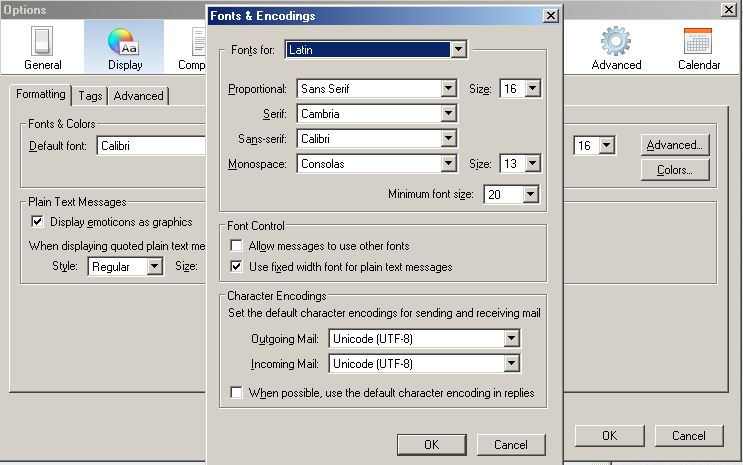
Modified by Gnospen
Incoming Mail was set to Western (ISO-8859-1). I changed it to UTF -8 and the message now displays correctly. thanks!
It is still strange that TB had already selected the encoding as Unicode but didn't render the message in Unicode until it was re selected . seems like a bug .