How can I reinstall username and password as necessities for opening my gmailaccount? (They suddenly disappeared, leaving my gmailaccount open.)

It has usually been necessary to use both username and password for getting access to my gmail inbox, buth suddenly the inbox appears without any of them. In other words, there is no longer any barrier between 'ordering' Gmail and the inbox. The password is properly established, but there is no need for it anymore.
All Replies (1)
Assuming you didn't allow Firefox to save your password, the most likely explanation is that Google is setting a persistent cookie that keeps you logged in to all Google services. It's probably best to sign out of your Google account to terminate your session and invalidate the cookie.
Alternately, you can change how Firefox manages your Google cookies, for example, by expiring them at the end of your session (when you close Firefox, assuming you do not have Firefox set to restore your previous tabs at startup). To make that change, there are two steps: updating permissions and removing existing cookies.
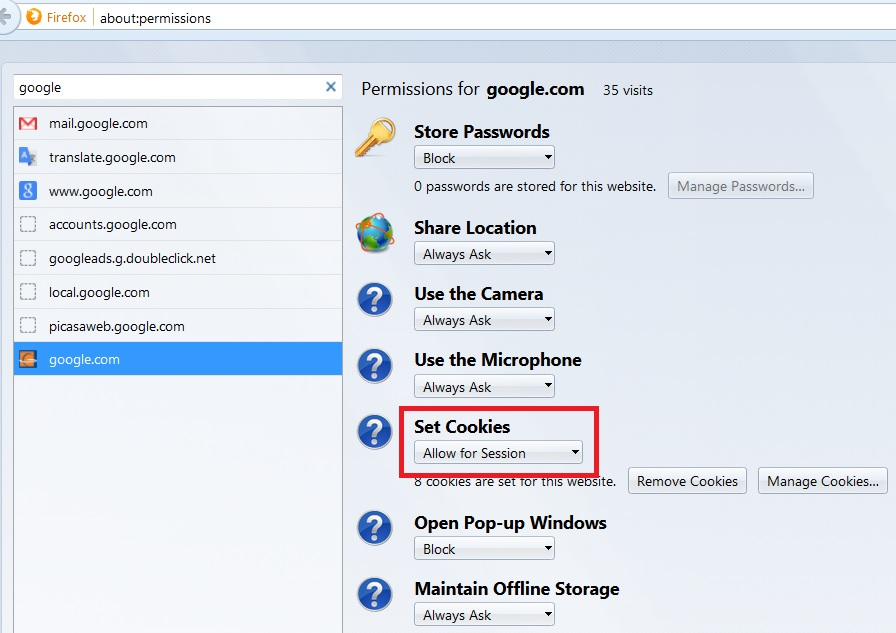
You can type or paste about:permissions into the address bar and press Enter to load the Permissions Manager.
The left column should start filling with sites. You can type google in the search bar to filter the list, and as Firefox finds more, some additional domains may be added.
Select a domain on the left and then on the right change its cookie permission setting to "Allow for Session". (Screen shot example attached)
Then use the Remove Cookies button.
Repeat for each domain that might possibly be relevant to Gmail.
Note: one negative side effect is that the annoying blue bar about making Google your home page will keep reappearing after the cookies are cleared. You can find suggestions for dealing with that in this thread: https://support.mozilla.org/questions/1049226