


Needing to disable smooth scrolling and hardware acceleration for users on a Remote Desktop Session.

Hello, I need to disable smooth scrolling and hardware acceleration for any user that logs into a RDS server. I have messed the mozilla.cfg and created a autoconfig.js file. I guess I am missing something along the way.
This is currently my autoconfig.js pref("general.config.filename", "mozilla.cfg"); pref("general.config.obscure_value", 1); pref("app.update.channel", "release");
Mozilla.cfg // Smooth Scrolling Disabled lockpref("general.smoothScroll.disabled", true); // disables hardware acceleration lockPref("layers.acceleration.disabled", true); lockPref("gfx.direct2d.disabled", true);
Anything I am missing? When I restart both options are still checked in the options.
Thanks!!
All Replies (6)
Chosen Solution
hi b1gt3x, as you use a plaintext cfg file, you'll want to put this in your autoconfig.js intead:
pref("general.config.obscure_value", 0);
pref("general.config.filename", "mozilla.cfg");
also, you'll have to make it lockPref with a capital P in all instances - as this is reacting very sensitive to spelling errors.. http://kb.mozillazine.org/Locking_preferences.
Awesome! That got the Hardware acceleration part.
Am I also missing something to disable smooth scrolling? // Smooth Scrolling Disabled lockPref("general.smoothScroll.disabled", True);
// disables hardware acceleration lockPref("layers.acceleration.disabled", true); lockPref("gfx.direct2d.disabled", true);
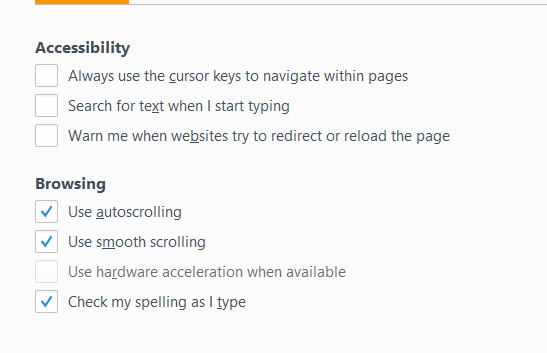
Here is a screen shot of what I need disabled and grayed out. Hardware acceleration is good now. Just need "Use Smooth Scrolling" disabled as well.
Try this for smooth scroll:
// always make sure to start mozilla.cfg with an comment line

// Smooth Scrolling Disabled
lockPref("general.smoothScroll", false);

// disables hardware acceleration
lockPref("layers.acceleration.disabled", true);
lockPref("gfx.direct2d.disabled", true);
(edited to restore lost line breaks)
Modified by cor-el
try this:
// Smooth Scrolling Disabled
lockPref("general.smoothScroll", false);
Awesome guys it worked. Much appreciated!