I can't find my local folder

I have 5 email addresses in my Thunderbird program on my computer and all these are working fine. But I don't have any local folder. How can I get one?
Chosen solution
This is a funny one.
Some users complain at the Local Folders, seeing no use for it, and want it removed or hidden. (These users obviously don't use RSS, newsgroups, offline storage for IMAP, account-independent filing, Outbox for Send Later etc etc.) Local Folders can be deliberately hidden, but it's not a simple thing to do, and you don't have any add-ons installed (other than the eset one) that might suppress it. So it's hard to believe that Local Folders has been accidentally turned off, or even deliberately turned off, for that matter.
Going back to the possibility of it having been renamed, I take it that if you open Account Settings, under Tools, and step through your 5 visible accounts, each appears to be a real full email account with server settings etc? Local Folders, being a Special Account, doesn't have its own associated email address or server settings, so stands out as being a bit different.
It's possible to set POP-connected accounts to share the Local Folders Inbox, so making Thunderbird work more like Outlook Express, and so it's possible that you have one or more POP-based accounts doing this coupled with Local Folders being renamed, so this is all getting a bit tenuous as a possible solution. However, the original accounts tend to become invisible when you do this, so again it doesn't feel likely.
I'll ponder further. Let's see if anyone else has any ideas. Toad-Hall? ;-)
Read this answer in context 👍 0All Replies (15)

Can you post your Troubleshooting Information? Help (Alt-H) - Troubleshooting Information
Application Basics Name Thunderbird Version 31.7.0 User Agent Mozilla/5.0 (Windows NT 6.1; WOW64; rv:31.0) Gecko/20100101 Thunderbird/31.7.0 Profile Folder Show Folder (Local drive) Application Build ID 20150507114201 Enabled Plugins about:plugins Build Configuration about:buildconfig Memory Use about:memory Mail and News Accounts ID Incoming server Outgoing servers Name Connection security Authentication method Name Connection security Authentication method Default? account1 (none) Local Folders plain passwordCleartext account2 (pop3) pop.netvigator.com:110 plain passwordCleartext smtp.netvigator.com:25 plain passwordCleartext true account4 (pop3) mail.lotuslactation.com:110 alwaysSTARTTLS passwordCleartext mail.lotuslactation.com:587 alwaysSTARTTLS passwordCleartext true account5 (imap) imap.googlemail.com:993 SSL passwordCleartext smtp.googlemail.com:465 SSL passwordCleartext true account6 (imap) imap.googlemail.com:993 SSL passwordCleartext smtp.googlemail.com:465 SSL passwordCleartext true account7 (imap) imap.googlemail.com:993 SSL passwordCleartext smtp.googlemail.com:465 SSL passwordCleartext true Crash Reports Report ID Submitted bp-b63aa116-420f-49d4-82c7-dab442150412 12-Apr-15 Extensions Name Version Enabled ID ESET Smart Security Extension 6.0.316.0 false eplgTb@eset.com Important Modified Preferences Name Value accessibility.typeaheadfind.flashBar 0 browser.cache.disk.capacity 358400 browser.cache.disk.smart_size_cached_value 358400 browser.cache.disk.smart_size.first_run false browser.cache.disk.smart_size.use_old_max false extensions.lastAppVersion 31.7.0 font.internaluseonly.changed true font.name.monospace.el Consolas font.name.monospace.tr Consolas font.name.monospace.x-baltic Consolas font.name.monospace.x-central-euro Consolas font.name.monospace.x-cyrillic Consolas font.name.monospace.x-unicode Consolas font.name.monospace.x-western Consolas font.name.sans-serif.el Calibri font.name.sans-serif.tr Calibri font.name.sans-serif.x-baltic Calibri font.name.sans-serif.x-central-euro Calibri font.name.sans-serif.x-cyrillic Calibri font.name.sans-serif.x-unicode Calibri font.name.sans-serif.x-western Calibri font.name.serif.el Cambria font.name.serif.tr Cambria font.name.serif.x-baltic Cambria font.name.serif.x-central-euro Cambria font.name.serif.x-cyrillic Cambria font.name.serif.x-unicode Cambria font.name.serif.x-western Cambria font.size.fixed.el 14 font.size.fixed.tr 14 font.size.fixed.x-baltic 14 font.size.fixed.x-central-euro 14 font.size.fixed.x-cyrillic 14 font.size.fixed.x-unicode 14 font.size.fixed.x-western 14 font.size.variable.el 17 font.size.variable.tr 17 font.size.variable.x-baltic 17 font.size.variable.x-central-euro 17 font.size.variable.x-cyrillic 17 font.size.variable.x-unicode 17 font.size.variable.x-western 17 gfx.direct3d.last_used_feature_level_idx 0 mail.openMessageBehavior.version 1 mail.winsearch.enable true mail.winsearch.firstRunDone true mail.winsearch.global_reindex_time 1325763450 mailnews.database.global.datastore.id e8b719be-9a6d-4406-98d1-090dbc09465 mailnews.database.global.views.conversation.columns {"threadCol":{"visible":true,"ordinal":"1"},"flaggedCol":{"visible":true,"ordinal":"3"},"attachmentCol":{"visible":false… network.cookie.prefsMigrated true places.database.lastMaintenance 1435633055 places.history.expiration.transient_current_max_pages 13994 places.history.expiration.transient_optimal_database_size 167772160 plugin.importedState true plugins.update.notifyUser true print.print_printer hp psc 1310 series print.printer_hp_psc_1310_series.print_bgcolor false print.printer_hp_psc_1310_series.print_bgimages false print.printer_hp_psc_1310_series.print_command print.printer_hp_psc_1310_series.print_downloadfonts true print.printer_hp_psc_1310_series.print_edge_bottom 0 print.printer_hp_psc_1310_series.print_edge_left 0 print.printer_hp_psc_1310_series.print_edge_right 0 print.printer_hp_psc_1310_series.print_edge_top 0 print.printer_hp_psc_1310_series.print_evenpages true print.printer_hp_psc_1310_series.print_footercenter print.printer_hp_psc_1310_series.print_footerleft &PT print.printer_hp_psc_1310_series.print_footerright &D print.printer_hp_psc_1310_series.print_headercenter print.printer_hp_psc_1310_series.print_headerleft &T print.printer_hp_psc_1310_series.print_headerright &U print.printer_hp_psc_1310_series.print_in_color true print.printer_hp_psc_1310_series.print_margin_bottom 0.5 print.printer_hp_psc_1310_series.print_margin_left 0.5 print.printer_hp_psc_1310_series.print_margin_right 0.5 print.printer_hp_psc_1310_series.print_margin_top 0.5 print.printer_hp_psc_1310_series.print_oddpages true print.printer_hp_psc_1310_series.print_orientation 0 print.printer_hp_psc_1310_series.print_pagedelay 500 print.printer_hp_psc_1310_series.print_paper_data 9 print.printer_hp_psc_1310_series.print_paper_height 11.00 print.printer_hp_psc_1310_series.print_paper_size 6619251 print.printer_hp_psc_1310_series.print_paper_size_type 0 print.printer_hp_psc_1310_series.print_paper_size_unit 1 print.printer_hp_psc_1310_series.print_paper_width 8.50 print.printer_hp_psc_1310_series.print_reversed false print.printer_hp_psc_1310_series.print_scaling 1.00 print.printer_hp_psc_1310_series.print_shrink_to_fit true print.printer_hp_psc_1310_series.print_to_file false print.printer_hp_psc_1310_series.print_unwriteable_margin_bottom 0 print.printer_hp_psc_1310_series.print_unwriteable_margin_left 0 print.printer_hp_psc_1310_series.print_unwriteable_margin_right 0 print.printer_hp_psc_1310_series.print_unwriteable_margin_top 0 print.printer_PDF24_PDF.print_bgcolor false print.printer_PDF24_PDF.print_bgimages false print.printer_PDF24_PDF.print_colorspace print.printer_PDF24_PDF.print_command print.printer_PDF24_PDF.print_downloadfonts false print.printer_PDF24_PDF.print_duplex 1465771104 print.printer_PDF24_PDF.print_edge_bottom 0 print.printer_PDF24_PDF.print_edge_left 0 print.printer_PDF24_PDF.print_edge_right 0 print.printer_PDF24_PDF.print_edge_top 0 print.printer_PDF24_PDF.print_evenpages true print.printer_PDF24_PDF.print_footercenter print.printer_PDF24_PDF.print_footerleft &PT print.printer_PDF24_PDF.print_footerright &D print.printer_PDF24_PDF.print_headercenter print.printer_PDF24_PDF.print_headerleft &T print.printer_PDF24_PDF.print_headerright &U print.printer_PDF24_PDF.print_in_color true print.printer_PDF24_PDF.print_margin_bottom 0.5 print.printer_PDF24_PDF.print_margin_left 0.5 print.printer_PDF24_PDF.print_margin_right 0.5 print.printer_PDF24_PDF.print_margin_top 0.5 print.printer_PDF24_PDF.print_oddpages true print.printer_PDF24_PDF.print_orientation 0 print.printer_PDF24_PDF.print_page_delay 50 print.printer_PDF24_PDF.print_paper_data 1 print.printer_PDF24_PDF.print_paper_height 11.00 print.printer_PDF24_PDF.print_paper_name print.printer_PDF24_PDF.print_paper_size_type 0 print.printer_PDF24_PDF.print_paper_size_unit 0 print.printer_PDF24_PDF.print_paper_width 8.50 print.printer_PDF24_PDF.print_plex_name print.printer_PDF24_PDF.print_resolution 116724784 print.printer_PDF24_PDF.print_resolution_name print.printer_PDF24_PDF.print_reversed false print.printer_PDF24_PDF.print_scaling 1.00 print.printer_PDF24_PDF.print_shrink_to_fit true print.printer_PDF24_PDF.print_to_file false print.printer_PDF24_PDF.print_unwriteable_margin_bottom 0 print.printer_PDF24_PDF.print_unwriteable_margin_left 0 print.printer_PDF24_PDF.print_unwriteable_margin_right 0 print.printer_PDF24_PDF.print_unwriteable_margin_top 0 Graphics Adapter Description Intel(R) HD Graphics 4600 Vendor ID 0x8086 Device ID 0x0412 Adapter RAM Unknown Adapter Drivers igdumdim64 igd10iumd64 igd10iumd64 igdumdim32 igd10iumd32 igd10iumd32 Driver Version 9.18.10.3186 Driver Date 5-17-2013 Adapter Description (GPU #2) NVIDIA GeForce GTX 960 Vendor ID (GPU #2) 0x10de Device ID (GPU #2) 0x1401 Adapter RAM (GPU #2) 2048 Adapter Drivers (GPU #2) nvd3dumx,nvwgf2umx,nvwgf2umx nvd3dum,nvwgf2um,nvwgf2um Driver Version (GPU #2) 9.18.13.4725 Driver Date (GPU #2) 1-9-2015 Direct2D Enabled true DirectWrite Enabled true (6.2.9200.17292) ClearType Parameters ClearType parameters not found WebGL Renderer false GPU Accelerated Windows 2/2 Direct3D 10 AzureCanvasBackend direct2d AzureSkiaAccelerated 0 AzureFallbackCanvasBackend cairo AzureContentBackend direct2d JavaScript Incremental GC 1 Accessibility Activated 0 Prevent Accessibility 0 Library Versions Expected minimum version Version in use NSPR 4.10.6 4.10.6 NSS 3.16.2.3 Basic ECC 3.16.2.3 Basic ECC NSS Util 3.16.2.3 3.16.2.3 NSS SSL 3.16.2.3 Basic ECC 3.16.2.3 Basic ECC NSS S/MIME 3.16.2.3 Basic ECC 3.16.2.3 Basic ECC
Well, your list contains:
account1 (none) Local Folders plain passwordCleartext
There is your Local Folders.
I assume you can see all of your 5 other accounts?
Do you have one whose name doesn't appear on the Troubleshooting list? Maybe you do have Local Folders but have changed its display name.
Modified by Zenos
I don't have it listed on the side only the five email address - please see the image - where should I look for it?

Try View|Folders in the Menu and make sure it's set to All. Yours may be set to Unread.
The View|Folders is set to All but there are only the five mentioned above.
Chosen Solution
This is a funny one.
Some users complain at the Local Folders, seeing no use for it, and want it removed or hidden. (These users obviously don't use RSS, newsgroups, offline storage for IMAP, account-independent filing, Outbox for Send Later etc etc.) Local Folders can be deliberately hidden, but it's not a simple thing to do, and you don't have any add-ons installed (other than the eset one) that might suppress it. So it's hard to believe that Local Folders has been accidentally turned off, or even deliberately turned off, for that matter.
Going back to the possibility of it having been renamed, I take it that if you open Account Settings, under Tools, and step through your 5 visible accounts, each appears to be a real full email account with server settings etc? Local Folders, being a Special Account, doesn't have its own associated email address or server settings, so stands out as being a bit different.
It's possible to set POP-connected accounts to share the Local Folders Inbox, so making Thunderbird work more like Outlook Express, and so it's possible that you have one or more POP-based accounts doing this coupled with Local Folders being renamed, so this is all getting a bit tenuous as a possible solution. However, the original accounts tend to become invisible when you do this, so again it doesn't feel likely.
I'll ponder further. Let's see if anyone else has any ideas. Toad-Hall? ;-)
Hi Zenos,
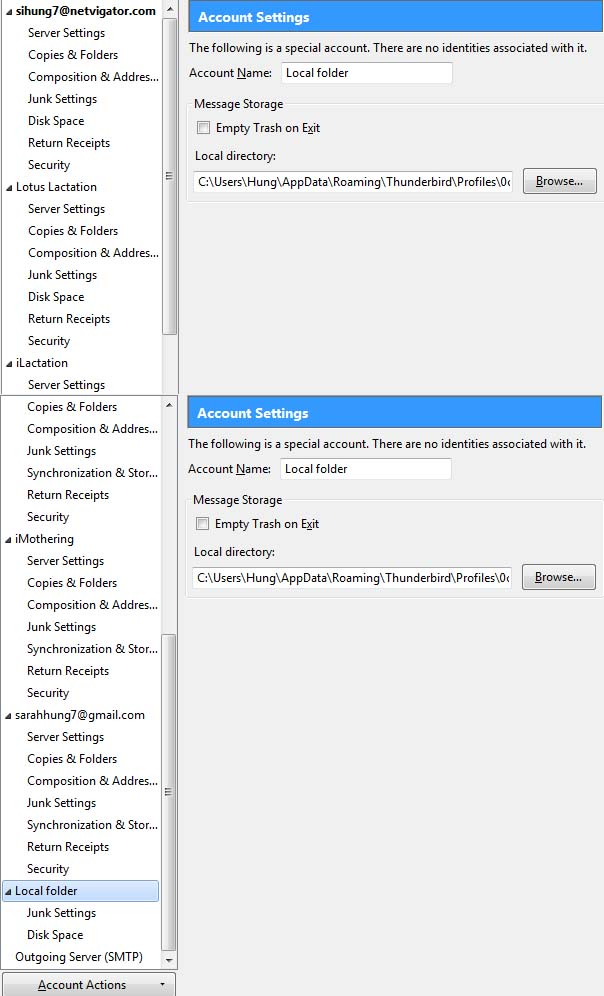
Thank you for your help I have found it! It seems to be mixed up with my email sihung7@netvigator.com. I've attached the Account Settings screen shot and have now renamed the folder to be Local Folder.
But in my list on the side this changes my email account to be under Local Folder. It is a pop account and it is working so I don't really mind what it is called.
My next problem is that my C drive is full. So I'd like to change the Local directory to be on the E drive instead. Are there any instructions of how to do this?
Thanks again, SARAH
I've found the information at http://kb.mozillazine.org/Moving_your_mail_storage_location_%28Thunderbird%29 Thanks again for all your help.
Sarahs navigator will be local folders renamed. But it looks like you got there in the end. The blue screen icon is the give away. Only local folders has that icon.
.It is actually preferable to place your entire Thunderbird profile on the E: drive. But doing so is difficult for many people. There are instructions here http://chrisramsden.vfast.co.uk/3_How_to_install_Add-ons_in_Thunderbird.html read them over and speak up when you get stuck I think might be a good starting point.
My instructions Install this add-on https://addons.mozilla.org/en-US/thunderbird/addon/profileswitcher/?src=search
Close Thunderbird using the "Open profile manager > normal mode" entry the add-on put on the file menu. Go to the e: drive and make a folder name it mail on the start menu type %appdata%\Thunderbird and press enter. in the explorer window that opens drag the entire folder named "profiles" to your new folder Mail on the e:drive.
Wait what feels like a long time for the mail to copy.
open the E:\mail\profiles folder in explorer. There should be a single folder in there names somerandomstring.default. Rename the folder somerandomstring.Sarah
When you launch Thunderbird the profile manager will open. Select the add option to add a new profile. In the wizard click next. Leave the default user information and choose the folder. (this is the important part.) Select the folder you renamed sonerandomstring.sarah and click finish.
When Thunderbird restarts it should now be using the copy on the E: drive.
For safety make another copy on a 'usb drive of the original profiles folder and then delete it. Your done.
Hi Matt,
Is it necessary to move the whole profile over to the E drive? So far I've moved the Local Folder to the E drive and everything is working.
All this worry about Local Folders started because my gmail account is currently running at 96% and I wanted to move the emails from the server to the Local Folders. Is this possible?
sihung7 said
Hi Matt, Is it necessary to move the whole profile over to the E drive? So far I've moved the Local Folder to the E drive and everything is working.
Not necessary, only preferable. Just be aware most instructions assume your profile is in one place, under the folder profiles. Your is now in Two so most instructions online will require some sort of modification.
All this worry about Local Folders started because my gmail account is currently running at 96% and I wanted to move the emails from the server to the Local Folders. Is this possible?
Yes it is possible, but truly tedious. The IMAP synchronization gets all messed up if you move lots of mails at once and just makes more headaches.
I suggest an intermediate step.
Install the import export tools add-on https://addons.mozilla.org/en-US/thunderbird/addon/importexporttools/
Use the add-on to actually export the mails as EML files. One folder at a time and then delete everything in the folder (ctrl+A to select all is your friend here)
this will create thousands and thousands of files. One for each email. You could leave it at that, or you could use the import export tool to import the EML files back into Thunderbird.
Doing this places less strain on the protocols and the tolerances of anti virus etc.
Export is simply a copy really. but it is done independently of the server so there is not interactive actions to mess up. Delete sends a note to the GMail server to remove the folder name label from their copy. so again a light action. Import to local folder is again only a copy.
This is to avoid issues that crop up when your moving and deleting thousands and thousands of messages that just don't cause issue in the daily use of delete 10 mails.
Note that in the end all your mail will still be on the gmail server in the all mail folder. Deleting mail from there will finally remove it.
This all a tad off-topic, but… Matt said
…There are instructions here http://chrisramsden.vfast.co.uk/3_How_to_install_Add-ons_in_Thunderbird.html …I'm surprised that this link works. It shouldn't. ;-)
I moved house recently and had to part company with my ISP, vfast.co.uk, who had been hosting my website for free. My current ISP don't bundle a webhosting service (nor a news server, and even their email is contracted out; bt.com, bah!) and I've been scratching around for a free or low-cost alternative. In theory, chrisramsden.vfast.co.uk should have been taken down by now, since I'm not paying them any longer.
Currently that page is now at: http://xenos-email-notes.simplesite.com/416814616 which is free, but less than ideal, as it doesn't provide proper URLs for the individual pages. So linking to them becomes rather messy.
Thank you all so much (and especially Matt), I have finally managed to sort all my problems out. I have changed the whole Thunderbird profile to my E drive. Used the Import Export add on to copy all the mail from before 1 Jan 2015 to the local folder And finally deleted all the emails before 1 Jan 2015 from my gmail account. I can now work again! Thank you again, SARAH
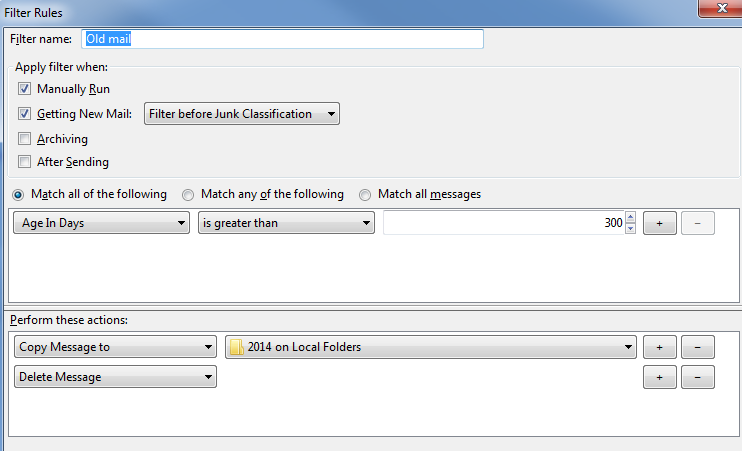
You actually have a couple of things left if you don't want to go through this again. Use a Thunderbird filter to archive mail older than X days.
Tools menu (alt+T) > Message filter. Change the account shown to your Gmail one. Add a filter.
Make it look something like this

Now this filter will only work on your inbox (or other folder you specify). But it makes the whole thing just happen when Thunderbird gets mail.