


I'm trying to add an email account, but the "Done" button is always disabled, even though I know my information is correct.

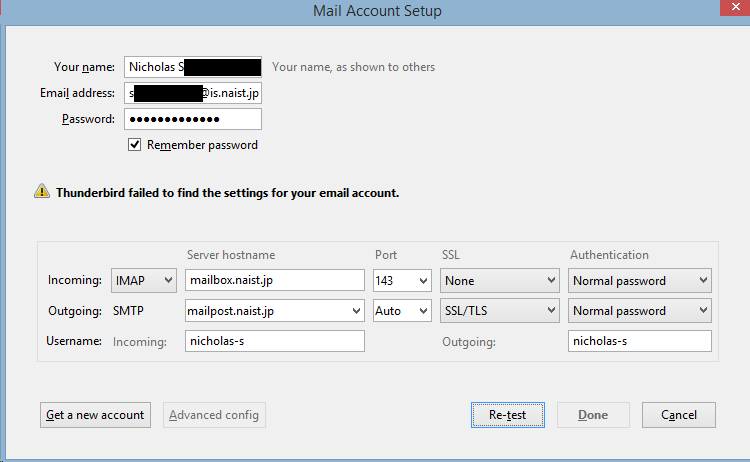
I have entered everything into the form, the same as it's set up in Windows Live Mail on my other PC. I can get as far as the attached image. I can't click "Done"! The server has certificate errors and gives warnings when accessing the webmail interface, but that should not be a problem.
Chosen solution
There is no security set in inbound and address mailbox....
On outbound there is auto on port and address mailpost....
Does naist.jp have a page with settings?
Read this answer in context 👍 1All Replies (3)
Here is the image I couldn't upload on the OP.
Chosen Solution
There is no security set in inbound and address mailbox....
On outbound there is auto on port and address mailpost....
Does naist.jp have a page with settings?
I had tried setting all the options to Autodetect, but that didn't work. I got the values there from a colleague, the above is me trying one of the various permutations. However, after some searching and an email to the office, I have found the actual correct values. (If I understood Japanese I think this would have been easier to find)
With the new values, clicking Re-test still yields the same result, disabling the Done button. I suspect the certificate errors are causing this? I touched one of the settings and the Done button re-enabled, so it is now correctly setup.
My apologies for not double checking the information I had before posting this question. Though if you know why the Autodetect wouldn't be working I'd be interested to know.