


Moving mails to local folders doesn't remove them from the Inbox file

Hi.
I'm using Thunderbird to fetch and archive all my mail from GMX.net. Since I only want to do this sporadically, I opted for the portable version (currently 31.4.0). Downloading works fine, and so does moving the mails to local folders. However when I checked the size of the Thunderbird folder it seemed a bit large. Turns out that all the mails were stored in two places - the mail/inbox folder (like pop.gmx.net) AND under local folders (in seperate files, reflecting the local folder names).
Is this normal behavior, can I turn it off and can I just delete the large Inbox file manually without breaking anything?
Here's the procedure I followed:
1) Create a local folder ("hello") 2) ctrl+a in inbox 3) rightclick, select move to - local folders - "hello"
Chosen solution
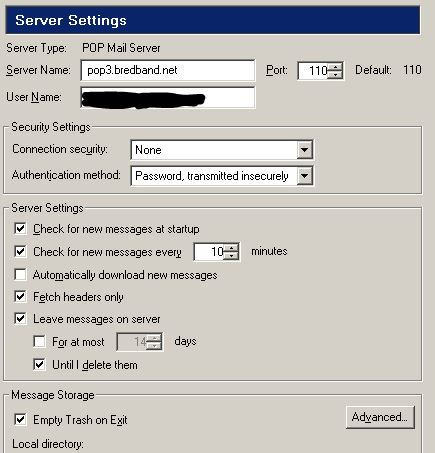
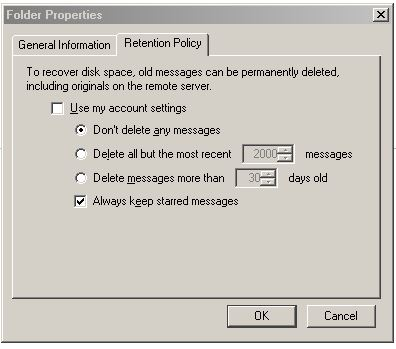
Much depends on how you set up your pop-server What to do with deleted files and if you keep them on the server and what you do at the folders properties
And compact your folders
Read this answer in context 👍 1All Replies (2)
Chosen Solution
Much depends on how you set up your pop-server What to do with deleted files and if you keep them on the server and what you do at the folders properties
And compact your folders
Modified by Gnospen
Thanks, compacting the inbox folder reduced the size of the Inbox file to 0b.