


Why has my all-in-one firefox/google changed, it used to show items at the top of the search box Amazon,ebay, twitter etc. it has changed to a plain google box

The search screen has changed to a simple goole box without the tabs which used to have Amazon,Ebay,Twitter,Wikipedia etc above the box but now it is just a simple Google search box in th middle of the screen. I have tried to search for thec original but no success, any ideas ?
Thanks
All Replies (2)

Hi Barric1,
Thank you for your question about the search changes in Firefox. There's been a lot of exciting news and we are happy to assist you.
You can now choose to search with Amazon/Ebay/others after you've typed your query in. Here's what it looks like: http://i.imgur.com/sLkD6iM.png
Hopefully this will save some time and a few clicks, especially if you switch between different search engines often.
If you want to, you can customise the search box so it searches on particular site (like Amazon or Wikipedia) instead of Google. Here are some instructions on how to do this:
Do you want to change your default search engine?
In Firefox 33 or below, you would change your default search engine from the Search bar, as shown in this animation. Starting in Firefox 34, you can use one of these methods:
Note: The following may not apply to localized versions of Firefox.
- Click the menu button
 and choose Options on Windows or Preferences on Mac or Linux, then select the Search settings panel.
- Click on the magnifying glass icon in the Search bar, then click on Change Search Settings, as shown here:
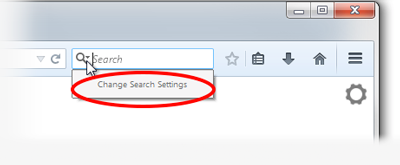
In the Search settings panel that opens, select a different search engine from the drop-down menu (see this screenshot).
For more information, see the article Search bar - add, change and manage search engines on Firefox.
Let us know if this answers your questions. If you have any other questions, we are happy to help.
Jayelbe


If you want to restore the previously used standalone window to manage search engines then you can toggle this pref to false with a middle-click on the about:config page.
about:config page: browser.search.showOneOffButtons = false
You need to close and restart Firefox to make this work properly.
In the address bar, type about:preferences#search<enter>
If you miss being able to switch search engines without going crazy with menus, try this out;
Context Search {web link} Expands the context menu's 'Search for' item into a list of installed search engines, allowing you to choose the engine you want to use for each search.