


how do I import .eml messages?

I have email messages in folders in the .eml format; but none of the three import programs see them as messages when I point to the folders. How can I import them into thunderbird as local folders?
Thanks, in advance.
All Replies (2)
Chosen Solution
Download ImportExporttools to eg: desktop or Downloads folder: https://addons.mozilla.org/en-US/thunderbird/addon/importexporttools/
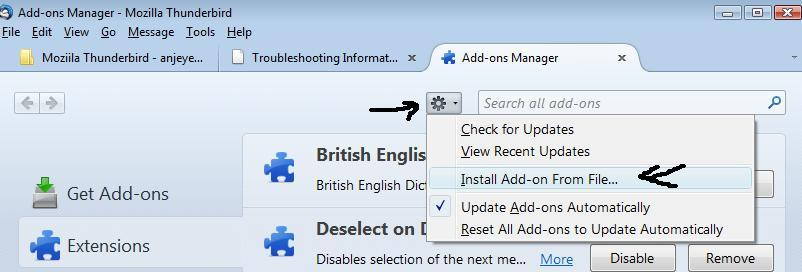
How to install addon: Tools > Addons or menu icon > addons
Click on gear icon and select 'Install addon from file' locate the file you just downloaded and clickon Open. see image below
How to use to import .eml files:
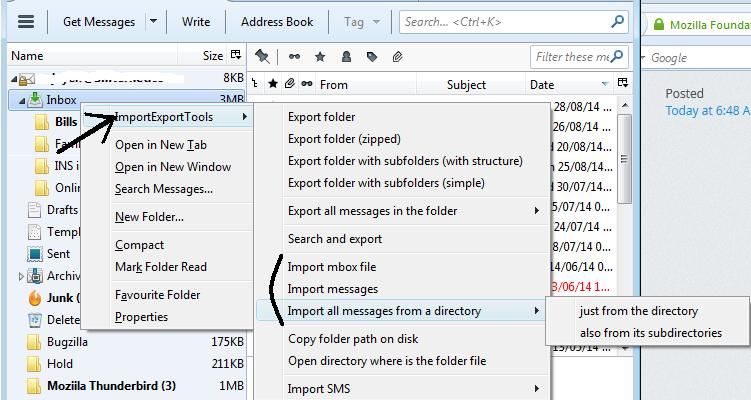
Right click on the folder which you want to import into.
Select 'ImportExportTools > import all messages from a directory > just from the directory.
Select the folder containing the .eml files
click on 'Select folder'
or you can use: Right click on the folder which you want to import into. Select 'ImportExportTools > import messages choose the actual .eml files and click on 'Open'
see second image
Thanks for your help. It worked like a charm!