


Is it possible to export all of the fields for calendar events ? Specifically we're after the event creation date time.

We need to find out when a calendar event was created.
I have been unable to find this information in Lightning or any exports.
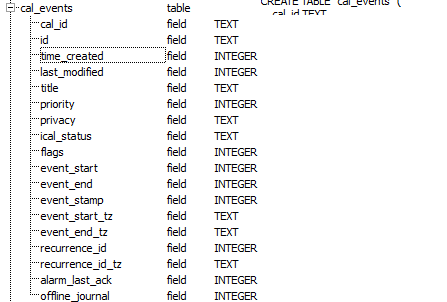
From looking into the local.sqlite database file the cal_events table has a field called time_created. Unfortunately when I try to export this, the format is unknown so it just exports as a number.
Does anyone know of another way to export this information ?
Thanks in advance
Chosen Solution
what exactly are you trying to achieve is my obvious question. A single forensic inquiry is different to a full listing of all events over years.
I assume you mean the created date shown in this view of the database. https://support.cdn.mozilla.net/media/uploads/images/2014-06-02-18-47-50-c207d9.png
The values stored there are javascript date time values.
If you enter the value into a javascript like
var d = new Date(1374129123000000);alert(d);
Where 1374129123000000 is your number not mine then the alert will be the datetime UTC
You can enter that javascript onto the error console and have it evaluate. Tools menu (Alt+T) > error console.
All Replies (3)


When you export the Event, it includes everything(old event too)
To Export Event
- Thunderbird Menu > Events & Tasks >Export
- If you have DOUBT export as HTML file and open the HTML file, there you can see the list of Events and Tasks
I've exported as csv & html, but neither show the event created date/time which is what we're after.
If you see the event created date/time, could you say what version of thunderbird/lightning you're using.
Thank you
Chosen Solution
what exactly are you trying to achieve is my obvious question. A single forensic inquiry is different to a full listing of all events over years.
I assume you mean the created date shown in this view of the database. https://support.cdn.mozilla.net/media/uploads/images/2014-06-02-18-47-50-c207d9.png
The values stored there are javascript date time values.
If you enter the value into a javascript like
var d = new Date(1374129123000000);alert(d);
Where 1374129123000000 is your number not mine then the alert will be the datetime UTC
You can enter that javascript onto the error console and have it evaluate. Tools menu (Alt+T) > error console.