address book disapeared

I recently updated the email and over 3700 emails are not there and my address book has disapeared. it is blank. How can I get these back? thank you
All Replies (11)
Sometimes, when thunderbird updates, it creates a new profile. I suggest you do this: - click help>troubleshootinginformation - scroll to 'Profiles' and click 'about:profiles' - there may be an unused profile, I suggest pressing the 'open' button to see if that profile has your content, such as in the imapmail or mail folders. - if you see your accounts there, then click the button to activate the profile and see if that works for you. And, if not, I think we can still recover the addressbook. Let me know.
I cannot find help>trouble shooting information anywhere to click on it?????? I need to speak to someone and have them walk me through this. As I said, I am a pastor of a church and I am in desperate need of my over 3700 emails and my LARGE address books. Sure would APPRECIATE some clear guidance!!!!!!!!!!!!!!!!!!!!!!
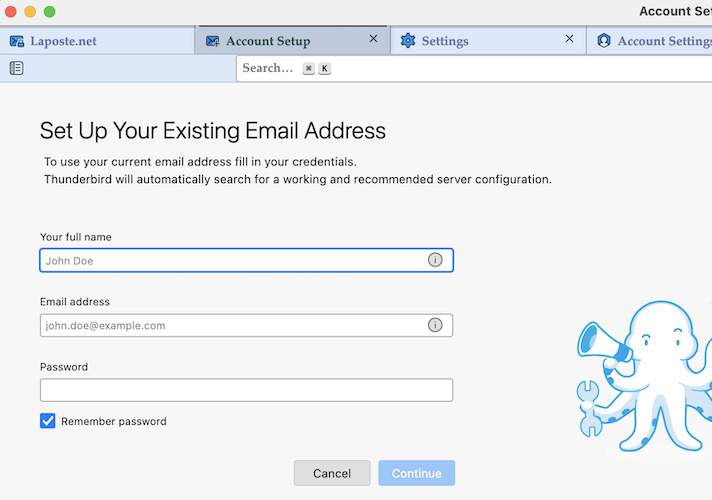
@ghaskell: when you launch Thunderbird do you see an "Account Setup" tab in the main Thunderbird window (like the one in my image) asking to "Set up your existing email address"?
How do I launch it to reach that screen?
My cell number is 570-947-6615....... I need to be guided through this MESS!!!!!!!!!!!!!!!!!!!!!!!!!!!!!!!!!!!!!
ghaskell said
How do I launch it to reach that screen?
I didn't tell you to launch that screen. Il asked whether your actual start Thunderbird looks like the one shown in my image ? Or do you see the normal screen with your accounts, folders and messages?
I see the normal screen. I missed your call..........sorry. I am available now if you want to call back.
The help>troubleshootinginformation link is reached with these steps: - click the 'hamburger' menu (three short stacked lines) in upper right of thunderbird screen - that menu shows 'help' - click the 'troubleshooting information' option - scroll to 'Profiles' and click 'about:profiles' - there may be an unused profile, I suggest pressing the 'open' button to see if that profile has your content, such as in the imapmail or mail folders. - if you see your accounts there, then click the button to activate the profile and see if that works for you. And, if not, I think we can still recover the addressbook. Let me know.

How to find my address book as it not shown on THe Menu. Thank you.
- * Numbered list item
click the alt key to display the menu bar. then click tools
Michael Blitchtein said
How to find my address book as it not shown on THe Menu. Thank you.
- * Numbered list item
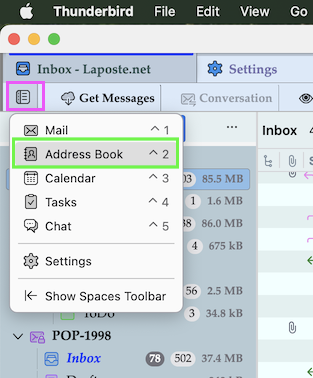
To open the the Address Book tab >>> left-click on the "Open spaces menu" button in the upper left corner of the Thunderbird main window and select "Address Book" in the drop-down menu (image)