Time Machine backup of Thunderbird

Hello, I am using Time Machine to backup my Mac, but the tool excludes Thunderbird. In settings I have not excluded any files. My Thunderbird folder is fairly large, 25GB - thanks to the great archiving features of Thunderbird, How can I include Thunderbird folder to backups? Thanks in advance for helping. BR Tapio Heikkila
All Replies (3)
Hi, why should Time Machine exclude the Thunderbird profile from backup? Because of its size (error message?)? If your Thunderbird profile is saved in its default location ~/Library/Thunderbird/ and if you automatically backup your User-Library with Time Machine your Thunderbird data should be included.
Thanks Mapenzi, the profile is in default location and there is no error message. But Apple writes in Mac help, that they may exclude files of certain providers, if they feel so - therefore I was concerned. But it seems that Macs hidden files -functionality does not work in the same way with the backup files as it does with the computer itself. In the computer the profile folder is normally hidden, but you can command to display it. In the backup files the command does not work, and the profile folder stays always hidden. This was the reason why I did not see it. But I found the profile using search... It is shame that you need to use your valuable time with this kind of problems. Thanks again BR Tapio
tapio.heikkila said
But Apple writes in Mac help, that they may exclude files of certain providers, if they feel so - therefore I was concerned.
This is the first time I ever heard this. Can you give me the source of this information?
tapio.heikkila said
But it seems that Macs hidden files -functionality does not work in the same way with the backup files as it does with the computer itself. In the computer the profile folder is normally hidden, but you can command to display it. In the backup files the command does not work, and the profile folder stays always hidden.
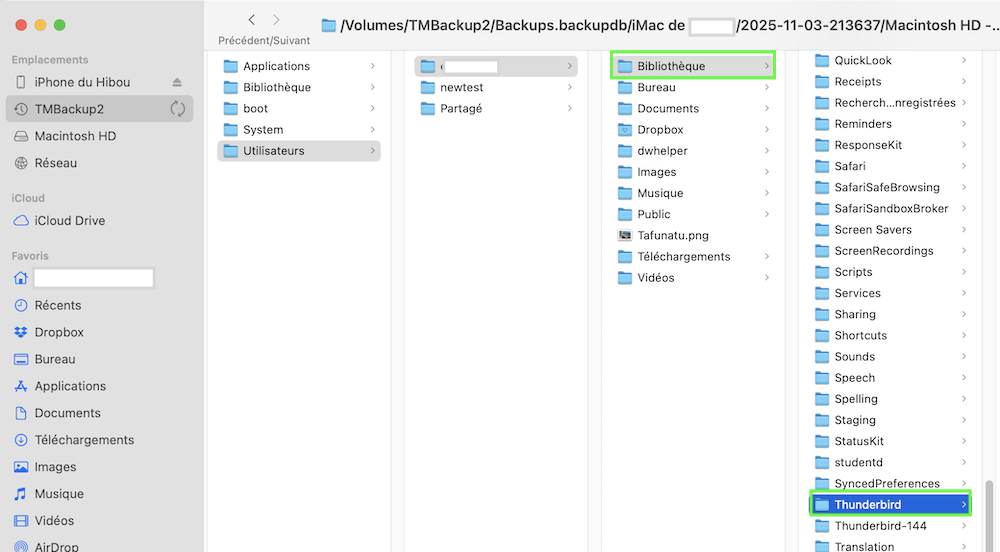
Running macOS Monterey I cannot confirm this. On both my external HDs with the Time Machine backups I can easily visualise the user library (see image)