This thread was archived.
Please ask a new question if you need help.

Archived
E-mail Format

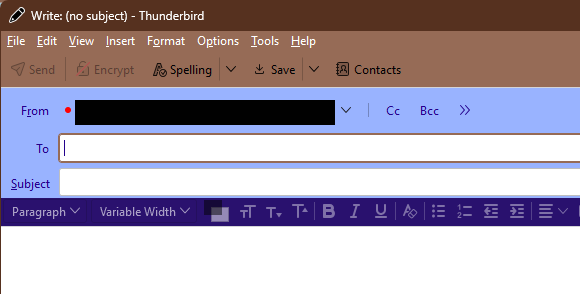
When I start to compose a new e-mail, From, To, and Subject are all approximately below Insert on the top menu. How can I change this so From, To, and Subject are all aligned on the left side of the e-mail?
When I start to compose a new e-mail, From, To, and Subject are all approximately below Insert on the top menu. How can I change this so From, To, and Subject are all aligned on the left side of the e-mail?
All Replies (1)
This can be done with userChrome.css (see picture):
#MsgHeadersToolbar {margin-left: -70px !important;}
Help/Troubleshooting Info, Profile Folder, Open Folder, close TB, create a new folder named chrome, create a new document in chrome with a text editor, name it userChrome.css, Save as type: All files *.*, copy in the above code, change the number as desired. Double-click toolkit.legacyUserProfileCustomizations.stylesheets to true in Settings/General/Config. editor, restart TB.