


Cannot see threaded messages TB 25.10

Linux Mint 22.1 Thunderbird version 25.10.
In view-- sort by--Threads is enabled. See the attached figure. Mery's messages areent seen as threads
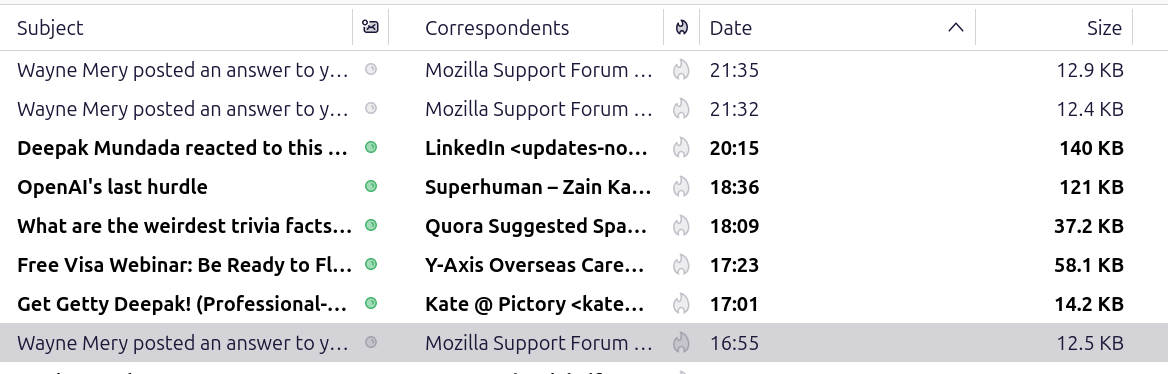
All Replies (8)
A way to help verify threading is to set view>threads>expand all threads
I cant select any of View >Threads>Expand all threads or collapse all threads. No check mark comes in front of either of these. I can select other options in View> Threads.
There is no checkmark done for that. I thought it might expand the threads for you. Does your view>sort by also have received date checked? I have no solution, but what you're describing is something I have not seen before.
Thank you David. I was wondering if there is any way to see only threaded responses ? Some responses were threaded and visible as threads. I am 66 and not sharp now.
I regret that I am not very familiar with threads, since I never use them. Possibly, someone else here may have suggestions.
Its not that I need threads. If there any other way of seeing all the messages in a place or as conversations? I thought threads was the only way. I have to search for a good tutorial on Thunderbird. There are many other basic things about TB that I need to know. Thank you .
This addon may help: https://addons.thunderbird.net/en-US/thunderbird/addon/gmail-conversation-view/ and this URL of threading may also assist. https://support.mozilla.org/en-US/kb/message-threading-thunderbird

You can probably do what you want by using conversations. Select a message. Click on the "Message" menu. Click on "Open in conversation".