


Windows 10 reached EOS (end of support) on October 14, 2025. If you are on Windows 10, see this article.

Search Support

Avoid support scams. We will never ask you to call or text a phone number or share personal information. Please report suspicious activity using the “Report Abuse” option.

Learn More
Archived

How can I create a new Saved Search?

david replied
roshni

This page describes that one can create a saved search by going to File -> New -> Saved Search. However, on my version of Thunderbird (Version 136.0.1 on Windows 11), this button doesn't exist for me (see attached). I'd use the keyboard shortcut Ctrl-Shift-F to search and then save as a Saved Search, but the result I get looks different from the New Saved Search Folder window in the linked support page. In particular, I want to create a Saved Search that scans across multiple different inboxes, but this isn't possible starting from a search. What can I do here?
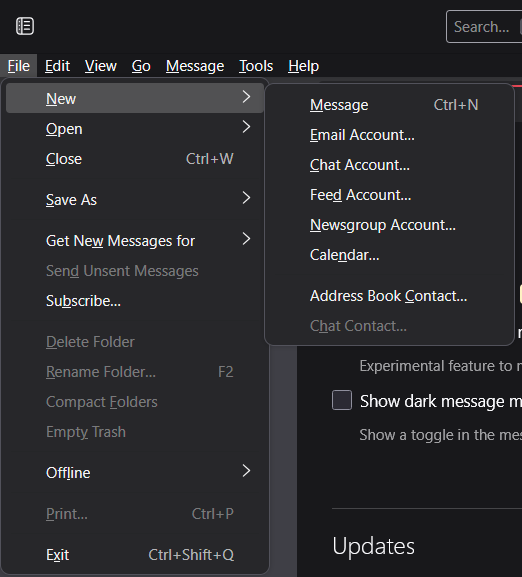
[https://support.mozilla.org/en-US/kb/using-saved-searches This page] describes that one can create a saved search by going to File -> New -> Saved Search. However, on my version of Thunderbird (Version 136.0.1 on Windows 11), this button doesn't exist for me (see attached). I'd use the keyboard shortcut Ctrl-Shift-F to search and then save as a Saved Search, but the result I get looks different from the New Saved Search Folder window in the linked support page. In particular, I want to create a Saved Search that scans across multiple different inboxes, but this isn't possible starting from a search. What can I do here?
Attached screenshots

All Replies (1)

I will report the page to developers. This appears to be something in flux. To create a saved search, click the edit>find and then click the button to create a saved search and do that on next pane. Documentation on this could be easier, I agree.