This thread was archived.
Please ask a new question if you need help.

Archived
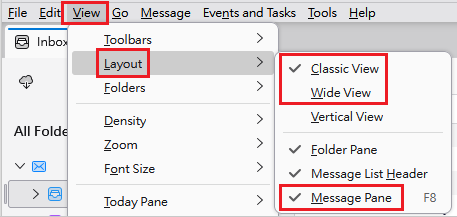
My messages used to display in a lower pane. From yesterday, I have a list of emails covering the whole screen. I have to select open, then where to do so. How can I restore the former presentation which was more user-friendly

Tell me how to change back to the previous display mode! Thank you. Stuart Gilchrist
Tell me how to change back to the previous display mode! Thank you. Stuart Gilchrist
All Replies (1)

1. View > Layout > select either Classic View or Wide View. 2. View > Layout > select Message Pane.