


Windows 10 reached EOS (end of support) on October 14, 2025. If you are on Windows 10, see this article.

Search Support

Avoid support scams. We will never ask you to call or text a phone number or share personal information. Please report suspicious activity using the “Report Abuse” option.

Learn More
Archived

Account Setup screen

sfhowes replied
Off-Grid Wannabe

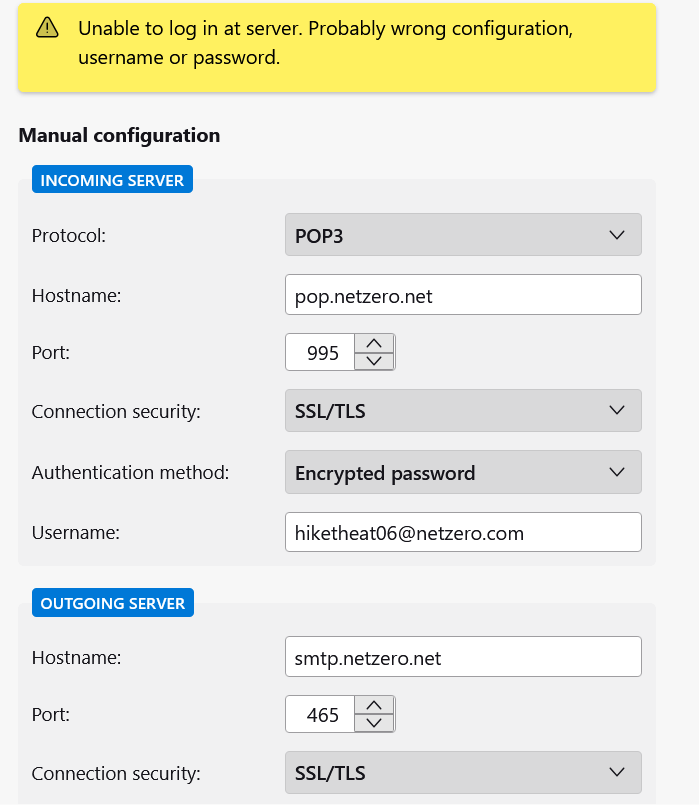
Just installed Thunderbird on a new Windows 10 laptop. Trying to get set up, I'm getting a message that says "Unable to login at server. Probably wrong configuration, username, or password. I'm pretty sure my password and username are correct, as I've been using the same account and PW for years, but on my mobile device, I entered everything the way I'm remembering to be right, but since the app on my phone autofills it for me, I cant be sure at this point {eyeroll}. I'm not quite computer illiterate at this point (I just learned how to take a screenshot on my laptop!), but not sure how to resolve the issue. The email account I'm starting off with is a NetZero account, and I'm assuming the auto-detect for the configurations is correct. Thoughts? Thanks!
Just installed Thunderbird on a new Windows 10 laptop. Trying to get set up, I'm getting a message that says "Unable to login at server. Probably wrong configuration, username, or password. I'm pretty sure my password and username are correct, as I've been using the same account and PW for years, but on my mobile device, I entered everything the way I'm remembering to be right, but since the app on my phone autofills it for me, I cant be sure at this point {eyeroll}. I'm not quite computer illiterate at this point (I just learned how to take a screenshot on my laptop!), but not sure how to resolve the issue. The email account I'm starting off with is a NetZero account, and I'm assuming the auto-detect for the configurations is correct. Thoughts? Thanks!
Attached screenshots

All Replies (1)

The settings are correct, except use 'normal password' authentication for the incoming and outgoing.

http://help.netzero.net/support/email/tbird.html