Support Forum discussions

Does Firefox have a fundamentally structural and architectural problem?

  1. Yes, I read about the up-coming signing requirement to run add-ons. I also read about the "tier structure" of reporting, but I found it unclear:

    (a) What are the parameters which decide or determine whether a query warrants escalation?

    (b) How does a contributor actually "bump", "promote" or "escalate" a customer query to go higher up? How exactly is that done? What is the procedure?

    (c) What is the criterion of selection of hierarchy when escalating a query - what determines the destination of the query? ... to Help Desk, to UA or wherever?

    Yes, I read about the up-coming signing requirement to run add-ons. I also read about the "tier structure" of reporting, but I found it unclear: (a) What are the parameters which decide or determine whether a query warrants escalation? (b) How does a contributor actually "bump", "promote" or "escalate" a customer query to go higher up? How exactly is that done? What is the procedure? (c) What is the criterion of selection of hierarchy when escalating a query - what determines the destination of the query? ... to Help Desk, to UA or wherever?
  2. Dingeroo said

    (Chris, probably assumed I had better credentials).

    On that note, I don't think anyone in this thread is qualified to answer your original question. For instance, if you were to ask me about the structure of the code of my website, I could answer you, because I know how it makes use of SSI and external CSS, and how they work together. If there's a common problem with my site, it could be caused by a couple of HTML tags left open, not because of how the code is structured.

    As far as I know, no-one in this thread knows C++, let alone contributes a significant amount of code to Firefox, so I don't think they could answer questions about the structure of the code. This is a user support website; they can help you with your usage of Firefox. Your question isn't about using Firefox; it's about the source code. If you're worried about coders trying to defend Firefox, don't worry. I've found that the people most familiar with the code are the ones most willing to criticize it. :)

    ''Dingeroo [[#post-66152|said]]'' <blockquote> (Chris, probably assumed I had better credentials)''. </blockquote> On that note, I don't think anyone in this thread is qualified to answer your original question. For instance, if you were to ask me about the structure of the code of my website, I could answer you, because I know how it makes use of SSI and external CSS, and how they work together. If there's a common problem with my site, it could be caused by a couple of HTML tags left open, not because of how the code is structured. As far as I know, no-one in this thread knows C++, let alone contributes a significant amount of code to Firefox, so I don't think they could answer questions about the structure of the code. This is a '''user''' support website; they can help you with your ''usage'' of Firefox. Your question isn't about using Firefox; it's about the source code. If you're worried about coders trying to defend Firefox, don't worry. I've found that the people most familiar with the code are the ones most willing to criticize it. :)
  3. Deliciously enlightening, Chris, specifically on the attitude of code developers and good to hear.

    I knew before I posted that this was not a Developer's Forum and had no expectation to be speaking with any - aware I could offer nothing much of value in terms of intelligent discussion on the specific architecture of Firefox.

    My intention, I guess, was more to discover among the Contributor Community what the overall knowledge and consensus of opinion was of the fundamental worthiness of Firefox in a general sense, without developer analysis required. Mark's response was exactly what I was looking for. Intelligible to a non-techie, useful and informative, while answering all that I had been questioning.

    Deliciously enlightening, Chris, specifically on the attitude of code developers and good to hear. I knew before I posted that this was not a Developer's Forum and had no expectation to be speaking with any - aware I could offer nothing much of value in terms of intelligent discussion on the specific architecture of Firefox. My intention, I guess, was more to discover among the Contributor Community what the overall knowledge and consensus of opinion was of the fundamental worthiness of Firefox in a general sense, without developer analysis required. Mark's response was exactly what I was looking for. Intelligible to a non-techie, useful and informative, while answering all that I had been questioning.
  4. Well, as if listening in on this conversation, my own PC granted your wish, John and Firefox crashed this morning. As a newbie Contributor, I suddenly realised that although I know to ask a customer to use about:crashes and then post up the last five Crash Report ID's, I have no clue what to do after that.

    There is only one Report listed, which is correct - past two wiped. I would like to learn the usual procedure and gain some understanding of the analysis of a Crash Report.

    Crash occurred as I was about to shut my PC down. I had closed all tabs, applications, web pages, programs, everything. Nothing was open except Firefox. I opened the Firefox menu (three bars at top right of screen) and then clicked on the close icon. Firefox closed. The dialogue box to submit a crash report simultaneously bounced onto the screen. Had that not jumped onto my screen, I would never have known that Firefox had crashed.

    As there is no straight 'copy' option in the right-click, drop down menu, I selected 'save the link' and grabbed the Crash ID from the File Name box. What have I done which has prevented the ID from becoming an active link in here?

    Crash Report ID: bp-9a711c79-b774-414a-b14a-e5e5d2150723 Date Submitted 24/07/2015 6:54 AM

    It can be viewed at this web address:

    https://crash-stats.mozilla.com/report/index/9a711c79-b774-414a-b14a-e5e5d2150723

    Well, as if listening in on this conversation, my own PC granted your wish, John and Firefox crashed this morning. As a newbie Contributor, I suddenly realised that although I know to ask a customer to use '''about:crashes''' and then post up the last five Crash Report ID's, I have no clue what to do after that. There is only one Report listed, which is correct - past two wiped. I would like to learn the usual procedure and gain some understanding of the analysis of a Crash Report. Crash occurred as I was about to shut my PC down. I had closed all tabs, applications, web pages, programs, everything. Nothing was open except Firefox. I opened the Firefox menu'' (three bars at top right of screen)'' and then clicked on the close icon. Firefox closed. The dialogue box to submit a crash report simultaneously bounced onto the screen. Had that not jumped onto my screen, I would never have known that Firefox had crashed. As there is no straight 'copy' option in the right-click, drop down menu, I selected 'save the link' and grabbed the Crash ID from the File Name box. What have I done which has prevented the ID from becoming an active link in here? Crash Report ID: bp-9a711c79-b774-414a-b14a-e5e5d2150723 Date Submitted 24/07/2015 6:54 AM It can be viewed at this web address: https://crash-stats.mozilla.com/report/index/9a711c79-b774-414a-b14a-e5e5d2150723
  5. Just follow

    When you post

    bp-9a711c79-b774-414a-b14a-e5e5d2150723
    

    Forum software converts that text to a link after you post it.

    Did you see Contributor News & Resourcesw_helpful-links-for-contributors -> https://sumopad.etherpad.mozilla.org/useful-links-SUMO-contributors -> March 9: Dev talks - Let's talk crashes with KaiRo & video

    Just follow * [[Firefox crashes - asking for support]] When you post bp-9a711c79-b774-414a-b14a-e5e5d2150723 Forum software converts that text to a link after you post it. * The link is as you posted above ** https://crash-stats.mozilla.com/report/index/9a711c79-b774-414a-b14a-e5e5d2150723 ** But would have a different format and an additional icon. Or it would have if that was not broken at the moment <br /> ''[Attn:Admin] [SUMO] question mark icon (icon.questionmark.png) appended to crash report missing'' [/forums/contributors/711389] Did you see <sub> [[Contributor News & Resources#w_helpful-links-for-contributors]]w_helpful-links-for-contributors -> https://sumopad.etherpad.mozilla.org/useful-links-SUMO-contributors </sub> -> ''[/forums/contributors/711118 March 9: Dev talks - Let's talk crashes with KaiRo]'' & [http://youtu.be/eEfUJg0TSiQproblems video]
  6. Dingeroo said

    (a) What are the parameters which decide or determine whether a query warrants escalation?

    All threads that have not received a reply after 24 hours are automatically escalated to our HelpDesk folks (for now it's mainly Rachel (guigs) who is in charge).

    You can also escalate any thread of your choice if you consider it necessary. There is no specific criteria for a thread to be escalated, most people escalate threads that are way too complicated or would require some research on the engineering side.

    As a rule of thumb I would follow these steps when trying to answer a question:

    Step 1. Do your own research (I think John99 already provided you with the most common links people use for doing their own research). If you cannot find what you’re looking for got to step 2.

    Step 2. Ask here in the support contributors forum/ main community discussions forums and/or IRC #sumo, maybe other contributors, moderators, admins know what to do. If no answer move to step 3.

    Step 3. Escalate to HelpDesk by adding the “escalate” tag to the thread.

    Don’t be afraid to use these forums here, IRC, PMs etc. There are plenty of senior contributors around who have been contributing for ages and they know everything inside out. On the Admin side you will always have Rachel (guigs), Mark (marksc) and Tyler (tylerdowner) for Firefox Desktop and Roland (rtanglao) for Firefox for Android.

    (b) How does a contributor actually "bump", "promote" or "escalate" a customer query to go higher up? How exactly is that done? What is the procedure?

    See above.

    (c) What is the criterion of selection of hierarchy when escalating a query - what determines the destination of the query? ... to Help Desk, to UA or wherever?

    If you want to escalate a thread because you’re not sure what’s the solution from a technical perspective you can do so by adding the “escalate” tag to that particular thread. Those always go to HelpDesk. Please see escalation guidelines here.

    If you want to highlight a thread because you think it’s a structural problem or a bug that is affecting a lot of users you can do so by just opening up a thread here in the community forums. People will see it, investigate it and make sure the right admins are aware. The priority will always be given to issues that seem to affect a lot of people so make sure you add examples of other users who seem to experience the same thing.


    ''Dingeroo [[#post-66170|said]]'' <blockquote> (a) What are the parameters which decide or determine whether a query warrants escalation? </blockquote> All threads that have not received a reply after 24 hours are automatically escalated to our HelpDesk folks (for now it's mainly [https://support.mozilla.org/en-US/user/rmcguigan Rachel (guigs)] who is in charge). You can also escalate any thread of your choice if you consider it necessary. There is no specific criteria for a thread to be escalated, most people escalate threads that are way too complicated or would require some research on the engineering side. As a rule of thumb I would follow these steps when trying to answer a question: '''Step 1'''. Do your own research (I think John99 already provided you with the most common links people use for doing their own research). If you cannot find what you’re looking for got to step 2. '''Step 2'''. Ask here in the support contributors forum/ main community discussions forums and/or IRC #sumo, maybe other contributors, moderators, admins know what to do. If no answer move to step 3. '''Step 3'''. Escalate to HelpDesk by adding the “escalate” tag to the thread. Don’t be afraid to use these forums here, IRC, PMs etc. There are plenty of senior contributors around who have been contributing for ages and they know everything inside out. On the Admin side you will always have [https://support.mozilla.org/en-US/user/rmcguigan Rachel (guigs)], [https://support.mozilla.org/en-US/user/marksc Mark (marksc)] and [https://support.mozilla.org/en-US/user/Tylerdowner Tyler (tylerdowner)] for Firefox Desktop and [https://support.mozilla.org/en-US/user/rtanglao Roland (rtanglao)] for Firefox for Android. <blockquote> (b) How does a contributor actually "bump", "promote" or "escalate" a customer query to go higher up? How exactly is that done? What is the procedure? </blockquote> See above. <blockquote> (c) What is the criterion of selection of hierarchy when escalating a query - what determines the destination of the query? ... to Help Desk, to UA or wherever? </blockquote> If you want to escalate a thread because you’re not sure what’s the solution from a technical perspective you can do so by adding the “escalate” tag to that particular thread. Those always go to HelpDesk. Please see [https://support.mozilla.org/en-US/kb/escalation-guidelines escalation guidelines here]. If you want to highlight a thread because you think it’s a structural problem or a bug that is affecting a lot of users you can do so by just opening up a thread here in the community forums. People will see it, investigate it and make sure the right admins are aware. The priority will always be given to issues that seem to affect a lot of people so make sure you add examples of other users who seem to experience the same thing.

    Modified by Madasan on

  7. Ah ... Thank you Madasan, I had thought for some reason that we had to decide between the Help Desk and UA, but obviously not, so that clarifies that. Great!

    Just one last question and then I shall leave you all alone. Does that therefore correlate then that once a post is 24 hours old we should not continue to add any responses, otherwise it will confuse the issue, if not the customer, given that Help Desk is now handling it and more competent than we are anyway?

    Ah ... Thank you Madasan, I had thought for some reason that we had to decide between the Help Desk and UA, but obviously not, so that clarifies that. Great! Just one last question and then I shall leave you all alone. Does that therefore correlate then that once a post is 24 hours old we should not continue to add any responses, otherwise it will confuse the issue, if not the customer, given that Help Desk is now handling it and more competent than we are anyway?
  8. No, feel free to answer to any post that has no replies even if it's more than 24 hours old. Helpdesk cannot always handle them all and we need all the help we cang et.

    Contributors are also encouraged to participate in solving the escalated threads if they're up to it, it's open for all!

    No, feel free to answer to any post that has no replies even if it's more than 24 hours old. Helpdesk cannot always handle them all and we need all the help we cang et. Contributors are also encouraged to participate in solving the escalated threads if they're up to it, it's open for all!
  9. OK. Thanks for the clarification. All good.

    I know I said I was winding this up, but I have been studying my Crash Report and there are some things of concern (I think!). Can I discuss those here or should I start a new thread, or do it in some other Forum?

    OK. Thanks for the clarification. All good. I know I said I was winding this up, but I have been studying my Crash Report and there are some things of concern (I think!). Can I discuss those here or should I start a new thread, or do it in some other Forum?
  10. more options

    Please start a thread in the forum for your specific crash.

    Please start a thread in the forum for your specific crash.
  11. OK - Hesitating to do that and use up valuable people resources, but also for another reason and that is the presence detected of something called the Mozilla spigot.toolbar, which according to searches on the web is very unfriendly and undesirable adware. Fournd actually two programs designed for Mozilla of which the web is critical. Don't know the truth in any of it, don't know how they got on my PC and have removed them, but probably not tactful to broadcast my questions on these across the public forum.

    Maybe, I'll open a separate thread in here first, just to be prudent. If after you look at the data you think it is OK to put it up as a crash report in the main support forum I can do so then.

    OK - Hesitating to do that and use up valuable people resources, but also for another reason and that is the presence detected of something called the Mozilla spigot.toolbar, which according to searches on the web is very unfriendly and undesirable adware. Fournd actually two programs designed for Mozilla of which the web is critical. Don't know the truth in any of it, don't know how they got on my PC and have removed them, but probably not tactful to broadcast my questions on these across the public forum. Maybe, I'll open a separate thread in here first, just to be prudent. If after you look at the data you think it is OK to put it up as a crash report in the main support forum I can do so then.

    Modified by Dingeroo on

  12. Dingeroo, Take the leap and posts a support question.

    Posting bugs unnecessarily or escalating unnecessarily is likely to place a strain on " valuable people resources"

    Posting a genuine support question on the other hand helps people, especially if it becomes a solved question.

    I see no reason to worry about:

    and that is the presence detected of something called the Mozilla spigot.toolbar, which according to searches on the web is very unfriendly and undesirable adware. Fournd actually two programs designed for Mozilla of which the web is critical. Don't know the truth in any of it, don't know how they got on my PC and have removed them, but probably not tactful to broadcast my questions on these across the public forum.

    We deal with solutions and facts. Gossip or third party opinion is largely irrelevant when looking for a solution. Questions about Firefox problems are always welcome (With a proviso that suggesting something that harms Firefox installs or Firefox users could be considered for censoring or removal).

    Dingeroo, Take the leap and posts a support question. Posting bugs unnecessarily or escalating unnecessarily '''is''' likely to place a strain on ''" valuable people resources"'' Posting a genuine support question on the other hand helps people, especially if it becomes a solved question. I see no reason to worry about: <blockquote> <sub>and that is the presence detected of something called the Mozilla spigot.toolbar, which according to searches on the web is very unfriendly and undesirable adware. Fournd actually two programs designed for Mozilla of which the web is critical. Don't know the truth in any of it, don't know how they got on my PC and have removed them, but probably not tactful to broadcast my questions on these across the public forum.</sub></blockquote> We deal with solutions and facts. Gossip or third party opinion is largely irrelevant when looking for a solution. Questions about Firefox problems are always welcome <sub> (With a proviso that suggesting something that harms Firefox installs or Firefox users could be considered for censoring or removal)</sub>.
  13. more options

    Please file a thread, this forum is not for support. spigot is malware, and we have no problem handling malware threads in the forum (not sure why you would think that is a problem?).

    Please file a thread, this forum is not for support. spigot is malware, and we have no problem handling malware threads in the forum (not sure why you would think that is a problem?).
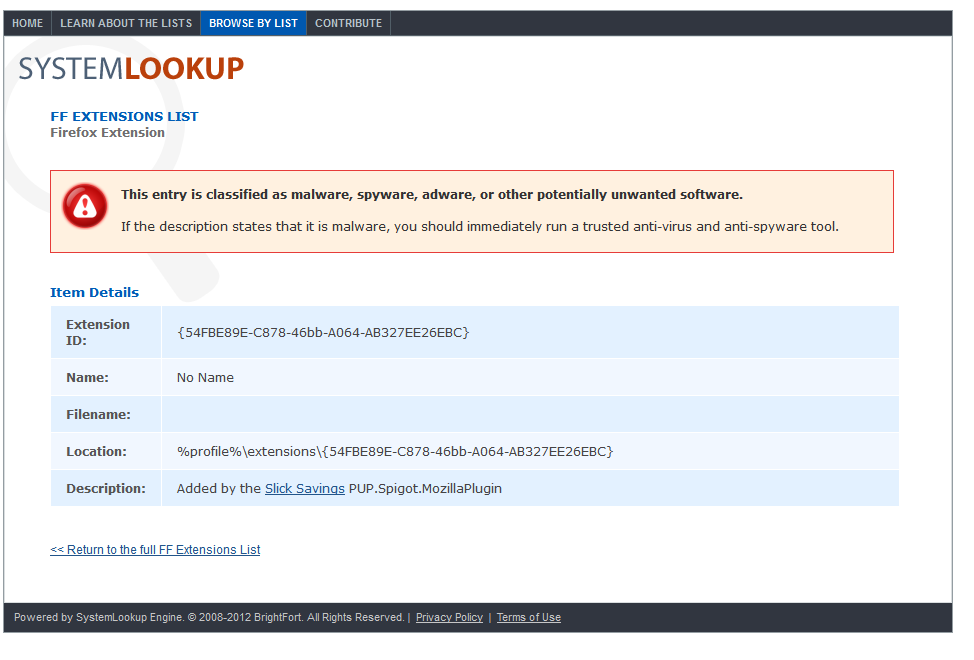
  14. Thank you John and Tyler. Have posted the Crash Report. I am a dummy I know. I have come across spigot before and being fully aware that it is malware I showed my inexperience by misunderstanding the wording of the string in System Lookup - at first glance it appeared to me that the spigot toolbar had been created for Mozilla. That is why I was reluctant to post up my Crash Report. Stoopid. Stoopid me. Apologies - I now get the framing of the wording.

    The weird thing is that both references under the Module Tab to it and the other piece of malware - metacrawler search - have now completely disappeared from my Crash Report, yet they were there when I originally viewed them and stood out because neither had a Version No. or a Debug File name, which is why I immediately linked both to System Look Up.

    My Crash Report is here: https://crash-stats.mozilla.com/report/index/9a711c79-b774-414a-b14a-e5e5d2150723

    Is it normal for the data in crash reports to change from one viewing to the next? I did run my anti-root kit program, which removed the malware, but would that change the Crash Report?.

    I took a screenshot of the System Look Up analysis of the spigot toolbar code, as per below. Can this code really be removed from a Crash Record?? Spigot Adware Analysis

    Thank you John and Tyler. Have posted the Crash Report. I am a dummy I know. I have come across spigot before and being fully aware that it '''''is''''' malware I showed my inexperience by '''''mis'''''understanding the wording of the string in System Lookup - at first glance it appeared to me that the spigot toolbar had been created '''''for''''' Mozilla. That is why I was reluctant to post up my Crash Report. Stoopid. Stoopid me. Apologies - I now ''get'' the framing of the wording. The weird thing is that both references under the Module Tab to it and the other piece of malware - metacrawler search - have now completely disappeared from my Crash Report, yet they were there when I originally viewed them and '''''stood out''''' because neither had a Version No. or a Debug File name, which is why I immediately linked both to System Look Up. My Crash Report is here: https://crash-stats.mozilla.com/report/index/9a711c79-b774-414a-b14a-e5e5d2150723 Is it normal for the data in crash reports to change from one viewing to the next? I did run my anti-root kit program, which removed the malware, but would that change the Crash Report?. I took a screenshot of the System Look Up analysis of the spigot toolbar code, as per below. Can this code really be removed from a Crash Record?? [[Image:Spigot Adware Analysis]]

    Modified by Dingeroo on

  15. I really would like an opinion regarding the disappearance of these entries in the crash report. Anyone?

    I really would like an opinion regarding the disappearance of these entries in the crash report. Anyone?
  16. Maybe you looked at a different crash report. Look through your browsing History. What was - metacrawler search - more malware ? I do notice the name pops up on searches relating to browser hijacking etc

    No doubt you noticed the CrashReport tables my be sorted by a choice of column and direction.

    Maybe you looked at a different crash report. Look through your browsing History. What was - metacrawler search - more malware ? I do notice the name pops up on searches relating to browser hijacking etc No doubt you noticed the CrashReport tables my be sorted by a choice of column and direction.
  17. I wish I could say yes, John, that perhaps I did do that, but I have not even tried to look at anyone else's Crash Reports. I am having a hard enough time understanding my own. The only way I know how to access it is through putting about:crashes in my own browser or go directly to the URL which that throws up. I have done that every time.

    To see others' Crash Reports, I would need to open a post with a report and click on its link. I have no confusion about having not done that. I know that I haven't, besides, my anti-rootkit ware removed the two pieces of malware anyway - the spigot toolbar and the metacrawler - they were both definitely on my system and it removed both.

    I am getting some pretty strange readings on my PC through some protection ware that I run and am currently having it analysed. It appears that there have been some hacking attempts. For that reason, I am not real keen to stay online here for long, thank you John, if you do not mind.

    I wish I could say yes, John, that perhaps I did do that, but I have not even tried to look at anyone else's Crash Reports. I am having a hard enough time understanding my own. The only way I know how to access it is through putting about:crashes in my own browser or go directly to the URL which that throws up. I have done that every time. To see others' Crash Reports, I would need to open a post with a report and click on its link. I have no confusion about having not done that. I know that I haven't, besides, my anti-rootkit ware removed the two pieces of malware anyway - the spigot toolbar and the metacrawler - they were both definitely on my system and it removed both. I am getting some pretty strange readings on my PC through some protection ware that I run and am currently having it analysed. It appears that there have been some hacking attempts. For that reason, I am not real keen to stay online here for long, thank you John, if you do not mind.
  18. No problem. I was trying to answer your direct question, but the conversation ought to be in your own support thread not here.

    I will close this thread as I think it has run its course. Anyone needing to add anything important may contact any Mod or Admin.


    I will add some comments to serve as a quick indication of its content
    
    No problem. I was trying to answer your direct question, but the conversation ought to be in your own support thread not here. I will close this thread as I think it has run its course. Anyone needing to add anything important may contact any Mod or Admin. --------- I will add some comments to serve as a quick indication of its content * [https://support.mozilla.org/en-US/forums/support-forum-contributors/711430?last=66241&page=1#post-66103 #post-66103 ] Mark's comprehensive answer, including mention of improvements and work in progress * [https://support.mozilla.org/en-US/forums/support-forum-contributors/711430?last=66241&page=1#post-66134 #post-66134] Tyler's comment on Firefox being generally stable, and listing likely causes of issues. * [https://support.mozilla.org/en-US/forums/support-forum-contributors/711430?last=66241&page=1#post-66166 #post-66166 ] Tyler's comments regarding HelpDesk and on addon signing * [https://support.mozilla.org/en-US/forums/support-forum-contributors/711430?last=66241&page=2#post-66185 #post-66185] Madalina's comments on the escalation process * [https://support.mozilla.org/en-US/forums/support-forum-contributors/711430?last=66241&page=2#post-66181 #post-66181] Dingeroo's start of comments on own issues with malware and crashes ** Follow in https://support.mozilla.org/en-US/questions/1074326

    Modified by John99 on

  1. 1
  2. 2