


Avoid support scams. We will never ask you to call or text a phone number or share personal information. Please report suspicious activity using the “Report Abuse” option.

Learn More
Open

New Icon pop up in Taskbar when I open Firefox.

fishfirst

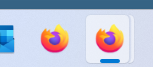
I had lots of trouble making Firefox work yesterday, after what I believe was a Mozilla update I had to uninstall and then reinstall. What I am experiencing after the new install and all updates is: I placed the icon on the taskbar. when I open Firefox it opens a new icon in the taskbar. I have two icons when using firefox instead of two like it has always been before. In the picture, the icon on the left is always there. The one on the right opens when I open firefox. Is it supposed to work like this? It is a windows issue? Is it A mozilla issue? Anyone else having this issue. I have tried different ways after deleting the icons, to place it back on the taskbar. I used the pin to taskbar, drag and drop on taskbar... Any ideas. Just live with it? or fix it somehow?
I had lots of trouble making Firefox work yesterday, after what I believe was a Mozilla update I had to uninstall and then reinstall. What I am experiencing after the new install and all updates is: I placed the icon on the taskbar. when I open Firefox it opens a new icon in the taskbar. I have two icons when using firefox instead of two like it has always been before. In the picture, the icon on the left is always there. The one on the right opens when I open firefox. Is it supposed to work like this? It is a windows issue? Is it A mozilla issue? Anyone else having this issue. I have tried different ways after deleting the icons, to place it back on the taskbar. I used the pin to taskbar, drag and drop on taskbar... Any ideas. Just live with it? or fix it somehow?
Attached screenshots

You must log in to your account to reply to posts. Please start a new question, if you do not have an account yet.