

Avoid support scams. We will never ask you to call or text a phone number or share personal information. Please report suspicious activity using the “Report Abuse” option.

Learn More
Open

Firefox ignores css style for all menu backgrounds after upgrade to v152

Paul

I have been using my userchrome.css for many years.

However, now Firefox ignores css style for all menu backgrounds after upgrading to v152.

Here is my current userchrome.css text: /*tighten drop down menus*/ menupopup > menuitem, menupopup > menu {

 padding-block: 1px !important;

}

root {
 --arrowpanel-menuitem-padding: 1px 1px !important;

}

/* changed this block ----------------------------------------------------*/ /* #bookmarksMenuPopup hbox {background:#CD5C5C !important;} */ /* /Change highlighted menu text to any color:/ */ /* menupopup > menu[_moz-menuactive="true"], */ /* menupopup > menuitem[_moz-menuactive="true"], */ /* popup > menu[_moz-menuactive="true"], */ /* browsermessage,notification .notification-inner{ border-color: red !important;} */ /* browsermessage, notification{ background-color: red !important;} */ /* menupopup { */ /* -moz-appearance: none !important; */ /* background-color: #CD5C5C !important } */

  1. bookmarksMenuPopup { --panel-background: #CD5C5C !important;}

menupopup > menu[_moz-menuactive="true"], menupopup > menuitem[_moz-menuactive="true"], popup > menu[_moz-menuactive="true"], browsermessage,notification .notification-inner{ border-color: red !important;} browsermessage, notification{ --panel-background: red !important;} menupopup {-moz-appearance: none !important; --panel-background: #CD5C5C !important }

/* other bookmarks */

  1. menu_unsortedBookmarks,
  2. menu_mobileBookmarks,
  3. bookmarksMenuItemsSeparator{

display: none !important; }

/* hide Bookmarks Toolbar Folder */

  1. bookmarksToolbarFolderMenu, #bookmarksToolbarFolderMenu+menuseparator {display: none !important;}

menupopup > menuitem, menupopup > menu { /* color of the text */ color: red !important; }

menupopup > :is(menuitem, menu):hover {

 background-color: lightskyblue !important;

} ((

menupopup:not(.in-menulist) > menuitem, menupopup:not(.in-menulist) > menu {

 color: white !important;

}

/* Global UI font */

  • {font-size: 14pt !important;

font-weight: bold !important;}

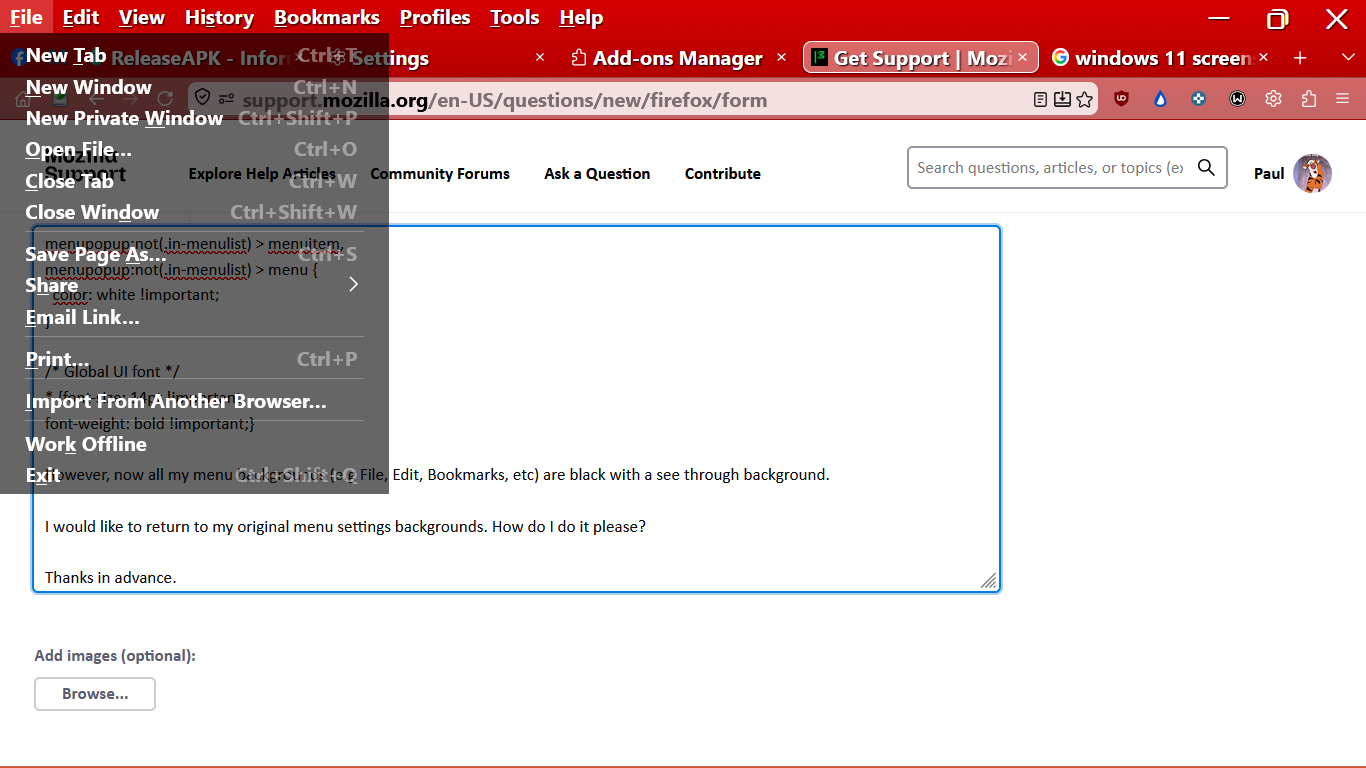
However, now all my menu backgrounds (e.g File, Edit, Bookmarks, etc, see attached screenshot) are black with a see through background.

I would like to return to my original menu settings backgrounds. How do I do it please?

Thanks in advance.
I have been using my userchrome.css for many years. However, now Firefox ignores css style for all menu backgrounds after upgrading to v152. Here is my current userchrome.css text: /*tighten drop down menus*/ menupopup > menuitem, menupopup > menu { padding-block: 1px !important; } :root { --arrowpanel-menuitem-padding: 1px 1px !important; } /* changed this block ----------------------------------------------------*/ /* #bookmarksMenuPopup hbox {background:#CD5C5C !important;} */ /* /Change highlighted menu text to any color:/ */ /* menupopup > menu[_moz-menuactive="true"], */ /* menupopup > menuitem[_moz-menuactive="true"], */ /* popup > menu[_moz-menuactive="true"], */ /* browsermessage,notification .notification-inner{ border-color: red !important;} */ /* browsermessage, notification{ background-color: red !important;} */ /* menupopup { */ /* -moz-appearance: none !important; */ /* background-color: #CD5C5C !important } */ #bookmarksMenuPopup { --panel-background: #CD5C5C !important;} menupopup > menu[_moz-menuactive="true"], menupopup > menuitem[_moz-menuactive="true"], popup > menu[_moz-menuactive="true"], browsermessage,notification .notification-inner{ border-color: red !important;} browsermessage, notification{ --panel-background: red !important;} menupopup {-moz-appearance: none !important; --panel-background: #CD5C5C !important } /* other bookmarks */ #menu_unsortedBookmarks, #menu_mobileBookmarks, #bookmarksMenuItemsSeparator{ display: none !important; } /* hide Bookmarks Toolbar Folder */ #bookmarksToolbarFolderMenu, #bookmarksToolbarFolderMenu+menuseparator {display: none !important;} menupopup > menuitem, menupopup > menu { /* color of the text */ color: red !important; } menupopup > :is(menuitem, menu):hover { background-color: lightskyblue !important; } (( menupopup:not(.in-menulist) > menuitem, menupopup:not(.in-menulist) > menu { color: white !important; } /* Global UI font */ * {font-size: 14pt !important; font-weight: bold !important;} However, now all my menu backgrounds (e.g File, Edit, Bookmarks, etc, see attached screenshot) are black with a see through background. I would like to return to my original menu settings backgrounds. How do I do it please? Thanks in advance.
Attached screenshots

You must log in to your account to reply to posts. Please start a new question, if you do not have an account yet.