


I have 2 Firefox in my Control Panel Programs, How do I choose which to Uninstall?
I have been having trouble with my Windows 11 laptop. In my efforts to resolve these issues I noticed that I now have two installs of Firefox in my Control Panel. Both installed during my time of dealing with my Windows issue. Five days apart Feb 5 and 10, 2026. Both show the same version number 147.0.3, and same size 322MB. I have used FF for many years so these seem to have been installed sometime during my efforts to repair Windows. My FF was never a part of the Windows issue AFAIK.
Anyway I have FF working as I like with my Session Manager and various AddOns and personal settings, so I do not want to have to start over with FF. So how do I choose which instance of FF to uninstall in Control Panel?
My issue with Windows was my Outlook would not connect to the server. I assume Microsoft Exchange server, my internet connectivity was fine. And FF was fne as well. I eventually was able to repair my M365 connectivity. Major PITA from out of nowhere.
Chosen solution
Ron said
Thank you. I went to Control Panel and checked both FF instances. The first opened up the Uninstall popup, with the option to Refresh rather than Uninstall. I cancelled. Then clicked the second FF instance, it opened FF Helper then option to Refresh FF. I cancelled again. Not sure which to uninstall.
Ron, I see you're not sure which Firefox program to uninstall because you got stuck at the screen with the Refresh Firefox button. Ignore that button and just click on Next to get to the Uninstall window that shows the location of the Firefox version you are uninstalling. Cancel the uninstall if it shows the location of the program you are using and uninstall the other one.
Another way to find the Mozilla Firefox program location os by going to the Troubleshooting Information page (enter about:support in the address bar) and see what it says for "Application Binary" under the Application Basics section.
Just keep in mind that you can always reinstall Firefox even if you have two versions and you uninstall both, since your user profile data will not be touched.
Read this answer in context 👍 0All Replies (5)

You can check the properties of the Firefox shortcut to see the location where Firefox is installed... for example, "C:\Program Files\Mozilla Firefox\firefox.exe". If you do have multiple copies of Firefox, don't uninstall this one.
The window that opens when you uninstall Firefox will show the location of the Firefox program that will be uninstalled. The Uninstall Firefox from your computer article includes this screenshot:
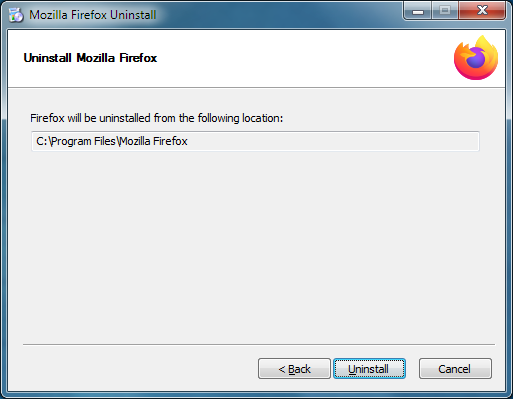
In any case, uninstalling Firefox doesn't remove your user profile data, such as bookmarks, passwords, add-ons and settings. See Profiles - Where Firefox stores your bookmarks, passwords and other user data. You can actually uninstall all Firefox versions and then reinstall Firefox by downloading it from https://www.firefox.com and it will use your existing profile data.
Thank you. I went to Control Panel and checked both FF instances. The first opened up the Uninstall popup, with the option to Refresh rather than Uninstall. I cancelled. Then clicked the second FF instance, it opened FF Helper then option to Refresh FF. I cancelled again. Not sure which to uninstall.
Chosen Solution
Ron said
Thank you. I went to Control Panel and checked both FF instances. The first opened up the Uninstall popup, with the option to Refresh rather than Uninstall. I cancelled. Then clicked the second FF instance, it opened FF Helper then option to Refresh FF. I cancelled again. Not sure which to uninstall.
Ron, I see you're not sure which Firefox program to uninstall because you got stuck at the screen with the Refresh Firefox button. Ignore that button and just click on Next to get to the Uninstall window that shows the location of the Firefox version you are uninstalling. Cancel the uninstall if it shows the location of the program you are using and uninstall the other one.
Another way to find the Mozilla Firefox program location os by going to the Troubleshooting Information page (enter about:support in the address bar) and see what it says for "Application Binary" under the Application Basics section.
Just keep in mind that you can always reinstall Firefox even if you have two versions and you uninstall both, since your user profile data will not be touched.
Thank you, AliceWyman. I followed your very helpful advice and determined that the first FF was the one to save. I then checked the second and it was installed in my Account/User folder. I uninstalled that FF instance. Restart and Control Panel shows 1 FF. I then had to Pin my FF to my Taskbar as previously. Restart again (just to be sure) and all is good. YAY!
Thanks again. Very helpful.
Although I am sure having 2 FF instances in my Control Panel probably didn't matter, it bothered me. I'm happy to have this resolved.
Ron
Hey, that's great! Thanks for posting back about the solution.