


Windows 10 reached EOS (end of support) on October 14, 2025. For more information, see this article.

Search Support

Avoid support scams. We will never ask you to call or text a phone number or share personal information. Please report suspicious activity using the “Report Abuse” option.

Learn More

Sending message dialog doesn't close when using Thunderbird with hMailServer

  • No replies
  • 0 have this problem
more options

I've recently installed Thunderbird and configured it to connect to a few of the email accounts I've setup. For gmail servers, everything seems to work fine. For a locally run hMailServer server, I can connect, download messages, and even send messages - sort of.

When I try to send an email through the hMailServer account, the message sends correctly: it arrives at the other address quite quickly, and I can see in the server's logs where it connected via SMTP, transmitted the message, received a "250 Queued" response, sent QUIT to log off, and got the "221 goodbye". However the Thunderbird UI itself never progresses past the Sending Message dialog: the status stays at Sending message... and the progress bar is full. I can hit cancel and it prompts to delete the draft, etc., but either way, the message has been successfully sent. This doesn't happen with other accounts, so I'm curious what I need to do to get this to go away or send correctly....

I'm using Thunderbird 147.
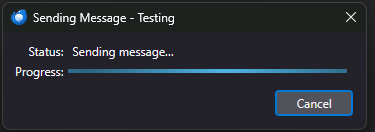
I've recently installed Thunderbird and configured it to connect to a few of the email accounts I've setup. For gmail servers, everything seems to work fine. For a locally run hMailServer server, I can connect, download messages, and even send messages - sort of. When I try to send an email through the hMailServer account, the message sends correctly: it arrives at the other address quite quickly, and I can see in the server's logs where it connected via SMTP, transmitted the message, received a "250 Queued" response, sent QUIT to log off, and got the "221 goodbye". However the Thunderbird UI itself never progresses past the Sending Message dialog: the status stays at Sending message... and the progress bar is full. I can hit cancel and it prompts to delete the draft, etc., but either way, the message has been successfully sent. This doesn't happen with other accounts, so I'm curious what I need to do to get this to go away or send correctly.... I'm using Thunderbird 147.
Attached screenshots

You must log in to your account to reply to posts. Please start a new question, if you do not have an account yet.