


After a hard reset on my laptop Firefox thinks it's on another device and erased all my previous settings.
What it says on the tin. My laptop freezed up and had to hard reset it. I think it update windows after that and now that I open firefox, I find that not only was I logged out from my profile, but once I logged in, Firefox thinks I'm in another device and won't load my bookmarks and settings.
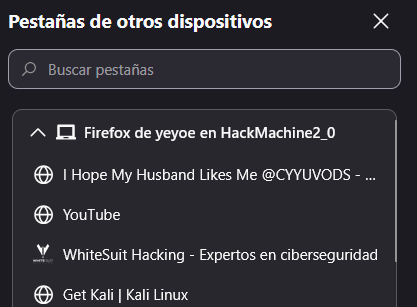
I know it thinks it's on another device since when I check my synced tabs, it shows the ones I had open before I had to reset my laptop. All I can think about is that something broke with the windows update and all I want is to load my previous settings, extensions and bookmarks as they were before.
Edit: I would like to add that I had it set up to stop with the ai stuff google and other companies and now they are back on, I'm quite angry since now I have to figure how to fix this and the ai content is making it harder.
Modified by yeyoeduardochp
All Replies (2)
Hola, Solo tenias un Firefox de escritorio conectado a la cuenta de Mozilla? Si este es el caso no es como se debe usar el servicio de Sync de Mozilla, este servicio es para sincronizar dispositivos con Firefox no para usarlo de respaldo. Para usarlo como un "tipo" de servicio de backup al menos deberías conectadar 2 Firefox desktop o podrían ser 2 perfiles. La otra opción es hacer una copia de la carpeta de perfil regularmente del Firefox.
Saludos
Okay, so there is no way to recover it? Because it seems to think there is another device even though I'm using the same Pc since it's telling me the previous tabs are open. If that's not the case, is there any way to prevent this from happening again?
Thank you for assitance.