


Cannot paste in Office 365 in Firefox

Works fine in Chrome. Right clicking and short cut ( CTR V) does not work. They both used to i have checked extensions, add On, refreshed and restarted the problem persists tried changing the setting ( config dom ..testing) nothing seems to work except Shift-Control V any ideas?
All Replies (2)
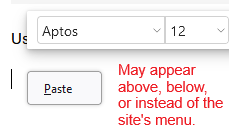
A few versions ago, Firefox started allowing sites to access the clipboard for pasting from a site's custom menu. You may see a permission button floating around with the word Paste when the site tries to do that (example screenshots attached).
Have you see anything like that?
The permission button shouldn't be needed when using Ctrl+V or pasting from Firefox's built-in context menu (which you usually can summon by holding down Shift while right-clicking to override the site's custom menu). If those do not work, hmm, do you recall changing any settings related to the clipboard (through about:config or a user.js file)?

I have not seen that but sure appreciate you offering a solution