


Windows 10 reached EOS (end of support) on October 14, 2025. For more information, see this article.

Search Support

Avoid support scams. We will never ask you to call or text a phone number or share personal information. Please report suspicious activity using the “Report Abuse” option.

Learn More

Right Click Menu is Bugged and Shows all Options

  • No replies
  • 0 have this problem
  • 6 views
  • Last reply by Dave Scott

more options

I recently (A few hours or so ago at the time of posting this) realized that whenever I right clicked on anything, no matter if it was a link, text, image, or nothing at all, the menu that popped up showed basically every single possible option.

I do not know if anything would actually happen if i tried some of the options on the wrong file types and such, but I have noticed that trying to use some of the options that would appear and work normally before (like copying a link from a redirecting image), no longer do anything. Copying images seems to work, as well as cutting, selecting, searching terms on google, etc.

I do not think I did anything to cause it. I was using my computer normally for a bit before noticing and I think I would've noticed sooner if it was messed up from the start. I also don't remember if my firefox was updated recently, but there were no updates queued when I checked (Currently at Version 134.0).

The image attached is what shows up when I do nothing but click on the background image of the default home page.
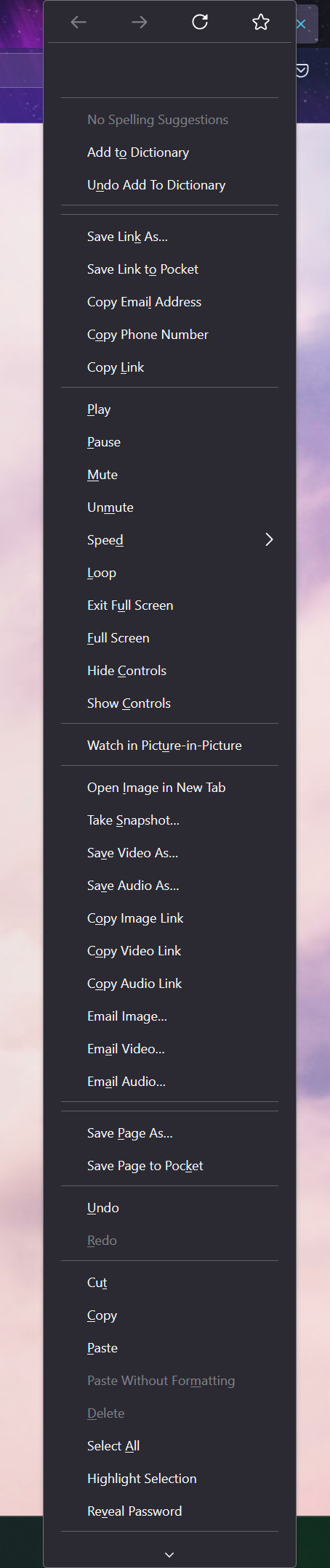
I recently (A few hours or so ago at the time of posting this) realized that whenever I right clicked on anything, no matter if it was a link, text, image, or nothing at all, the menu that popped up showed basically every single possible option. I do not know if anything would actually happen if i tried some of the options on the wrong file types and such, but I have noticed that trying to use some of the options that would appear and work normally before (like copying a link from a redirecting image), no longer do anything. Copying images seems to work, as well as cutting, selecting, searching terms on google, etc. I do not think I did anything to cause it. I was using my computer normally for a bit before noticing and I think I would've noticed sooner if it was messed up from the start. I also don't remember if my firefox was updated recently, but there were no updates queued when I checked (Currently at Version 134.0). The image attached is what shows up when I do nothing but click on the background image of the default home page.
Attached screenshots