


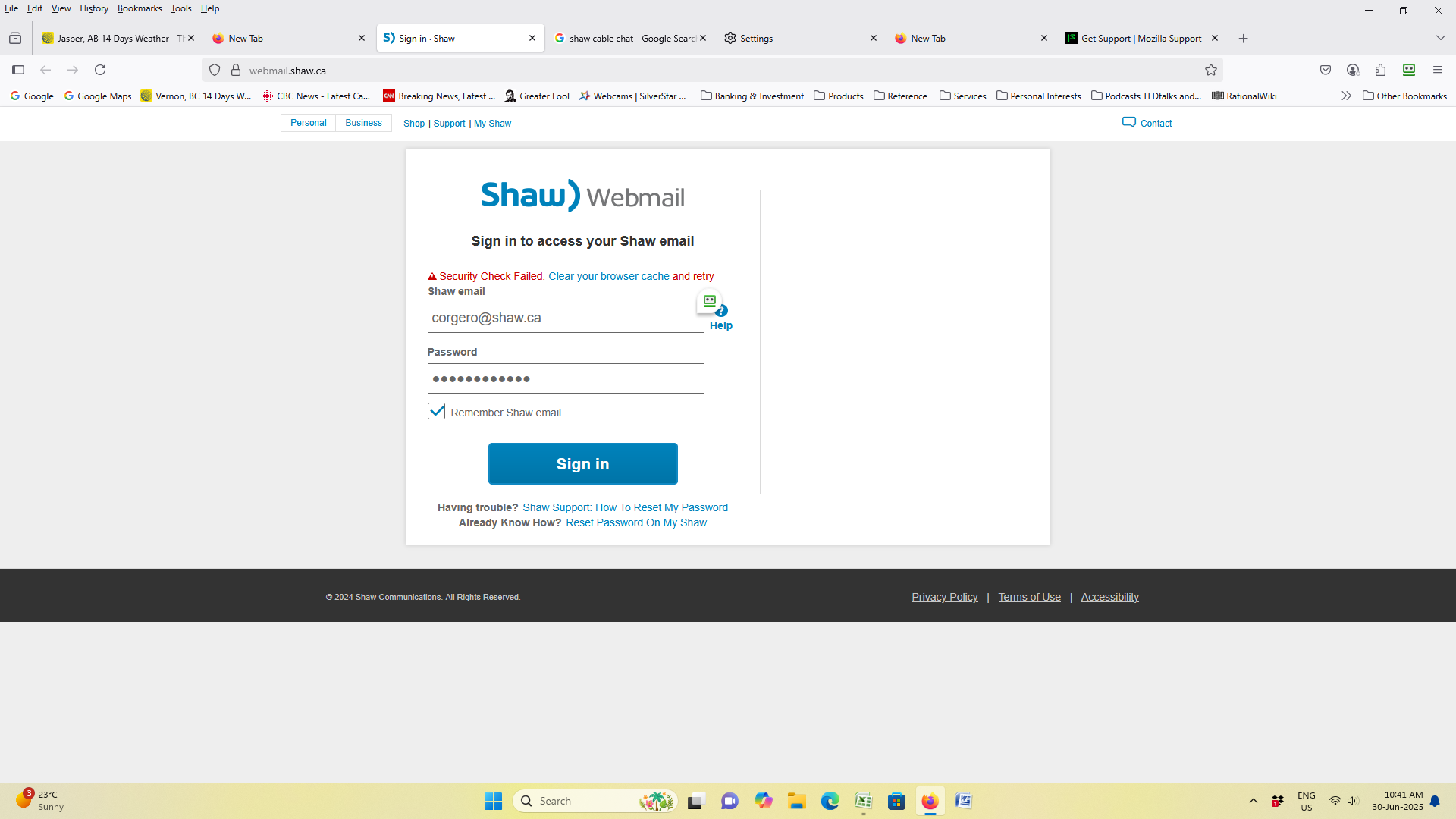
Shaw Webmail error: Security Check Failed. Clear your browser cache and retry.

When signing in to online Shaw Webmail, message says 'Security Check Failed. Clear your browser cache and retry'. Screenshot attached. Have done so in "Clear browsing and data history", (as per Firefox guidelines) multiple times, for all History and cache. Did not resolve issue. Contacted Shaw Support; they instructed to try logging in with Chrome browser. Worked fine. Issue appears to be strictly with Firefox Browser (on multiple devices). I prefer Firefox over Chrome. Any advice greatly appreciated.
Được chỉnh sửa bởi NoahSUMO vào
Giải pháp được chọn
Ed - Thank you! Running Troubleshoot mode and following the recommendations for checking Extensions solved the problem. It was MalwareBytes Browser Guard. Have updated and problem now gone. Really appreciate the time you took to assist with this. Cheers, Corky
- jesher2000 - thank you for your suggestion, however Ed's advice solved the problem.
Tất cả các câu trả lời (8)

While on the login page, try clicking the padlock to the left of the address bar > Clear cookies and site data > refresh the tab.
Thank you for the suggestion, Ed. Have tried this several times and the problem persists.
"Clear browsing and data history"
I don't find a setting with that name. Try clearing cache this way:
- press Ctrl-Shift-Delete (Mac: Cmd-Shift-Delete)
- set 'Time range...' to 'Everything'
- untick all items except 'Temporary cached files and pages'
- clear, then restart FF
No luck. Same result: 'Security Check Failed'. Weird, have used Firefox on all my PCs for years. Never had any issue like this.
Also, of note - this problem, as best I can tell, is ONLY occurring with Shaw Webmail. All other high-security log-ins (bank/credit cards/retailers such as Amazon) are functioning smoothly on FF.
Thank you for taking the time to make suggestions.
Odd. Does that also happen in Troubleshoot mode (https://support.mozilla.org/en-US/kb/diagnose-firefox-issues-using-troubleshoot-mode)?
There's a little Roboform icon near the login form. Are you have your username and password autofilled? In case the site protects against bot attacks by not trusting autofill, click at the end of each field, type a space, then backspace to delete the space. Then submit.
Any difference?
Giải pháp được chọn
Ed - Thank you! Running Troubleshoot mode and following the recommendations for checking Extensions solved the problem. It was MalwareBytes Browser Guard. Have updated and problem now gone. Really appreciate the time you took to assist with this. Cheers, Corky
- jesher2000 - thank you for your suggestion, however Ed's advice solved the problem.
You're welcome :-) Wouldn't hurt to file that problem - https://help.malwarebytes.com/hc/en-us/p/contact_support.