


Why can't I attach a document to my email

When I try to attach a document to my email, neither the top or button will allow me to go to the file to evewn fine the document I want to attach.
എല്ലാ മറുപടികളും (4)

Chosen Solution
This is a known bug. https://bugzilla.mozilla.org/show_bug.cgi?id=2077526
Beyond drag and drop there is another workaround:
- at the top right of the Thunderbird window, click the menu button ≡ > Settings > General
- scroll down to the bottom and click 'Config Editor'
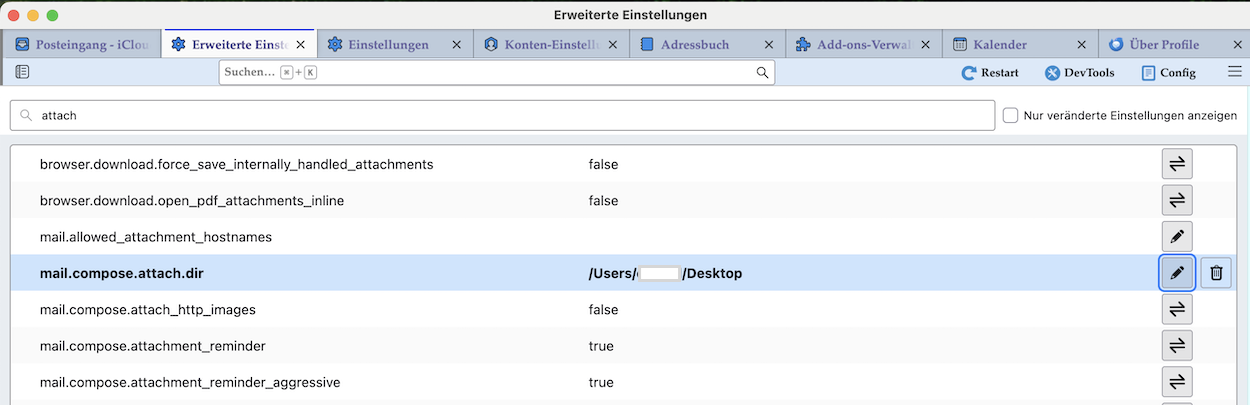
- search for the preference mail.compose.attach.dir
- the value (Path) here must be changed to one that is still available (for example C:)
- restart Thunderbird
That should fix it.

Hallo, gut und schön, aber das existiert bei mir nicht: >>> Scrollen Sie bis ganz nach unten und klicken Sie auf „Konfigurationseditor“. Suche nach der Einstellung mail.compose.attach.dir <<< Bitte einen Screen wo ist das finde! Danke im Voraus. VG Gerd
Gerd Giese said
Bitte einen Screen wo ist das finde!
Rechts oben auf den App-Menü Button ≡ (familiär auch Hambuger Button genannt) klicken > Einstellungen > Allgemein >>>>> bis nach unten gehen und auf den Button "Konfiguration bearbeiten ..." klicken Es öffnet sich ein neues Tab "Erweiterte Einstellungen" (siehe screen)
Ja super, hat 100% geholfen - danke! VGGerd