In the last two weeks many Italian users have reported problems with Flash contents: Firefox is very slow to render Flash pages or it is totally unresponsive.
With other browsers using same plugin they do not have problems. The issue is not easily reproducible by advanced users of the forum and it is under investigation. In past, a similar problems was caused by a malware called Link Optimizer/Gromozon rootkit, and we are also monitoring the Adobe support forum to see if they find the cause.
Has anyone else stumbled in this problem?
In the last two weeks many Italian users have reported problems with Flash contents: Firefox is very slow to render Flash pages or it is totally unresponsive.
With other browsers using same plugin they do not have problems. The issue is not easily reproducible by advanced users of the forum and it is under investigation. In past, a similar problems was caused by a malware called Link Optimizer/Gromozon rootkit, and we are also monitoring the Adobe support forum to see if they find the cause.
Has anyone else stumbled in this problem?
Try the plugin checker http://www.mozilla.org/en-US/plugincheck/ to see if all flash player plugins are up to date.
Also try the Adobe site flash test: http://www.adobe.com/shockwave/welcome/
Also I suggest asking about this on our Firefox support site at
http://support.mozilla.com/kb/ask
dad7732, underpass is our Italian locale lead and I'm guessing he was posting this info to check if this spike in Flash issues is seen in our other channels too. :)
Cheng, do you see similar spikes in the data you're monitoring?
dad7732, underpass is our Italian locale lead and I'm guessing he was posting this info to check if this spike in Flash issues is seen in our other channels too. :)
Cheng, do you see similar spikes in the data you're monitoring?
We see this a little on the forums, but more along the lines of "doesn't run" rather than being non-responsive. One cause we have pinned down is that Adobe shipped a 64-bit version of their plugin recently (late december) and it's unclear whether it has compatibility problems with regular (32-bit) Firefox. Most of the problems seem to be in XP but it's not clear if that's just because that's our most common windows OS.
We see this a little on the forums, but more along the lines of "doesn't run" rather than being non-responsive. One cause we have pinned down is that Adobe shipped a 64-bit version of their plugin recently (late december) and it's unclear whether it has compatibility problems with regular (32-bit) Firefox. Most of the problems seem to be in XP but it's not clear if that's just because that's our most common windows OS.
@dat7732: yes we for sure pass this kind of information to users. We found that everyone already had their plugin up to date.
@djst
(We really should have a better profile presentation under the avatar to make things like this clearer.)
Indeed it would be nice, wouldn'it...? ;-)
@Cww: the problem also shows up on Windows 7 and even some of my "real life colleagues" have reported me that this happened just after having updated to 9.0.1.
Moreover, several users seem to have found relief disabling the plugin-container from the about:config page. Strange things...
@dat7732: yes we for sure pass this kind of information to users. We found that everyone already had their plugin up to date.
@djst
<blockquote>(We really should have a better profile presentation under the avatar to make things like this clearer.)</blockquote>
Indeed it would be nice, wouldn'it...? ;-)
@Cww: the problem also shows up on Windows 7 and even some of my "real life colleagues" have reported me that this happened just after having updated to 9.0.1.
Moreover, several users seem to have found relief disabling the plugin-container from the about:config page. Strange things...
''dad7732 [[#post-44430|said]]''
<blockquote>
Also try the Adobe site flash test: http://www.adobe.com/shockwave/welcome/
</blockquote>
Just to be clear, that's the test page for Adobe Shockwave Player, although it does include a link to Adobe's Flash Player test page, (which is also linked from our [[Managing the Flash plugin]] article):<br>
http://www.adobe.com/software/flash/about/
There was a discussion awhile back in one of the KB Article Discussions I can't find, about including information on disabling plugin-container, which is named "Firefox Plugin Process (<plugin-name>)" on Mac OS (I mention that because I think the person who started the thread was on a Mac). If I remember right, Michael Verdi didn't want to explain how to disable plugin-container in a KB article because its purpose is to prevent a plugin crash from taking down the entire browser.
The What is plugin-container article's Discussion forum "Related article discussion" thread links to /forums/knowledge-base-articles/704424 for past discussion. In that thread, everyone seemed to agree that we should add a "Troubleshooting" section on disabling plugin-container but it never made it to the article (I ended up creating a MozillaZine article with a section on Disabling crash protection).
'''On disabling plugin-container: '''
There was a discussion awhile back in one of the [https://support.mozilla.org/en-US/kb/all/discussions KB Article Discussions] I can't find, about including information on disabling plugin-container, which is named "Firefox Plugin Process (<plugin-name>)" on Mac OS (I mention that because I think the person who started the thread was on a Mac). If I remember right, Michael Verdi didn't want to explain how to disable plugin-container in a KB article because its purpose is to prevent a plugin crash from taking down the entire browser.
The [[What is plugin-container]] article's Discussion forum "Related article discussion" thread links to [/forums/knowledge-base-articles/704424] for past discussion. In that thread, everyone seemed to agree that we should add a "Troubleshooting" section on disabling plugin-container but it never made it to the article (I ended up creating a MozillaZine article with a section on [http://kb.mozillazine.org/Plugin-container_and_out-of-process_plugins#Disabling_crash_protection Disabling crash protection]).
P.S. If Flash content causes Firefox to be unresponsive, it may be because of Hardware Acceleration, which can be turned off in Flash settings as a first step, rather than disabling plugin-container. That's mentioned in the Flash Plugin - Keep it up to date and troubleshoot problems article's Troubleshooting section, under "Playing Flash videos makes Firefox hang".
P.S. If Flash content causes Firefox to be unresponsive, it may be because of Hardware Acceleration, which can be turned off in Flash settings as a first step, rather than disabling plugin-container. That's mentioned in the [[Managing the Flash plugin]] article's Troubleshooting section, under "Playing Flash videos makes Firefox hang".
We also had hardware acceleration turned off on that boxes. When I ask advice here is because all the rest seems to fail ;-)
edit:
@Alice could be this the thread you were talking about ?
https://support.mozilla.org/en-US/questions/713600
underpass, Thanks but no, I was looking for an Article Discussions thread (those forums are not currently searchable).
Just to be clear, my suggestion was to have users turn off Hardware Acceleration in Flash Player Display settings, not in Firefox. (ref.)
'''underpass''', Thanks but no, I was looking for an [https://support.mozilla.org/en-US/kb/all/discussions Article Discussions] thread (those forums are not currently searchable).
Just to be clear, my suggestion was to have users turn off Hardware Acceleration in [http://www.macromedia.com/support/documentation/en/flashplayer/help/help01.html Flash Player Display settings], not in Firefox. ([http://kb.mozillazine.org/Flash#Performance_or_display_issues_with_certain_Flash_videos ref.])
Could plugin-container.exe be blocked by the Windows Firewall? Is there a quick way to check this?
I've always allowed "Plugin Container for Firefox" when Windows Firewall has asked (and it doesn't always ask... apparently only certain content requires it. See this post, linked from MozillaZine's article here, on OOPP and firewalls). For example, I just tested by opening a couple of Flash videos in Firefox 10 Beta and Windows Firewall never asked for permission, even though "Plugin Container for Firefox" for Beta 10 isn't on the Windows Firewall "allowed" list. I don't know what it might look like in Windows Firewall settings if plugin-container is blocked.
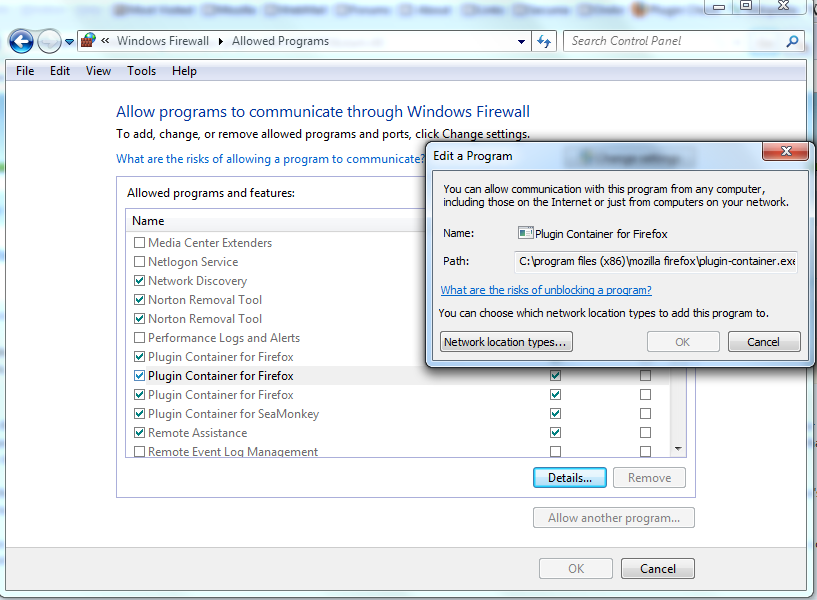
You can check the settings in the Control Panel -> Windows Firewall -> "Allow a program through Windows Firewall" list - see this screenshot showing "Plugin Container for Firefox" checkmarked (allowed) in my Windows Firewall Allowed Programs list on Win7. The "Edit a program" dialog shows the path to plugin-container.exe. It's listed three times, for 3 different installed Firefox versions, two of which I don't have installed any longer (I just removed those from the list).
P.S. I found these articles with more info, in case it helps:
''underpass [[#post-44456|said]]''
<blockquote>
Could plugin-container.exe be blocked by the Windows Firewall? Is there a quick way to check this?
</blockquote>
I've always allowed "Plugin Container for Firefox" when Windows Firewall has asked (and it doesn't always ask... apparently only certain content requires it. See [http://forums.mozillazine.org/viewtopic.php?p=9537743#p9537743 this post], linked from MozillaZine's article [http://kb.mozillazine.org/Plugin-container_and_out-of-process_plugins#Plugin-container here], on OOPP and firewalls). For example, I just tested by opening a couple of Flash videos in Firefox 10 Beta and Windows Firewall never asked for permission, even though "Plugin Container for Firefox" for Beta 10 isn't on the Windows Firewall "allowed" list. I don't know what it might look like in Windows Firewall settings if plugin-container is blocked.
You can check the settings in the Control Panel -> Windows Firewall -> "Allow a program through Windows Firewall" list - see this [http://i1209.photobucket.com/albums/cc391/wymette/WindowsFirewall-AllowedPrograms.png screenshot] showing "Plugin Container for Firefox" checkmarked (allowed) in my Windows Firewall Allowed Programs list on Win7. The "Edit a program" dialog shows the path to plugin-container.exe. It's listed three times, for 3 different installed Firefox versions, two of which I don't have installed any longer (I just removed those from the list).
P.S. I found these articles with more info, in case it helps:
*[http://www.7tutorials.com/how-manage-windows-firewall-communication-rules How to Manage Windows Firewall Communication Rules | 7 Tutorials]
*[http://www.sevenforums.com/tutorials/542-windows-firewall-add-remove-exception.html Windows Firewall - Add or Remove an Exception - Windows 7 Forums]
Since Firefox 9, all issues with slow Flash content or hangs in the French support forum have been caused by the Ask toolbar although users have uninstalled it with the Windows Removing Program feature. Sometimes, they don't even know it was installed.
AdwCleaner can remove it completely. This software seems also to be useful against the Babylon toolbar that causes also many troubles.
Since Firefox 9, all issues with slow Flash content or hangs in the French support forum have been caused by the Ask toolbar although users have uninstalled it with the Windows Removing Program feature. Sometimes, they don't even know it was installed.
[http://general-changelog-team.fr/outils/289-adwcleaner#englishadwcleaner AdwCleaner] can remove it completely. This software seems also to be useful against the Babylon toolbar that causes also many troubles.
Maybe the Ask.com Toolbar got installed with the Java Runtime Environment.
Thanks also to our friend '''flod''' (Italian translator of Firefox) we have another possible clue:
http://java.com/en/download/faq/ask_toolbar.xml
Maybe the Ask.com Toolbar got installed with the Java Runtime Environment.