


Windows 10 reached EOS (end of support) on October 14, 2025. If you are on Windows 10, see this article.

Search Support

Avoid support scams. We will never ask you to call or text a phone number or share personal information. Please report suspicious activity using the “Report Abuse” option.

Learn More

When I use “winget install ... -l ...” to install Firefox, the installation "disappears"

  • No replies
  • 0 have this problem
  • Open

The full winget command is: ```pwsh winget install --id Mozilla.Firefox.zh-CN -s winget -e -i -l D:/.../Mozilla/Firefox/ ```

The winget log mentioned that winget downloaded https://download-installer.cdn.mozilla.net/pub/firefox/releases/150.0.2/win64/zh-CN/Firefox%20Setup%20150.0.2.exe ```log 2026-05-12 22:19:28.840 [CORE] WinINet downloading from url: https://download-installer.cdn.mozilla.net/pub/firefox/releases/150.0.2/win64/zh-CN/Firefox%20Setup%20150.0.2.exe 2026-05-12 22:37:42.091 [CORE] Download hash: 6c7fb833ebb13637daf750c7a2c611e2b6d8d324dc2463eed40e8478d0c791fc 2026-05-12 22:37:42.091 [CORE] Download completed. 2026-05-12 22:37:42.094 [CLI ] Installer hash verified ```

Installer args: ```log 2026-05-12 22:37:43.543 [CLI ] Installer args: /InstallDirectoryPath="D:/.../Mozilla/Firefox/" 2026-05-12 22:37:43.545 [CLI ] Starting: 'D:\Temp\WinGet\Mozilla.Firefox.zh-CN.150.0.2\Firefox%20Setup%20150.0.2.exe' with arguments ' /InstallDirectoryPath="D:/.../Mozilla/Firefox/"' 2026-05-12 22:38:12.554 [REPO] Reading MSI UpgradeCodes 2026-05-12 22:38:12.891 [REPO] Reading MSI UpgradeCodes 2026-05-12 22:38:13.405 [CLI ] During package install, 1 changes to ARP were observed, 1 matches were found for the package, and 1 packages were in both 2026-05-12 22:38:13.405 [CLI ] The entry determined to be associated with the package is 'Mozilla Firefox (x64 zh-CN)', with publisher 'Mozilla' ```

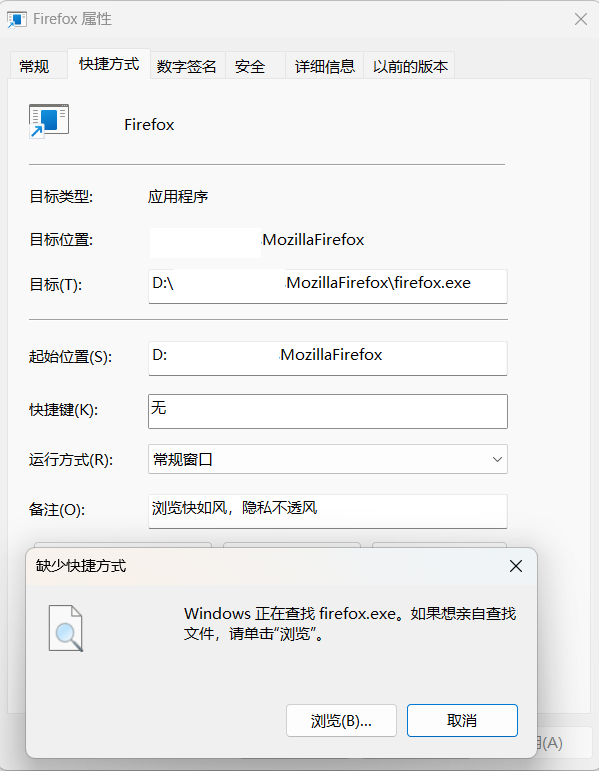
Then winget shows the installation was successful, but the shortcuts in the Start menu and on the desktop point to a path that doesn't exist. I noticed that this path is the one I passed to winget via the -l parameter, but it is missing the slash (`/`) > D:/a/b/Mozilla/Firefox/ → D:\abMozillaFirefox\ I couldn't find the installed Firefox either in the root directory of drive D or under the originally expected path D:\...\Mozilla\Firefox.

Although I passed the -i parameter (specifying interactive installation) to winget, I didn't see the installer window. In the user registry, the installer also wrote the aforementioned incorrect path, and I cannot uninstall this installation through Windows Settings.

I wrote a script myself to search for folders or files with 'firefox' in the name (case-insensitive) on my system's C and D drives, and I only found this folder that looks related: ```pwsh > ls "C:\Users\...\AppData\Roaming\Mozilla\Firefox"

   Directory: C:\Users\...\AppData\Roaming\Mozilla\Firefox

Mode LastWriteTime Length Name


------------- ------ ----

d---- 2025/11/23 18:05 Background Tasks Profiles d---- 2025/12/24 18:47 Crash Reports d---- 2025/11/23 18:05 Pending Pings d---- 2025/11/23 18:06 Profile Groups d---- 2025/11/23 18:06 Profiles -a--- 2025/12/27 8:43 75 installs.ini -a--- 2025/12/27 8:43 482 profiles.ini ``` But based on the LastWriteTime, this seems to have been left when I previously installed Firefox.

I want to know what the installer does after running the above installation, and how I can undo these changes to reinstall Firefox?

> Note: English is not my native language, please forgive my spelling or grammar mistakes. > I originally wanted to post on a Chinese forum, but I was guided here...
The full winget command is: ```pwsh winget install --id Mozilla.Firefox.zh-CN -s winget -e -i -l D:/.../Mozilla/Firefox/ ``` The winget log mentioned that winget downloaded https://download-installer.cdn.mozilla.net/pub/firefox/releases/150.0.2/win64/zh-CN/Firefox%20Setup%20150.0.2.exe ```log 2026-05-12 22:19:28.840 [CORE] WinINet downloading from url: https://download-installer.cdn.mozilla.net/pub/firefox/releases/150.0.2/win64/zh-CN/Firefox%20Setup%20150.0.2.exe 2026-05-12 22:37:42.091 [CORE] Download hash: 6c7fb833ebb13637daf750c7a2c611e2b6d8d324dc2463eed40e8478d0c791fc 2026-05-12 22:37:42.091 [CORE] Download completed. 2026-05-12 22:37:42.094 [CLI ] Installer hash verified ``` Installer args: ```log 2026-05-12 22:37:43.543 [CLI ] Installer args: /InstallDirectoryPath="D:/.../Mozilla/Firefox/" 2026-05-12 22:37:43.545 [CLI ] Starting: 'D:\Temp\WinGet\Mozilla.Firefox.zh-CN.150.0.2\Firefox%20Setup%20150.0.2.exe' with arguments ' /InstallDirectoryPath="D:/.../Mozilla/Firefox/"' 2026-05-12 22:38:12.554 [REPO] Reading MSI UpgradeCodes 2026-05-12 22:38:12.891 [REPO] Reading MSI UpgradeCodes 2026-05-12 22:38:13.405 [CLI ] During package install, 1 changes to ARP were observed, 1 matches were found for the package, and 1 packages were in both 2026-05-12 22:38:13.405 [CLI ] The entry determined to be associated with the package is 'Mozilla Firefox (x64 zh-CN)', with publisher 'Mozilla' ``` Then winget shows the installation was successful, but the shortcuts in the Start menu and on the desktop point to a path that doesn't exist. I noticed that this path is the one I passed to winget via the -l parameter, but it is missing the slash (`/`) > D:/a/b/Mozilla/Firefox/ → D:\abMozillaFirefox\ I couldn't find the installed Firefox either in the root directory of drive D or under the originally expected path D:\...\Mozilla\Firefox. Although I passed the -i parameter (specifying interactive installation) to winget, I didn't see the installer window. In the user registry, the installer also wrote the aforementioned incorrect path, and I cannot uninstall this installation through Windows Settings. I wrote a script myself to search for folders or files with 'firefox' in the name (case-insensitive) on my system's C and D drives, and I only found this folder that looks related: ```pwsh > ls "C:\Users\...\AppData\Roaming\Mozilla\Firefox" Directory: C:\Users\...\AppData\Roaming\Mozilla\Firefox Mode LastWriteTime Length Name ---- ------------- ------ ---- d---- 2025/11/23 18:05 Background Tasks Profiles d---- 2025/12/24 18:47 Crash Reports d---- 2025/11/23 18:05 Pending Pings d---- 2025/11/23 18:06 Profile Groups d---- 2025/11/23 18:06 Profiles -a--- 2025/12/27 8:43 75 installs.ini -a--- 2025/12/27 8:43 482 profiles.ini ``` But based on the LastWriteTime, this seems to have been left when I previously installed Firefox. I want to know what the installer does after running the above installation, and how I can undo these changes to reinstall Firefox? > Note: English is not my native language, please forgive my spelling or grammar mistakes. > I originally wanted to post on a Chinese forum, but I was guided here...
Attached screenshots

Modified by DuckStudio

You must log in to your account to reply to posts. Please start a new question, if you do not have an account yet.