


Mozilla Firefox - Windows Security - Making Sure it's you with no OK Button.

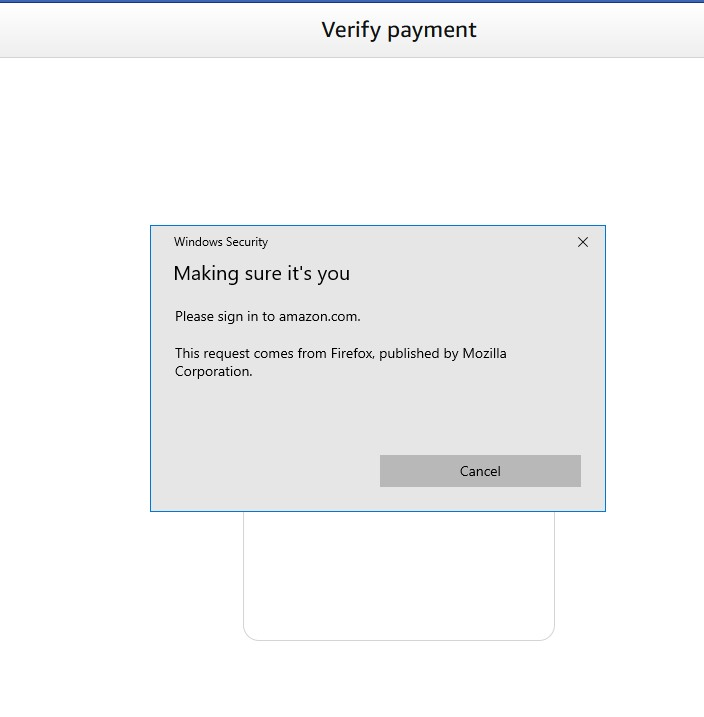
This problem with Firefox just started about 2 weeks ago. When using Firefox on my Windows 10 PC to place an order on Amazon, I keep getting a pop-up after I select to "Pay Now". The message reads:
Windows Security Verify payment
Making sure it's you Please sign on to amazon.com This request comes from Firefox, published by Mozilla Corporation.
The only option is "Cancel". There is no "OK" or "Confirm" button. If I close the window without clicking the button, it cancels my order on Amazon, as does clicking on the "Cancel" button. I haven't been able to purchase from my desktop in over 2 weeks now. I have to put items in my cart, then move over to my laptop or tablet to complete the order. I'm already signed in. I've signed out and back in again and it still does the same thing.
This is maddening! I now have 7 cancelled orders in my order history in the last 2 weeks. It better not be that I'm required to run Windows 11, because that's not going to happen! Windows 11 is spy central for Microsoft, and I can't stand the UI.
Tất cả các câu trả lời (1)
Have you received a W10 update recently? I've seen this once or twice before, and it seems to be some weird bug on Microsoft side after one of their recent updates — it's still not known what this is exactly supposed to mean…
Are you using some 2FA device, like a USB token, to verify your Amazon account with?