


Despite re-installing Firefox sidebar is still missing (I spent 3 full days trying to fix it before re-installing)

Despite re-installing Firefox sidebar is still missing (I spent 3 full days trying to fix it before re-installing). I also can't obtain another tab - I'm restricted just to the one page I'm currently using
Tất cả các câu trả lời (18)

rogerroger, what happens if you try the hotkeys:
- ctrl+T to open a new tab
- ctrl+alt+Z to open the sidebar
- ctrl+B to open the bookmarks sidebar
- ctrl+H to open the history sidebar
Also, have you tried Troubleshoot Mode (found under the top Help menu?)
Can you restart into Troubleshoot Mode (from Help menu) and see if Ctrl + T … Ctrl + H … or Ctrl + B shortcuts open the relevant functionality?
ctrl+T opens a new tab. Thank you - however, I don't get a X to close the new tab! ctrl+alt+Z has no effect. I have no problem opening the bookmarks or history sidebars. the Troubleshoot Mode doesn't help - I'm not presented with a General option
Many thank for your response
What exactly is the "General" you're looking for? And which other sidebar you're looking for (or to have open permanently I suppose?)
Could you attach a screenshot of the state with missing items, to help understand the issue? Thanks.
If you're suspecting there's buttons missing, see Customize Firefox controls, buttons and toolbars with its troubleshooting section at the bottom showing steps how to reset toolbars to factory state, if that's something that could help you.
> I don't know how to attach a screenshot (you'll to excuse my lack of Knowledge at 82!). I tried opening Customise but there's no entry (amongst the 20 or so options) for Sidebar
I tried the "Customize Firefox controls, buttons and toolbars" but all I get is two panels "Horizontal Tabs" and "Vertical Tabs" but nothing happens when I click on Vertical Tabs - nothing below that responds to anything/
When I go to Settings I don't get a "General" which the links suggests I go to
The guide for adding screenshots is here: How do I create a screenshot of my problem?
Please try to document each of the steps above you're mentioning — it sounds like you're following "some" guide that's however outdated or not relevant for your version — please also share which one, and what is the goal you're actually trying to achieve. It's not apparent from the steps above.
This is a video how the same version as yours looks out of the box: streamable.com/yyqzj4 — for comparison. You shouldn't see anything behave much differently.
Yes it is similar. Are you suggesting that I shouldn't have a sidebar?
For screenshots, Paint won't open in my Windows 10
This is the sidebar: (are you looking for something else perhaps?)
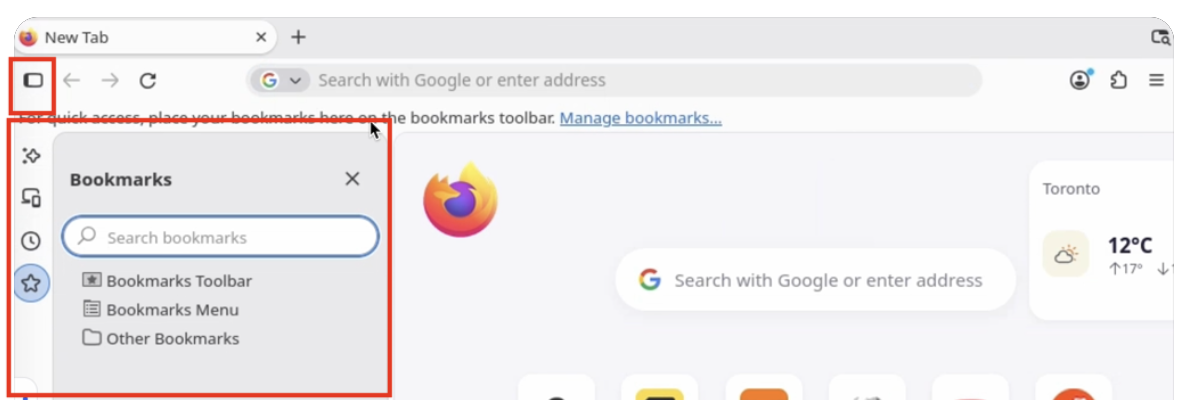
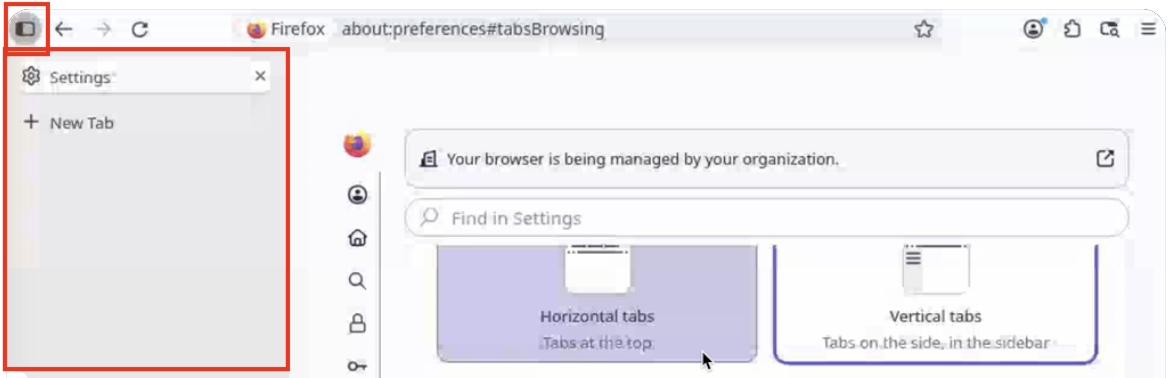
I don't have the + New Tab underneath "Settings"
My Sidebar (until last Thursday) had a full list of all the websites which wanted to visit; I merely had to click one of the links to go to the relevant website
And do you actually have vertical tabs in the sidebar, or the default horizontal ones like at the start of the video?
Where the "full list of all the websites which wanted to visit" would come from? So it's neither bookmarks nor history that you also ruled out above. Was that an add–on, or a third–party service? Where did the content come from, and how it was presented to you? (How would the browser know what you wanted to visit ahead of time?)
Or we're talking about actual browser tabs you used to navigate in sidebar, that now all somehow disappeared? (And you don't see your old tabs, but any new tabs do appear?)
Được chỉnh sửa bởi jbr vào
When I had a website I wanted to visit again I merely saved it into the sidebar which was always on display to the left of the website so I could easily click on one if I wanted to. The whole thing disappeared Thursday & I assumed it was something I had done. It begins to sound as though it might not have been me!
Sorry I still have no idea what feature that might have been, I'll leave that to others if that rings any bells. There's no way to "save website into the sidebar" if that was neither tabs, nor bookmarks or history. If that was a third–party addon, that would have to be a question for its authors what changed on their side.
rogerroger, when you say: "When I had a website I wanted to visit again I merely saved it into the sidebar which was always on display to the left of the website" what steps did you take to save that website? Did you press a hotkey, click a button, drag and drop with the mouse, or did you do something else to save the site?