


Windows 10 reached EOS (end of support) on October 14, 2025. If you are on Windows 10, see this article.

Tìm kiếm hỗ trợ

Tránh các lừa đảo về hỗ trợ. Chúng tôi sẽ không bao giờ yêu cầu bạn gọi hoặc nhắn tin đến số điện thoại hoặc chia sẻ thông tin cá nhân. Vui lòng báo cáo hoạt động đáng ngờ bằng cách sử dụng tùy chọn "Báo cáo lạm dụng".

Tìm hiểu thêm
Đã giải quyết

Firefox ignores css style for hamburger menu after updating from 150.0.3 to 151

Piterk đã trả lời
Piterk

I have custom userChrome file that made my history and hamburger menu (application menu / settings) text and distances smaller since Firefox introduced this ugly feature, trying to be cool in windows 10 times. Nowadays even windows 11 brings back compact mode but firefox still uses huge spacing. I just fixed issue with custom CSS and forgot about it. Unfortunately, after updating to FF 151, my CSS is ignored and I am forced to new ugly context menu. What is weird, I still have good small pacing when right-clicking pages, UI elements and when I enter bookmarks. Only places that ignore my CSS are hamburger menu for settings and list under history view. I do not really understand this code, I just copied it from someone else. Can someone help me fix this issue?

menupopup > menu, menupopup > menuitem{ padding-block: 3px !important; min-height: 0px !important; }

root{

--arrowpanel-menuitem-padding: 0px !important; }
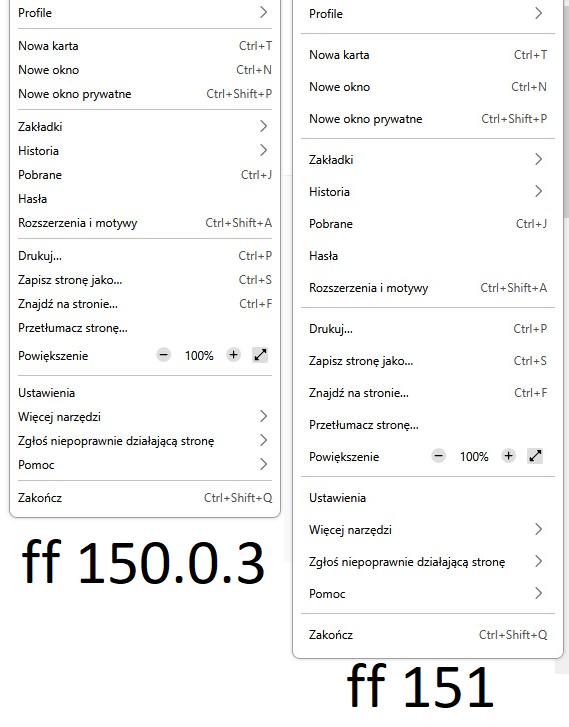
I have custom userChrome file that made my history and hamburger menu (application menu / settings) text and distances smaller since Firefox introduced this ugly feature, trying to be cool in windows 10 times. Nowadays even windows 11 brings back compact mode but firefox still uses huge spacing. I just fixed issue with custom CSS and forgot about it. Unfortunately, '''after updating to FF 151, my CSS is ignored and I am forced to new ugly context menu'''. What is weird, '''I still have good small pacing when right-clicking pages, UI elements and when I enter bookmarks. Only places that ignore my CSS are hamburger menu for settings and list under history view'''. I do not really understand this code, I just copied it from someone else. Can someone help me fix this issue? menupopup > menu, menupopup > menuitem{ padding-block: 3px !important; min-height: 0px !important; } :root{ --arrowpanel-menuitem-padding: 0px !important; }
Đính kèm ảnh chụp màn hình

Được chỉnh sửa bởi Piterk vào

Tất cả các câu trả lời (1)

Giải pháp được chọn

nevermind, I found solution on reddit. Just replace --arrowpanel-menuitem-padding: 0px !important; with: --panel-menuitem-padding: 0px !important;

Được chỉnh sửa bởi Piterk vào

Đặt một câu hỏi

Bạn phải đăng nhập vào tài khoản của bạn để trả lời bài viết. Vui lòng bắt đầu một câu hỏi mới, nếu bạn chưa có tài khoản.