


Join us to show up for other Firefox users 🦊. Earn fun badges and Mozilla swag vouchers! Find out more: https://mzl.la/askafox150

Windows 10 reached EOS (end of support) on October 14, 2025. If you are on Windows 10, see this article.

Tìm kiếm hỗ trợ

Tránh các lừa đảo về hỗ trợ. Chúng tôi sẽ không bao giờ yêu cầu bạn gọi hoặc nhắn tin đến số điện thoại hoặc chia sẻ thông tin cá nhân. Vui lòng báo cáo hoạt động đáng ngờ bằng cách sử dụng tùy chọn "Báo cáo lạm dụng".

Tìm hiểu thêm

Disabling OCSP

  • 2 trả lời
  • 1 gặp vấn đề này
  • 87 lượt xem
  • Trả lời mới nhất được viết bởi helmuthbaum
  • Đang mở

We’re experiencing intermittent OCSP issues where all our internal sites fail to validate certificates. The problem appears random and sometimes resolves by simply closing and reopening Firefox.

One of your forums mentions disabling OCSP checking via the UI, but that option is no longer available in the latest version (147.0.1).

We’ve temporarily disabled it via about:config by setting security.OCSP.enabled to false.

Is there a permanent way to disable OCSP checking that can be enforced via Group Policy (GPO)?
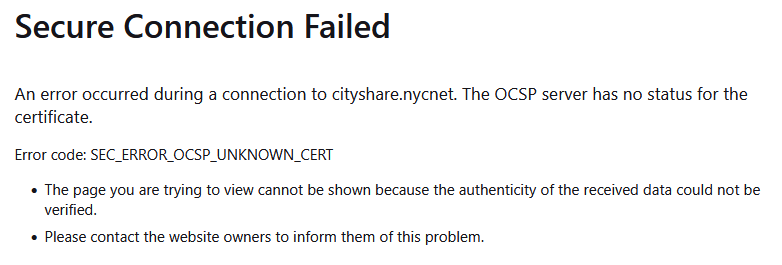
We’re experiencing intermittent OCSP issues where all our internal sites fail to validate certificates. The problem appears random and sometimes resolves by simply closing and reopening Firefox. One of your forums mentions disabling OCSP checking via the UI, but that option is no longer available in the latest version (147.0.1). We’ve temporarily disabled it via about:config by setting security.OCSP.enabled to false. Is there a permanent way to disable OCSP checking that can be enforced via Group Policy (GPO)?
Đính kèm ảnh chụp màn hình

Tất cả các câu trả lời (2)

Hi,

Is your question related to Firefox Enterprise?

Hi,

It is not, but we do manage it via group policy settings. More importantly, why are we seeing this error message that it seems it started after the latest update? Edge and Chrome are not having cert issues when accessing the sites, we also noticed if you close and launch Firefox, the issue goes away temporarily. Can the issue be resolved by resetting the certs its picking up from our PCs? The certs that we are seeing as having an issue are certs that are created by our internal systems.

Đặt một câu hỏi

Bạn phải đăng nhập vào tài khoản của bạn để trả lời bài viết. Vui lòng bắt đầu một câu hỏi mới, nếu bạn chưa có tài khoản.