


bookmarks

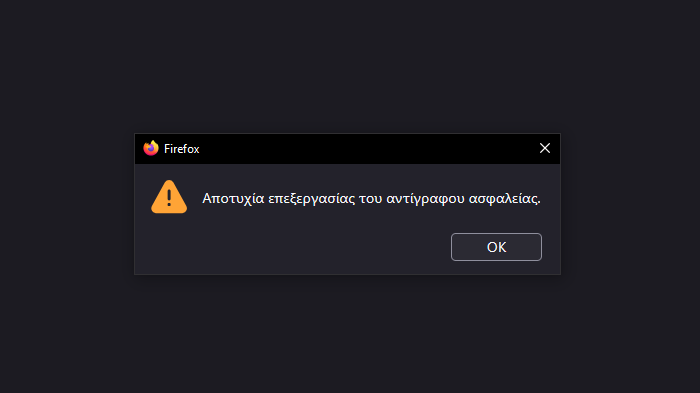
Out of a sudden all of my bookmarks were lost. I tried importing bookmarks i had previously saved in an HTML. Did NOT work. I tried "revert to older date bookmarks." Did NOT work. I tried "import from another browser."Did NOT work. Funny thing is that with the same HTML file i extracted from mozilla when i made a copy a couple of weeks before, i was able to upload all bookmarks to Opera but not to Mozilla!!!! The image below for the non Greeks reads "Failure to process copy document".
Giải pháp được chọn
I think corrupted files are rare, possibly caused by Firefox crashing or overly aggressive antivirus software trying to clean the file. But locked/inaccessible files seem to be more common. It's difficult to think of any way prevent random disasters, so backups probably are your best best. Any maybe Firefox should make that infobar with the error more obvious so you can find the help article more quickly.
With respect to passwords, you could consider a third party password manager with a cloud backup. While some premium features are no longer free, I think Bitwarden is still well regarded. https://bitwarden.com/
Tất cả các câu trả lời (6)
This often indicates that Firefox cannot update, and possibly cannot even read, the "Places" database that stores your bookmarks and history. So that is the next thing to check:
First, if you haven't already, please do a normal shutdown and/or restart of your system. Restarting Windows can help by freeing up locked files, completing any deferred updates, and resolving temporary file permission issues.
Next, if Firefox still has bookmark problems, could you let us know what you get when you run the "Verify Integrity" diagnosis and repair function. That's here:
Open Firefox's Troubleshooting Information page using any of these methods:
- "3-bar" menu button > Help > More Troubleshooting Information
- (menu bar) Help > More Troubleshooting Information
- type or paste about:support in the address bar and press Enter
Near the bottom, there is a section titled Places Database -- that's the file which stores history and bookmarks. Click the button labeled Verify Integrity. There may be a 10-15 second delay before results appear.
If all is well, the report that appears below the button should start with:
> Task: checkIntegrity
+ The places.sqlite database is sane
+ The favicons.sqlite database is sane
> Task: invalidateCaches
+ The caches have been invalidated
> Task: checkCoherence
+ The database is coherent
Does yours say both databases are "sane" or something else? You can select and copy the report, and then paste it into a reply for review and comment.
First of all, thank you for replying. I already did a couple of restarts but didn"t change anything. Below is the report of the system check you proposed.I don't speak "PC" language so all this is chinesse to me :)). I hope the image is clear enough.
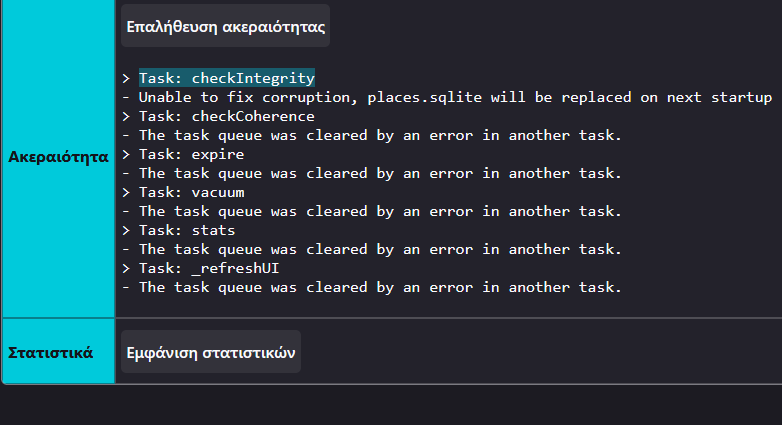
Thank you for the screenshot. The second line indicates that the places.sqlite file is not repairable. The next time you quit/exit Firefox and restart it, Firefox will build a new one using your last automatic bookmark backup (all the history will be gone, though, because there's no backup to restore for that).
You are the MAN!!!!! Just did a restart (4th for today) and eventually problem was solved I was soooo woried that i would have to import all the bookmarks from opera one by one. And trust me i have A LOT :)). Any advice for the future if something similar happens? I've been using mozilla for more than 15 years now and i was never worried as much as was today. I was mostly concerned about passwords on certain pages like banking and insurance websites. That is the reason i keep a copy of my bookmarks on a seperate hard drive,but if i can't import them then its no use. Anyway,thank you so much again for your response.
Hello,
I am glad to hear that your problem has been resolved. If you haven't already, please select the answer that solves the problem. This will help other users with similar problems find the solution.
Thank you for contacting Mozilla Support.
Giải pháp được chọn
I think corrupted files are rare, possibly caused by Firefox crashing or overly aggressive antivirus software trying to clean the file. But locked/inaccessible files seem to be more common. It's difficult to think of any way prevent random disasters, so backups probably are your best best. Any maybe Firefox should make that infobar with the error more obvious so you can find the help article more quickly.
With respect to passwords, you could consider a third party password manager with a cloud backup. While some premium features are no longer free, I think Bitwarden is still well regarded. https://bitwarden.com/