

Windows 10 reached EOS (end of support) on October 14, 2025. If you are on Windows 10, see this article.

Search Support

Avoid support scams. We will never ask you to call or text a phone number or share personal information. Please report suspicious activity using the “Report Abuse” option.

Learn More
Open

Emails disappearing from inbox

Marina Milankovic

I've set up Thunderbird on my mac as part of a changeover from a Windows laptop. Emails that come in, I have read and then keep in the inbox are regularly disappearing (mostly when new emails arrive) and are nowhere to be found -not in Trash, Deleted messages nor can they be found through a Search of the account. This is not happening with the Windows laptop that is still active. I have checked all the settings and nothing indicates why this is happening. I haven't set up any filters and under Retention Policy 'Don't delete any messages' is selected. What on earth is going on??

I've set up Thunderbird on my mac as part of a changeover from a Windows laptop. Emails that come in, I have read and then keep in the inbox are regularly disappearing (mostly when new emails arrive) and are nowhere to be found -not in Trash, Deleted messages nor can they be found through a Search of the account. This is not happening with the Windows laptop that is still active. I have checked all the settings and nothing indicates why this is happening. I haven't set up any filters and under Retention Policy 'Don't delete any messages' is selected. What on earth is going on??

All Replies (1)

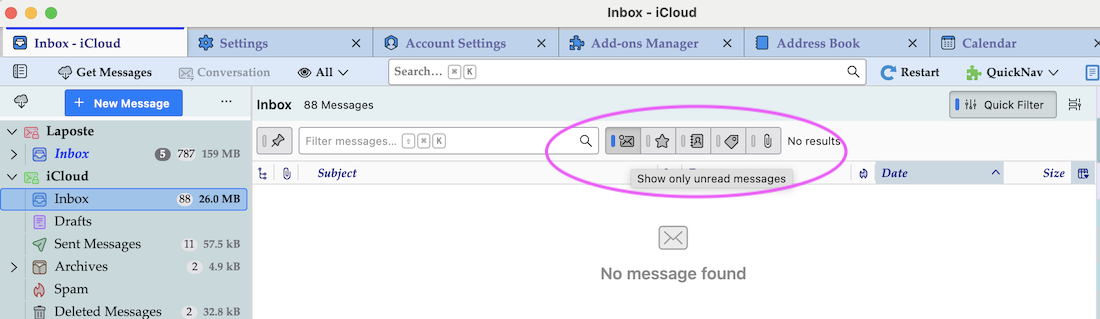
Spontaneously I would have said that you have inadvertently activated the Quick Filter "Show only unread messages". But if this were true you should still find those messages via a search. How is this account set up on your Mac and how is it on your Windows laptop: POP or IMAP?
Buza umbuzo

You must log in to your account to reply to posts. Please start a new question, if you do not have an account yet.