


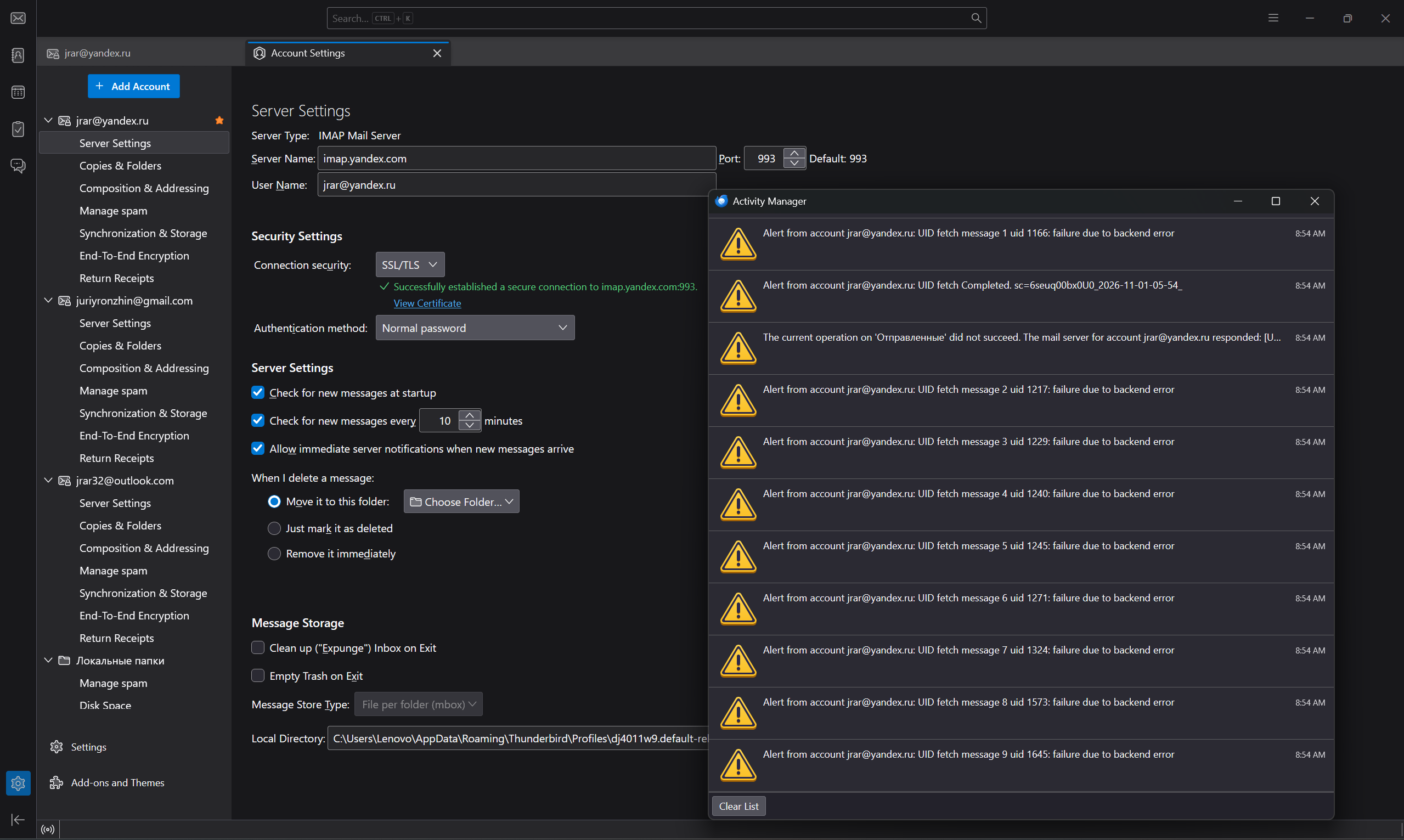
Alert from added account: failure due to backend error

Yandex email account. Messages are constantly being received: “Alert from account [redacted]@yandex.ru: UID fetch message 5 uid 122: failure due to backend error”. The numbers are always different. Emails are being received and sent. The server settings — the ones recommended by Yandex — are configured correctly. But these notifications appear almost every second. What is the problem?
Ilungisiwe ngu christ1
All Replies (4)

failure due to backend error
This is a problem at the server side. So you should talk to your email provider.
christ1 said
failure due to backend errorThis is a problem at the server side. So you should talk to your email provider.
Thanks.. Yes. They answered me: "All the basic settings you specified are correct — I don't see any limitations." Actually, the mail is working. the problem is with notifications, which I have to turn off due to the constant pop-up warnings. I tried disabling the antivirus and installing another version of the program. It doesn't help. There are no such problems with gmail or outlook.
Try right-click Inbox > Properties > click 'Repair folder' button.
Also, tips to prevent UID fetch errors:
- keep Thunderbird updated to the latest version
- regularly compact folders
- avoid large mailbox sizes
- maintain a stable Internet connection
- backup your Thunderbird profile periodically
Thank you. So far, no success. I tried to repair. Perhaps the box is too large, problems with indexing, or is it still an issue on Yandex’s side...