


Since latest update, all my subfolders have disappeared and no messages showing as being in in box, help please

Since latest update of todays date, all my subfolders have disappeared and no messages showing as being in the in box or deleted. Any help appreciated, thanks
All Replies (11)
This is too poor information to understand your problem. A screenshot of your Thunderbird folder pane might be helpful
Ilungisiwe ngu Mapenzi
Help > Troubleshoot Mode better?

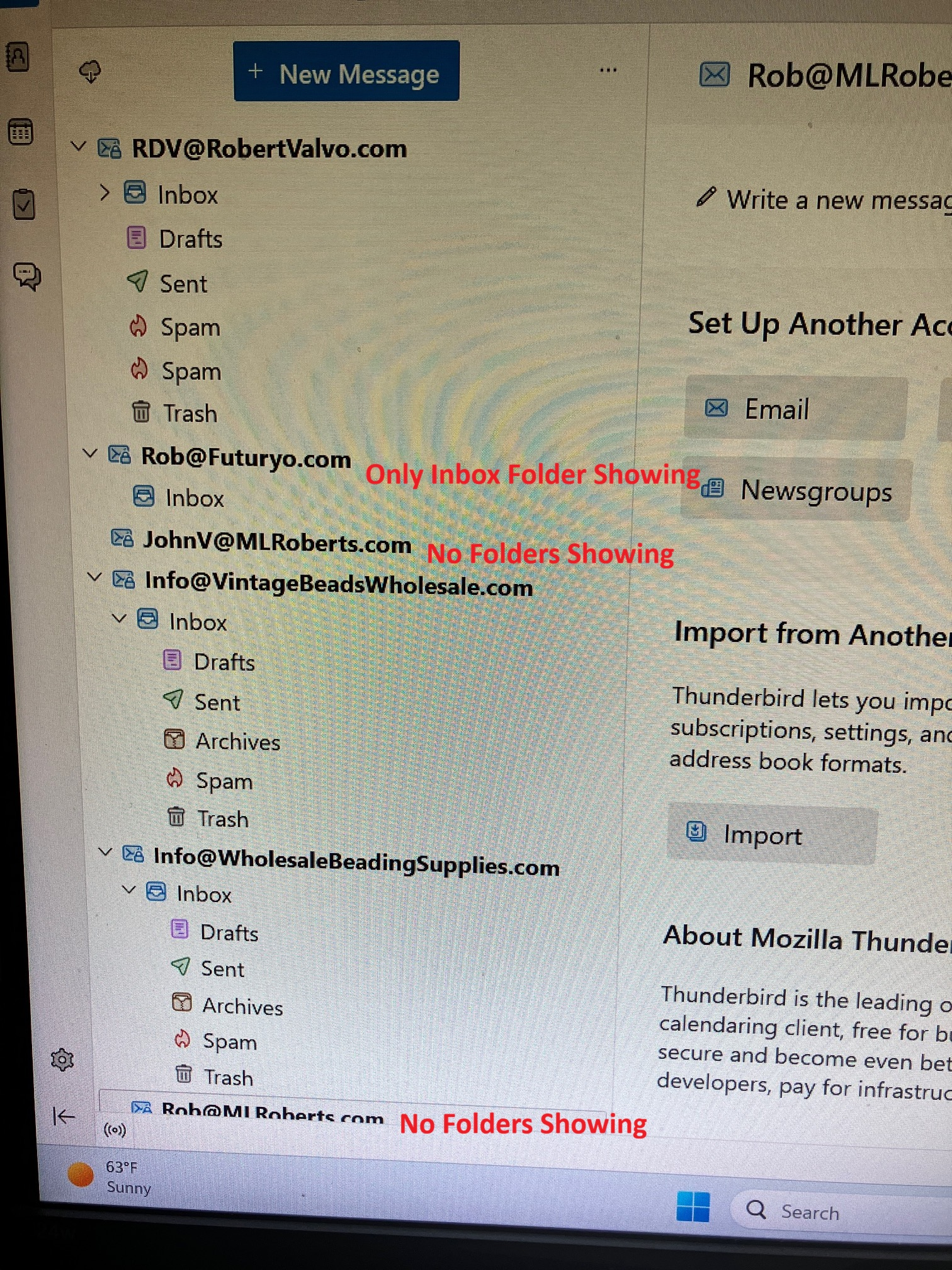
Hello: I am experiencing the same issue... Folders disappearing and reappearing or not appearing at all. Each time I open and close Thunderbird it changes with different email addresses and different folders appearing / disappearing and or being out of order. It started with one email address about a week ago (after a Thunderbird Update - Now using version X64 - 159.0) and now it is occurring with multiple email addresses.... (see attached screenshot) I use IMAP email settings and a Windows 11 Home computer operating system. Please let me know if you need any further information to troubleshoot or resolve this known issue... Thank you for attention to this matter. Rob
I have also tried Troubleshooting mode and the problems persist in trouble shooting mode. I also uninstalled and re-installed email accounts and Thunderbird in full and the problem still persists...

Same problem too.
RDV6, yes my screen looks like you screenshot. It dosnt make any sense, one minute the folders are all showing and then they arent. Im also running after an update yesterday the X64. IMAP and Windows 11 as well. Frustrating doesn't cover it. Be nice if Mozilla could help. Thanks for your reply.
Try the following solution (without guarantee for success): open Thunderbird, go to Help > Troubleshooting Information > Profile Folder > Open Folder, then quit Thunderbird. In the profile folder search for the file "folderCache.json" and delete it. Restart Thunderbird
Mapenzi, many thanks for your suggestion, unfortunately it hasn't worked other than I can now see my inbox contents. Many thanks for your efforts.
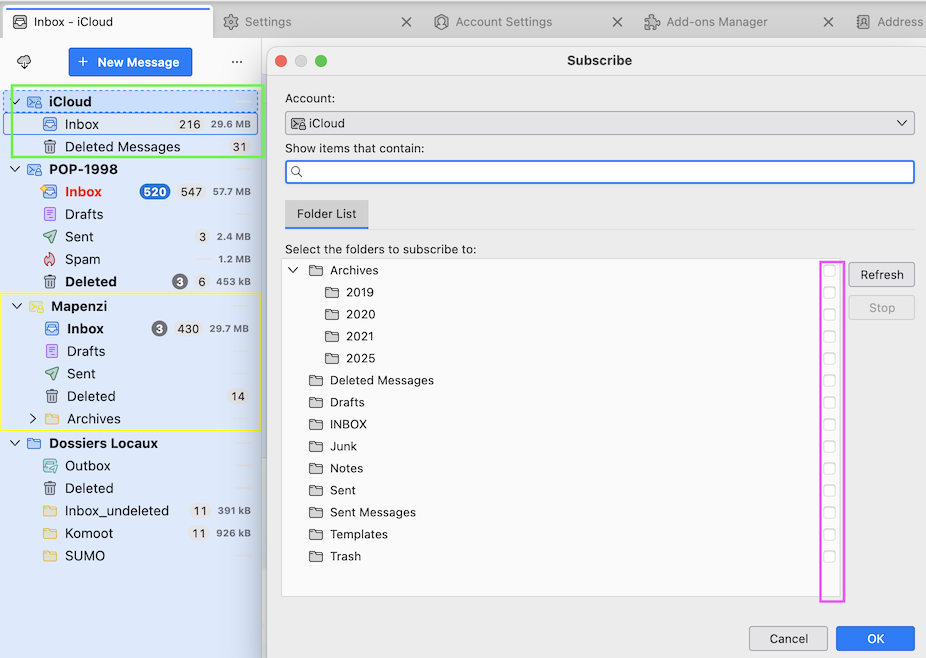
I have found a work around to bring the folders back into view... Right click on the account name in the left pane that has its folders missing. Subscribe. Click OK. The missing folders will reappear and FB will then resync. Not a solution and resyncing can take a while.
Also, while we are waiting for a fix...don't close FB, just minimise it. The problem only occurs when starting FB.
Derek Smalls said
I have found a work around to bring the folders back into view... Right click on the account name in the left pane that has its folders missing. Subscribe.
This is interesting and I already have thought of this possibility. But even when I open the folder list of an IMAP account via R-click > Subscribe and unsubscribe every folder in the list, upon closing the list the folders Inbox and Trash will still be displayed in the folder pane. I cannot reproduce the issue with an IMAP account displaying zero folders
Well I thought it was cracked, one minute the folders are there, you close it after checking the folders and BOOM they dont come up again, looking forward to the fix sooner than later hopefully.

RDV6 said
Hello: I am experiencing the same issue... Folders disappearing and reappearing or not appearing at all. Each time I open and close Thunderbird it changes with different email addresses and different folders appearing / disappearing and or being out of order. It started with one email address about a week ago (after a Thunderbird Update - Now using version X64 - 159.0) and now it is occurring with multiple email addresses.... (see attached screenshot) I use IMAP email settings and a Windows 11 Home computer operating system. Please let me know if you need any further information to troubleshoot or resolve this known issue... Thank you for attention to this matter. Rob I have also tried Troubleshooting mode and the problems persist in trouble shooting mode. I also uninstalled and re-installed email accounts and Thunderbird in full and the problem still persists...
I signed up to report a "possible solution" I got this from another Windows forum. For me so far one PC is fine with 159 and one (a lap-top) was not.
I "downgraded" to version 158 using the following work around. I modified the profile so please be sure to have a backup stored of your profile should anything go wrong.
I happened to have a 158 version installer, I am not recommending getting one from anyone but the official source (not sure if they are available).
On the affected machine - Turned off auto updates in 159> I left the installed 159 alone just be sure its closed> navigate to the active profile and delete the compatibility.ini file in that profile (this allows the roll back) > ran the 158 installer and the older version is installed > allowed time for folders to "repopulate" and its working very well.
Like the poster I quoted only one of two accounts suffered issues, (not all accounts) really weird.
It seems Moz is aware and fixes should arrive soon
If a roll back is attempted be sure to back things up before doing anything and be careful!
Bill
Ilungisiwe ngu Bill76