


Cant type a url into new tab box

when i open a new tab, I cannot typoe a URL in the space provideed
Giải pháp được chọn
In order to post an image, you will need to save it to your computer first as an image file. You can use Windows Paint, or your favorite image editor.
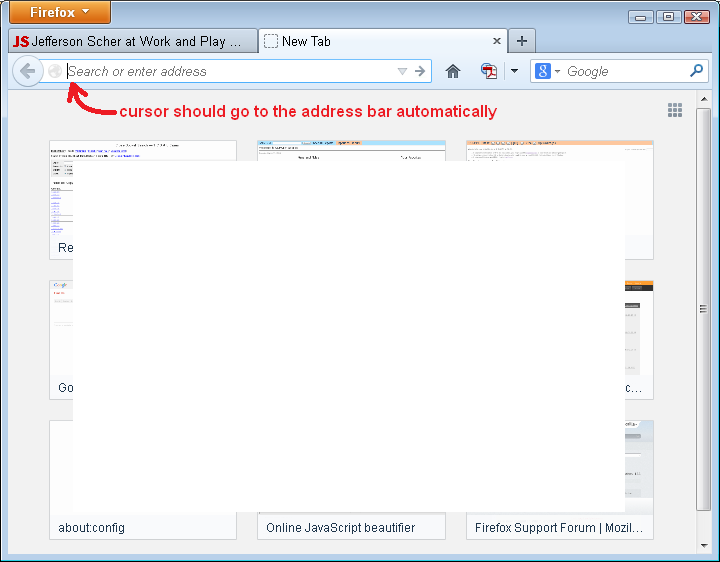
Here's an example of what "should" happen. (Attached)
Đọc câu trả lời này trong ngữ cảnh 👍 0Tất cả các câu trả lời (7)
I'm not sure what you mean.
You open a new page by typing the URL in the location bar in the Navigation Toolbar.
What page opens if you open a new tab?
The about:newtab page shows 9 (3x3) tiles with recently visited web page and you can't type on this page. You can drag a link (bookmark or history item) in one of the tiles to pin this link.
See this article about the New Tab page (about:newtab):
Can you attach a screenshot?
- http://en.wikipedia.org/wiki/Screenshot
- https://support.mozilla.org/kb/how-do-i-create-screenshot-my-problem
Use a compressed image type like PNG or JPG to save the screenshot.
When i click on the + on the navigation bar, a new tab space appears on the navigation bar. But I can not type in that space. My most recent URLs ppear but i cannot enter a new URL in the new tAB SPACE PROVIDED
Can you please attach a screenshot like I requested above?
- http://en.wikipedia.org/wiki/Screenshot
- https://support.mozilla.org/kb/how-do-i-create-screenshot-my-problem
Use a compressed image type like PNG or JPG to save the screenshot.
sorry to be difficult
I saved the screen image but cant copy or paste it into this response.
Giải pháp được chọn
In order to post an image, you will need to save it to your computer first as an image file. You can use Windows Paint, or your favorite image editor.
Here's an example of what "should" happen. (Attached)
My problem is solved. It required that I click on an empty space on the navigation line. The URL window yhen appears onthe line below the line the tasks aare shown on.
thanks toball responders.
Make sure that you do not run Firefox in full screen mode (press F11 or Fn + F11 to toggle; Mac: Command+Shift+F).
If you are in full screen mode then hover the mouse to the top of the screen to make the Navigation Toolbar and Tab bar appear.
Click the Maximize button (top right corner of the Navigation Toolbar) to leave full screen mode or right-click empty space on a toolbar and choose "Exit Full Screen Mode" or press the F11 key.