


Firefox 17.0.7. Menu display, when using extended display (Win7), flickers on & off when moving the cursor to a selection. Reg version of FF works properly.

Using Windows 7, Extended Display option., Firefox 17.0.7
Firefox Menus (File, Edit, etc) and user bookmark lists flicker in and out of visibility when moving the cursor to a selection. This does not happen on the primary display only the second display. It does not occur on the regular release product version (23, etc) and does not occur on any other application.
We are required to use version 17 on internal corporate machines.
Giải pháp được chọn
hello bob, that might be an issue with hardware acceleration - please try updating your graphics driver, or in case this doesn't solve the issue or there is no new version available at the moment, disable hardware acceleration in firefox > options > advanced > general.
Đọc câu trả lời này trong ngữ cảnh 👍 1Tất cả các câu trả lời (3)
Giải pháp được chọn
hello bob, that might be an issue with hardware acceleration - please try updating your graphics driver, or in case this doesn't solve the issue or there is no new version available at the moment, disable hardware acceleration in firefox > options > advanced > general.
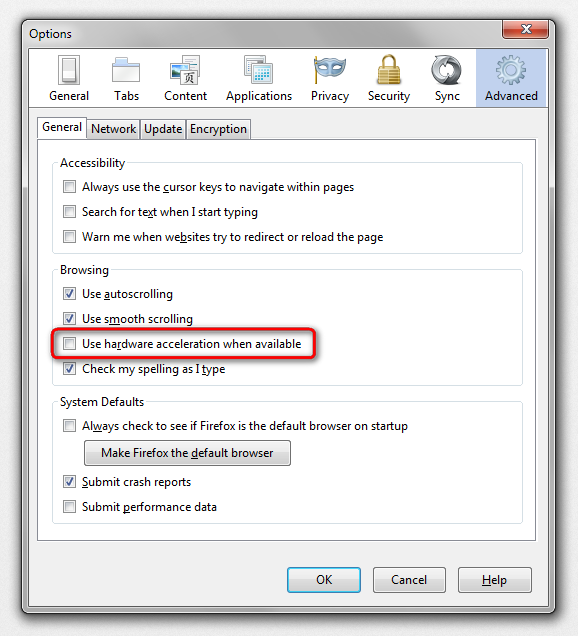
Try to disable hardware acceleration in Firefox.
- Tools > Options > Advanced > General > Browsing: "Use hardware acceleration when available"
- https://support.mozilla.org/kb/Troubleshooting+extensions+and+themes
Firefox hardware acceleration may not work properly with multiple screens that aren't completely the equal in both adapters and monitors.

Perfect! Hardware acceleration was the problem. Many thanks.