


How can I disable Global Privacy Control (GPC) in my browser?

When I tried to watch a video, I got the following message:
"Video unavailable due to your privacy settings
Your browser has Global Privacy Control (GPC) enabled, which prevents video providers from receiving viewing data.
To watch this video you will need to disable GPC in your browser and reload the page."
How can I watch the video?
Tất cả các câu trả lời (12)
- Click the menu button
 and select Settings.
- Select Privacy and security on the left.
- Go down to the Additional protections section.
- Click the box next to Tell websites not to sell or share my data to remove the check mark.
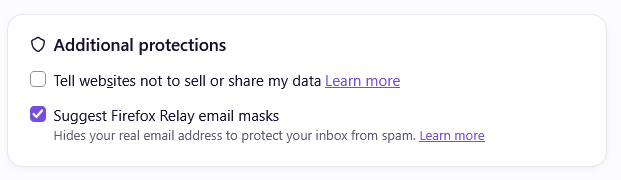
I followed your suggestion, but it did not solve the problem. Even after unchecking "tell websites not to sell or share my data," I still got the same message about the need to disable GPC.
Hi
Please can you share a link to the website where this is happening?
Paul, Here is a link to the website where this is happening (and thank you for your interest in solving the problem): https://www.nature.com/articles/d41586-026-03173-1 .
After switching VPN to the United States and turning that option off, this video became available immediately. You need to clear cache of that website with command + shift + R or switch VPN to Europe.
Thank you for your attempts to help. Unfortunately, at age 84 I'm no tech whiz . . . have no idea about VPNs. My system settings tell me that I have no VPNs configured. I believe that I correctly followed your guidance to disable my GPC, but am still unable to play the video. Have resigned myself to living without it. Regardless, thanks again.
Well, perhaps if you try to open the article in a new Private Window, the videos might become available there?
Thank you, but as a tech dinosaur, I have no idea what a "Private Window" is or how to open or use one.
The article Private Browsing - Use Firefox without saving history has all the options listed.
(It comes handy when you can't get rid of perhaps stale data or state on some website — it does not honor any previous history, so you're starting "fresh" in such window. It may or may not help in this case, but worth trying nonetheless.)
jbr, Thank you for this information about private windows. I was able to open the article in a new private window, but I still got the same message:
"Video unavailable due to your privacy settings
Your browser has Global Privacy Control (GPC) enabled, which prevents video providers from receiving viewing data.
To watch this video you will need to disable GPC in your browser and reload the page."
Seems to be a case of "You just can't there from here."
Another friend suggested this morning that I try viewing the video on the Safari browser, and that actually did the trick; I was able to view the video simply by accepting the cookies they insisted were necessary in order to do so. Problem solved. Thanks to all who tried to help on this forum!
That checkbox is the right spot. I hit this exact wall on a news site last month. Two things fixed it for me. First, close Firefox completely after you uncheck the box. A normal page reload kept sending the old signal. Second, check about:config. Type it in the address bar, search privacy.globalprivacycontrol.enabled, and make sure it says false. If it still says true, the checkbox didn't stick. One more quirk: sites sometimes cache that GPC signal. Try playing the video in a fresh private window after you change it. That finally worked for me when a regular tab kept throwing the same error.