


How do you change the border/highlight color in Split View?

Hi people. I use Split View a lot in FF browser and love the feature where when you click from side to side on each window you get a color highlight/border surrounding the active window, default is blue, but I would love it even more if I could choose my own custom color, I'm thinking a deeper cobalt electric blue or even a deep red. Can you change this color in settings? If not, how would I get this suggestion submitted?
Tất cả các câu trả lời (5)
Bonsoir
A space for users to give product feedback https://support.mozilla.org/en-US/kb/what-mozilla-connect
Discussions, https://connect.mozilla.org/t5/discussions/feedback-split-view/m-p/122572/highlight/true#M48178
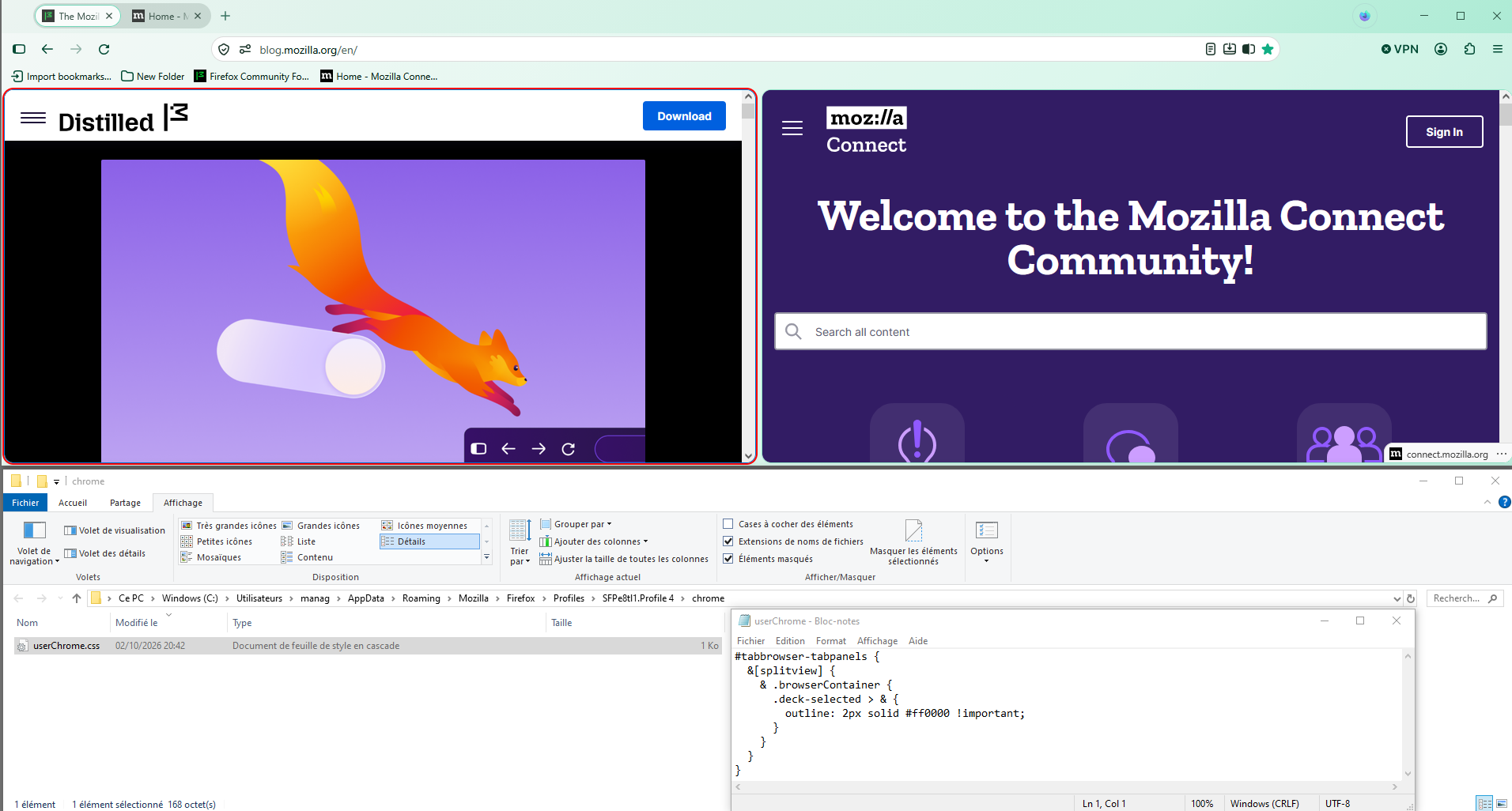
Of course, this is not the expected answer, nevertheless, below, a test with userChrome.css
Ok, that sounds like a workaround for me, but where do I put the code in that thread?
Bonjour
colors https://www.w3schools.com/colors/colors_picker.asp
css https://www.reddit.com/r/FirefoxCSS/comments/1s6epeq/comment/od1nmrd
#tabbrowser-tabpanels { &[splitview] { & .browserContainer { .deck-selected > & { outline: 2px solid #ff0000 !important; } } } }
Copy/paste the code into your notepad Save Type: All files userChrome.css
Create a chrome folder Move userChrome.css to your chrome folder
Go to your profile folder https://support.mozilla.org/en-US/kb/profiles-where-firefox-stores-user-data#w_how-do-i-find-my-profile
Move your chrome folder to your profile folder
Go to configuration editor https://support.mozilla.org/en-US/kb/about-config-editor-firefox Enter a search term toolkit.legacyUserProfileCustomizations.stylesheets Double-click on the preference, to set its value to true
And restart Firefox
If you want to change color, modify css and restart Firefox
For information https://support.mozilla.org/en-US/kb/contributors-guide-firefox-advanced-customization
WARNING from the moderator team: This script is not provided by Mozilla and is not officially supported.
Firefox is a work in progress and, to allow for continuous innovation, Mozilla cannot guarantee future updates won’t impact your customizations. For this reason, Mozilla does not officially support style rules customization.
Please read Firefox advanced customization and configuration options to learn more.
Được chỉnh sửa bởi Paul vào
OK I appreciate your help and your detective skills are truly amazing, but even though this seems on the surface to be a solution, this is way beyond my capabilities as a run-of-the-mill end user of a browser, I don't know how to do half the things which are here, I don't know about FF folders and am not comfortable interfering with codes. I don't even know how to create a 'chrome' folder or where to put it. It's just beyond me. I was really wanting some setting which you just find in the settings page and click and choose a colour in a menu which in the 21st century should be a thing. This is too advanced for me to be comfortable with. Thanks anyway, I do appreciate the effort you put in. I'll see about putting in a suggestion instead.
Hi,
The people who answer questions here, for the most part, are other users volunteering their time (like me), not Mozilla employees or developers. When a Mozilla employee jumps into a discussion, you'll see the Mozilla Staff label next to their name.
If you wish, you can leave feedback for developers on the Mozilla Connect website. Click the Firefox Menu  button in the toolbar, click Help and select Share ideas and feedback…. Alternatively, you can use this link. Your feedback is collected by a team that reads it and gathers data on the most common issues.
You can also file a bug report or feature request. See File a bug report or feature request for Mozilla products for details.