


New built-in VPN not redirecting to chosen country

The new Firefox built-in VPN, rolled out to Australia this week, is not redirecting to the chosen country location.
Despite selecting either US or UK in the country list, websites are still identifying me as located in Australia.
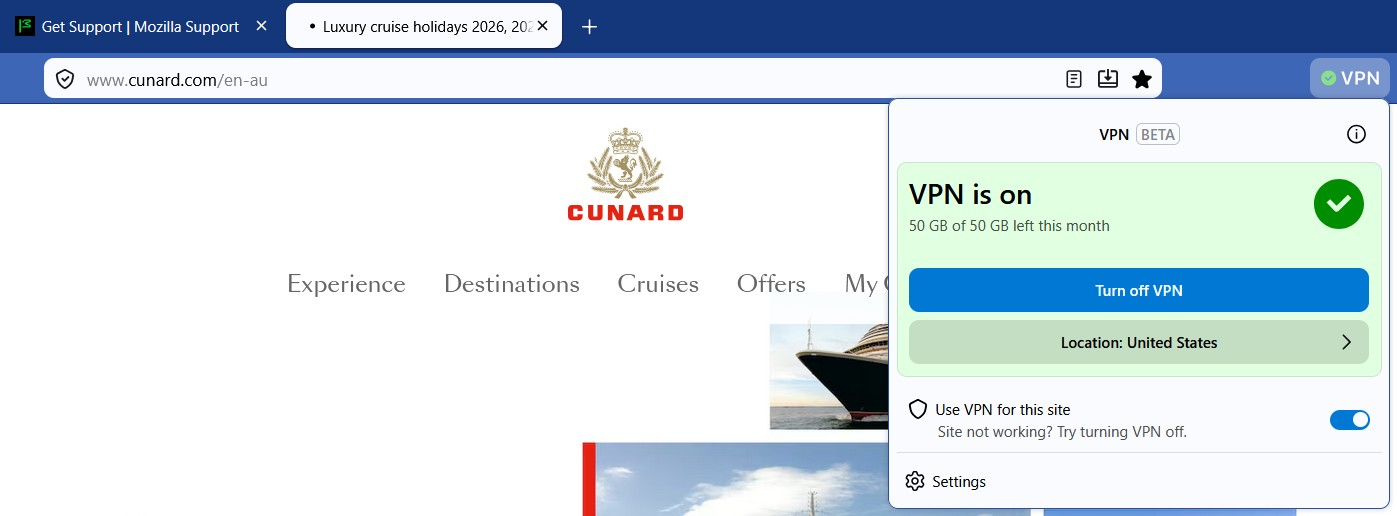
For example, despite VPN being on and US selected, cunard.com still redirects me to my home location of Australia (see https://www.cunard.com/en-au in address bar). Screenshot attached. Other websites similar.
Giải pháp được chọn
Firefox v152 released today appears to fix this problem. Websites now redirecting correctly.
Tất cả các câu trả lời (5)
Hi,
The website you mentioned doesn't seem to use the IP to determine location. Instead, it uses something else, e.g., your browser/preferred language.
What are other sites you have trouble with?
Hi Denys. Thanks for your reply. Other US websites that do not redirect to the US are t-mobile.com and foxnews.com. In addition, bbc.co.uk does not redirect to the the UK. All recognise me as being in Australia, despite Firefox VPN being on and location set to US or UK. Language settings do not fix the issue, whether English US, GB, or AU.
Other friends who use Nord VPN are able to redirect these websites based on VPN IP.
An additional item...
When I'm physically in the US or UK using Firefox on my laptop, cunard.com directs to the local US or UK sites. So I believe this web site does use IP to determine location.
Giải pháp được chọn
Firefox v152 released today appears to fix this problem. Websites now redirecting correctly.
That's great, thank you for letting us know!
I've just noticed that the BBC, for example, seems to store your location in cookies, so if you visit it before enabling the VPN, it may remember your actual country. In such cases, clearing cookies and data for the website should help.
Sorry I haven't replied earlier...