


no action when I type in a search term or a web address sometimes
Hello- about 6 or 7 months ago I started noticing issues where I will type in a web address or a search term and it will not do anything after pressing enter. Just sit there blank. This does not happen all the time but is happening enough that it is frustrating. for example I could type in bank of america or amazon.com or something like that and it will not do anything. No spinning wheel no anything. I can delete what I typed in and try typing something else and the same thing. I can open a new window and try searching again and it will do the same thing. Then a few minutes later I can try it again and it will work fine. BUT what DOES work always is if I open a new private window and search that way it will always work.
Any thoughts? i've deleted cache/browser history, cookies, un-installed and re-installed. I have the firefox is up to date message. I am using FIrefox 151.0.3 64 bit Using windows 11 Home version 25H2
I use Google as my default search engine in firefox.
Thanks
Ryan
Tất cả các câu trả lời (1)

Hi,
I'm not exactly sure what normally causes that, but just to rule out any issues relating to some obscure settings, please can you try Troubleshoot Mode and see if that causes the problem to disappear:
Try Firefox Troubleshoot Mode to see if the problem goes away. Firefox Troubleshoot Mode (previously known as Firefox Safe Mode) is a special diagnostic mode that temporarily turns off hardware acceleration, disables add-ons (extensions and themes) and resets some settings. See the Use Troubleshoot Mode in Firefox article for details.
If Firefox is open, you can restart in Firefox Troubleshoot Mode from the Help menu:
- Click the menu button
 , click Help, select Troubleshoot Mode and click Restart in the "Restart Firefox in Troubleshoot Mode?" dialog that opens.
If Firefox is not running, you can start Firefox in Troubleshoot Mode as follows:
- On Windows: Hold the Shift key when you open the Firefox desktop or Start menu shortcut.
- On Mac: Hold the option key while starting Firefox.
- On Linux: Quit Firefox, go to your Terminal and run firefox -safe-mode
(you may need to specify the Firefox installation path e.g. /usr/lib/firefox)
When the Firefox Troubleshoot Mode window appears, select "Open".
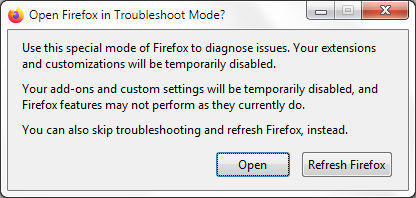
If the issue is not present in Firefox Troubleshoot Mode, your problem is probably caused by an extension, theme or hardware acceleration. Please follow the steps in the Troubleshoot extensions, themes and hardware acceleration issues to solve common Firefox problems article to find the cause.
To exit Firefox Troubleshoot Mode, just close Firefox and wait a few seconds before opening Firefox for normal use again. (If you can't exit Firefox Troubleshoot Mode, please see Firefox is stuck in Troubleshoot Mode).
Please can you let me know if this resolves the issue and we can try and figure out a fix from there.
Many thanks, Isaac