Problems adding new hotmail accounts.

Hi have various hotmail and live accounts already active in Thunderbird. Tonight, I tried to add a new hotmail account for my mom. The hotmail account is active and working well using the microsoft web browser.
I tried to add the new email to Thunderbird and in the first stage a green box with a checkmark appears " saying Configuration found in mozilla database.
IMAP box says: Incoming Imap SSL/TLS outlook.office365.com
Outgoing SMTP STARTTLS smtp-mail.outlook.com
username xxxxx.hotmail.com
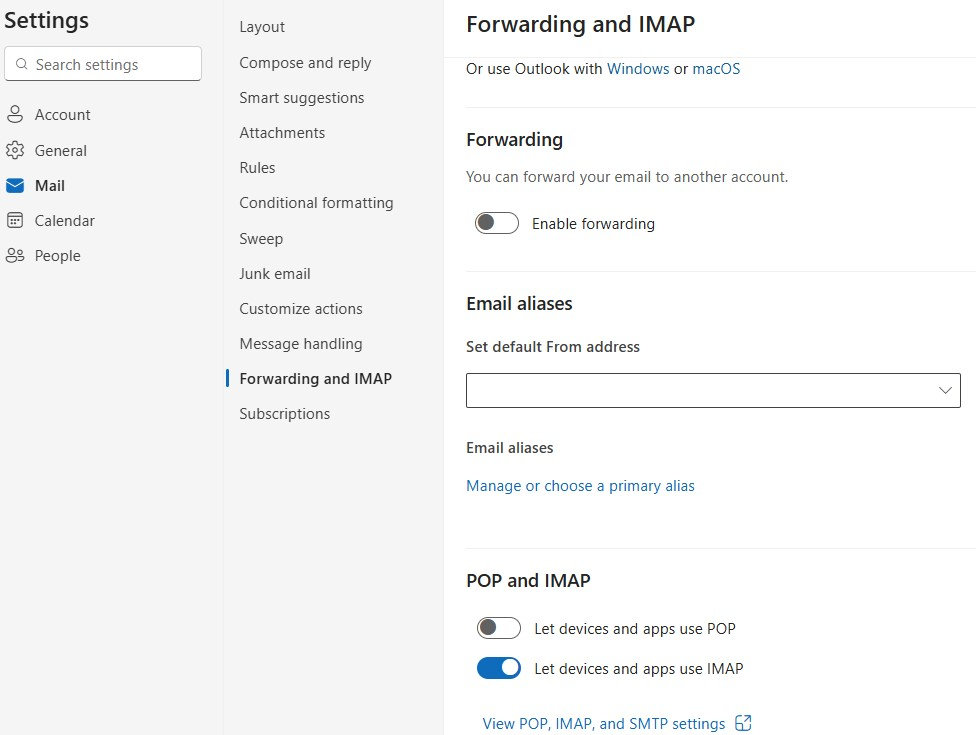
I press done, and a yellow box appears saying "Unable to log in at server. Probably wrong configuration, username or password. Now I did notice on my other hotmail accounts in Thunderbird, the outgoing says: smtp.office365.com and NOT smtp-mail.outlook.com I tried making the new account exactly like my other 5 live/hotmail accounts. Outgoing> smtp.office365.com. And still no go. The new email addy won't connect.
So I thought, maybe it's a bad email or the way I created it. So I created a NEW hotmail email address and same thing. Followed all the steps and same yellow non connect error box appears. The setup in the picture is exactly like my other accounts - and they all work fine. Has anyone tried to add a hotmail addy recently? I never had these issues when I set up the other addresses 4 or 5 years ago. Thanks guys
Giải pháp được chọn
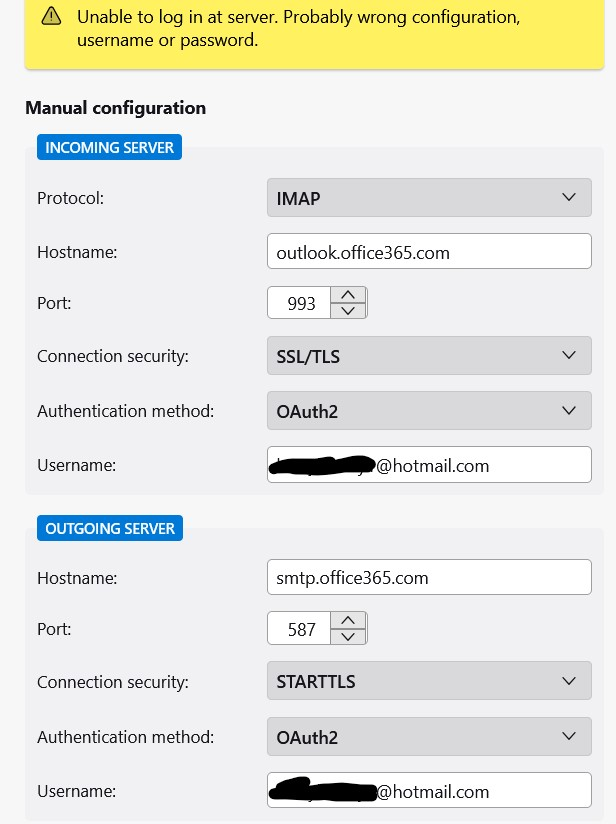
Open the account in webmail and enable IMAP in Settings/Mail/Forwarding & IMAP.
Đọc câu trả lời này trong ngữ cảnh 👍 1Tất cả các câu trả lời (3)

- Make sure cookies are allowed in Thunderbird
- Do not use a VPN while attempting to authenticate your account
- Make sure there is no application running on your computer which is blocking local TCP port 80, e.g. a local web server
Giải pháp được chọn
Open the account in webmail and enable IMAP in Settings/Mail/Forwarding & IMAP.
Thanks to Ed & sfhowes for your helpful replies. It was "sfhowes" solution that solved the problem. I went onto the outlook website, clicked the gear setting icon> Mail>Forwarding and IMAP> Pop and IMAP and selected LET DEVICES AND APPS USE IMAP.
When you first go to Forwarding and IMAP, you have to click a button that says sign in to make changes. I clicked on that and nothing happened. It turns out, I had a "Popup blocker extension" enabled in EDGE. It was preventing the sign-in password popup from opening which prevented me from seeing the "Let Devices and Apps use Imap" toggle switch. I turned off the popup blocker, and the security password popup appeared. I signed in, and that allowed the "Let Devices and apps use Imap" to appear. Toggle on.
So thanks sfhowes, and I hope this detailed solution helps others! This is why I love the internet...people helping people. You guys are great.