


After update wants password to install new helper tool but doesn't accept password

After the last update on my desktop browser, my password was requested in order to "install a new helper tool." But it isn't accepting my password, even after I double checked what it was. And there's no Change Password link.
Since I can still access the Firefox browser on my iPhone, I thought of I'd change my password there and sync, but the new password isn't accepted either. Once a password isn't accepted, pressing cancel closes the app and it can't be reopened without a Force Quit first.
And 'round and 'round I go. How do I regain access to my desktop browser?
Thanks.
Giải pháp được chọn
Hi, George.
Sorry I never responded. Like William, I am the administrator for my account and so that didn't help the issue.
What I ended up doing was deleting the Firefox program and reinstalling it. After a reboot, it was happily working again.
Thank you for responding.
Đọc câu trả lời này trong ngữ cảnh 👍 0Tất cả các câu trả lời (4)
Can you attach a screenshot of this password request?
- https://support.mozilla.org/en-US/kb/how-do-i-create-screenshot-my-problem
- use a compressed image type like PNG or JPG to save the screenshot
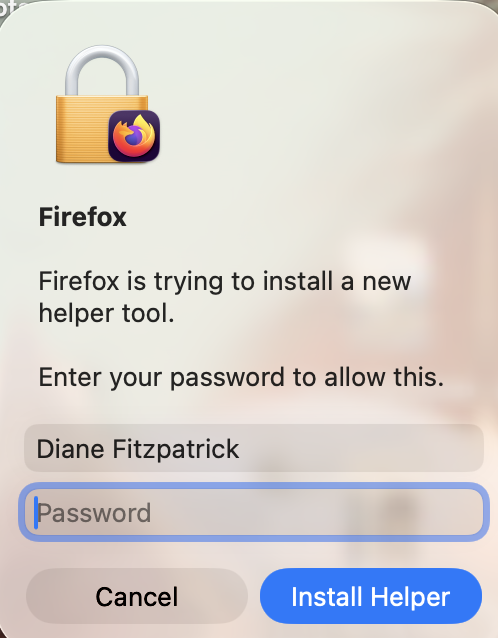
Hi
Is that a Mac? It sounds like you are seeing a macOS system prompt
i think you need to provide the Mac computer's administrator password
looks like Firefox is trying to update its "Updater" service (the helper tool) so it can install the latest browser update.
try with a user with Administrator privileges or Log out and log into the Administrator account of your computer and try again
Giải pháp được chọn
Hi, George.
Sorry I never responded. Like William, I am the administrator for my account and so that didn't help the issue.
What I ended up doing was deleting the Firefox program and reinstalling it. After a reboot, it was happily working again.
Thank you for responding.